New Installations of Dell Trusted Device Fails to Complete
Summary: This article provides information about Dell trusted Device v6.4 may fail to complete a new install due to services not starting, and how to resolve.
This article applies to
This article does not apply to
This article is not tied to any specific product.
Not all product versions are identified in this article.
Symptoms
Affected Products:
- Dell Trusted Device v6.4
Affected Operating Systems:
- Windows 10
- Windows 11
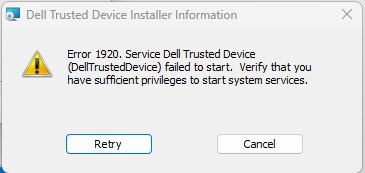
The following error may occur when attempting a new install of Dell Trusted Device v6.4.
Error 1920. Service Dell Trusted Device (DellTrustedDevice) failed to start. Verify that you have sufficient privileges to start system services.
Cause
The installer fails to check if all prerequisites are installed and causes the error.
Resolution
- Ensure the following .NET6 pre-requisites are installed.
- ASP.NET Core Runtime 6.0.32
- .NET Desktop Runtime 6.0.32
- Reboot and attempt installation again.

Affected Products
Dell Trusted DeviceArticle Properties
Article Number: 000227797
Article Type: Solution
Last Modified: 07 Apr 2025
Version: 4
Find answers to your questions from other Dell users
Support Services
Check if your device is covered by Support Services.