Alienware Command Center v6.3.7.0 läser inte in skärm, tangentbord, mus eller headset
Summary: Läs mer om vad du kan göra om en skärm, ett tangentbord eller ett headset inte visas i Alienware Command Center version 6.3.7.
Symptoms
Efter att ha följt ett arbetsflöde för installation av Alienware Command Center version 6.2.7.0 och sedan uppgraderat till version 6.3.7.0 via drivrutinsflöde eller manuell körning av installationsprogrammet, visas inte anslutna enheter i Alienware Command Center-användargränssnittet som förväntat.
Berörd programvara:
- Alienware Command Center
Berörda versioner:
- v6.3.7.0
Berörda plattformar:
- Alienware Aurora R15
- Alienware Aurora R16
- Alienware m15 R7
- Alienware m16 R1
- Alienware m16 R2
- Alienware m17 R5 AMD
- Alienware m18 R1
- Alienware m18 R2
- Alienware x14
- Alienware x14 R2
- Alienware x15 R2
- Alienware x16 R1
- Alienware x16 R2
- Alienware x17 R2
- Dell G15 5530
- Dell G16 7630
Berörd kringutrustning:
- Spelskärmen Alienware 25 AW2521H
- Spelskärmen Alienware 25 AW2521HF
- Spelskärmen Alienware 25 AW2521HFA
- Spelskärmen Alienware 25 AW2521HFL
- Spelskärmen Alienware 25 AW2521HFLA
- Spelskärmen Alienware 25 AW2523HF
- Alienware 27 360 Hz QD OLED-spelskärm AW2725DF
- Spelskärmen Alienware 27 AW2720HF
- Spelskärmen Alienware 27 AW2720HFA
- Spelskärmen Alienware 27 AW2721D
- Spelskärmen Alienware 27 AW2724DM
- Spelskärmen Alienware 27 AW2724HF
- Alienware 32 4K QD OLED-spelskärm AW3225QF
- Välvd OLED-skärm Alienware 34 AW3423DW
- Välvd spelbildskärm Alienware 34 QD OLED AW3423DWF
- Välvd Alienware 38-spelskärm AW3821DW
- Alienware-spelskärm på 500 Hz AW2524H
- Alienware 55 OLED-skärm AW5520QF
- Alienware-AW3420DW
- Alienware trådlöst spelheadset med dubbla lägen AW720H
- Alienware mekaniskt RGB-speltangentbord med låg profil | AW510K
- Mekaniskt speltangentbord från Alienware | AW310K
- Alienware Pro trådlöst speltangentbord
- Alienware Pro trådlös spelmus
- Alienware RGB-spelmus AW510M
- Mekaniskt RGB-speltangentbord från Alienware AW410K
- Alienware Tenkeyless speltangentbord AW420K
- Alienware Tri-Mode trådlöst spelheadset AW920H
- Alienware Tri-Mode trådlöst speltangentbord AW920K
- Alienware Tri-Mode avancerad trådlös spelmus AW720M
- Trådbunden Alienware-spelmus – AW320M
- Alienware kabelansluten/trådlös spelmus AW610M
- Trådbundet Alienware-spelheadset AW520H
- Alienware trådlös spelmus AW310M
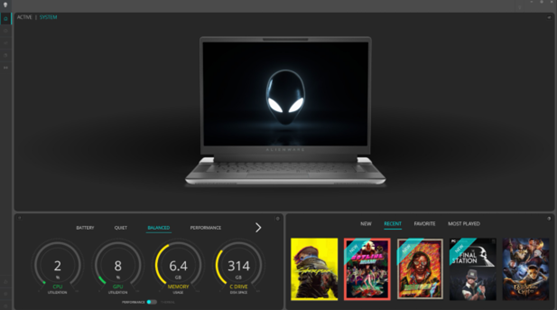
Det går inte att hitta enheter på instrumentpanelen i Alienware Command Center när det här problemet uppstår. De kan inte visas på några andra konfigurationssidor i Alienware Command Center. Exempelbilden nedan visar hur Alienware Command Center inte identifierar enheter.
Cause
Informationen AWCCSmartInstaller orsakar att detta inträffar. Installationsprogrammet för kringutrustning migrerar till InstallShield-ramverket för sin komponent. Ett fel uppstår vid kopiering eller borttagning av vissa filer när du försöker avinstallera tidigare versioner och installera den nyare versionen.
Resolution
Lös problemet genom att uppdatera till Alienware Command Center version 6.4 eller senare på datorn. Information om hur du laddar ner och installerar Alienware Command Center finns i Ladda ner och installera Dell-drivrutiner.