Alienware Command Center 6.3.7.0 ei lataa näyttöä, näppäimistöä, hiirtä eikä kuulokemikrofonia
Summary: Lue, mitä tehdä, jos näyttö, näppäimistö tai kuulokemikrofoni ei näy Alienware Command Center 6.3.7 -versiossa.
Symptoms
Kun olet asentanut Alienware Command Center 6.2.7.0 -version työnkulun ja päivittänyt versioon 6.3.7.0 ajurityönkulun avulla tai suorittanut asennusohjelman manuaalisesti, yhdistetyt laitteet eivät näy Alienware Command Center -käyttöliittymässä odotetulla tavalla.
Ohjelmistot, joita haavoittuvuus koskee:
- Alienware Command Center
Versiot, joita asia koskee:
- 6.3.7.0
Ympäristöt, joita tämä koskee:
- Alienware Aurora R15
- Alienware Aurora R16
- Alienware m15 R7
- Alienware m16 R1
- Alienware m16 R2
- Alienware m17 R5 AMD
- Alienware m18 R1
- Alienware m18 R2
- Alienware x14
- Alienware x14 R2
- Alienware x15 R2
- Alienware x16 R1
- Alienware x16 R2
- Alienware x17 R2
- Dell G15 5530
- Dell G16 7630
Oheislaitteet, joita ongelma koskee:
- Alienware 25 -pelinäyttö AW2521H
- Alienware 25 -pelinäyttö AW2521HF
- Alienware 25 -pelinäyttö AW2521HFA
- Alienware 25 -pelinäyttö AW2521HFL
- Alienware 25 -pelinäyttö AW2521HFLA
- Alienware 25 -pelinäyttö AW2523HF
- Alienware 27 360 Hz QD OLED -pelinäyttö AW2725DF
- Alienware 27 -pelinäyttö AW2720HF
- Alienware 27 -pelinäyttö AW2720HFA
- Alienware 27 -pelinäyttö AW2721D
- Alienware 27 -pelinäyttö AW2724DM
- Alienware 27 -pelinäyttö AW2724HF
- Alienware 32 4K QD OLED -pelinäyttö AW3225QF
- Kaareva Alienware 34 OLED -näyttö AW3423DW
- Kaareva Alienware 34 QD OLED -pelinäyttö AW3423DWF
- Kaareva Alienware 38 -pelinäyttö AW3821DW
- 500 Hz:n Alienware-pelinäyttö AW2524H
- Alienware 55 OLED -näyttö AW5520QF
- Alienware AW3420DW
- Alienware Dual Mode langattomat pelikuulokkeet AW720H
- Alienwaren matalan profiilin mekaaninen RGB-pelinäppäimistö | AW510K
- Mekaaninen Alienware-pelinäppäimistö | AW310K
- Alienware Pro langaton pelinäppäimistö
- Alienware Pro langaton pelihiiri
- Alienware RGB -pelihiiri AW510M
- Mekaaninen Alienware RGB -pelinäppäimistö AW410K
- Alienware Tenkeyless -pelinäppäimistö AW420K
- Langattomat Alienware Tri-Mode -pelikuulokkeet AW920H
- Alienware Tri-Mode langaton pelinäppäimistö AW920K
- Langaton Alienware Tri-Mode -pelihiiri AW720M
- Langallinen Alienware-pelihiiri AW320M
- Langallinen/langaton Alienware-pelihiiri AW610M
- Langalliset Alienware-pelikuulokkeet AW520H
- Langaton Alienware-pelihiiri AW310M
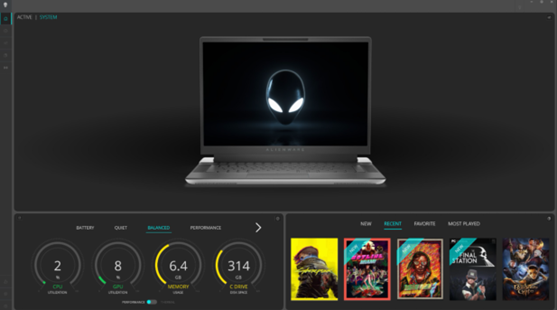
Laitteita ei löydy Alienware Command Centerin koontinäytöstä, kun tämä ongelma ilmenee. Ne eivät näy millään muulla Alienware Command Centerin määrityssivulla. Alla olevassa esimerkkikuvassa näkyy, että Alienware Command Center ei havaitse laitteita.
Cause
pikanäppäimellä AWCCSmartInstaller aiheuttaa tämän. Oheiskomponenttien asennusohjelma siirtyy komponenttinsa InstallShield-kehykseen. Virhe kopioitaessa tai poistettaessa joitakin tiedostoja, kun yritetään poistaa aiempien versioiden asennusta ja asentaa uudempi versio.
Resolution
Ongelma korjaantuu, kun tietokone päivitetään Alienware Command Center 6.4 -versioon 6.4 tai uudempaan versioon. Lisätietoja Alienware Command Centerin lataamisesta ja asentamisesta on artikkelissa Dell-ohjaimien lataaminen ja asentaminen.