PowerStore: Import third-party certificate from PowerStore Manager may fail with error code - 0xE090A001008
Summary: The Import of a third-party certificate from PowerStore Manager may fail with error code - 0xE090A001008.
This article applies to
This article does not apply to
This article is not tied to any specific product.
Not all product versions are identified in this article.
Symptoms
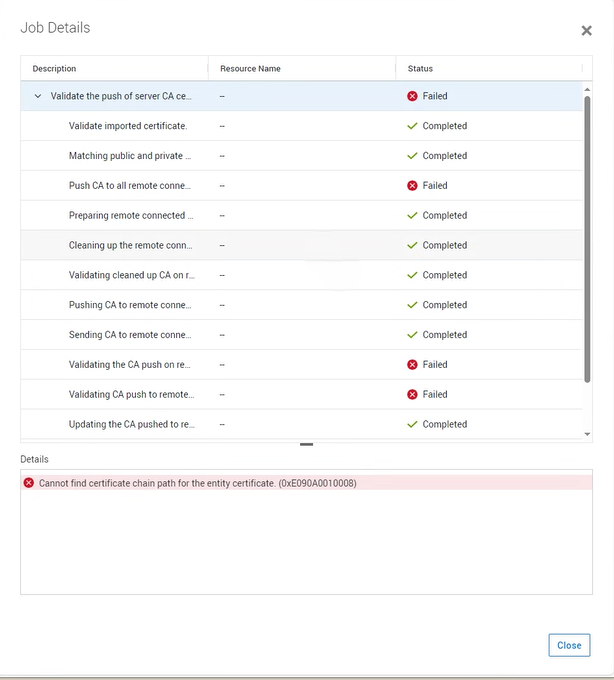
Following a certificate import failure, the error message: "Cannot find certificate chain path for the entity certificate (0xE090A001008)" was displayed:
Cause
The PowerStoreOS software always tries to verify the certificate that is importing to the remote system before committing the new server certificate.
One enhancement in PowerStoreOS version 4.0, causes the remote system to keep multiple CA certificates before committing (used to be only one).
Some systems verification may fail based on the order certificates that are returned from the remote system.
One enhancement in PowerStoreOS version 4.0, causes the remote system to keep multiple CA certificates before committing (used to be only one).
Some systems verification may fail based on the order certificates that are returned from the remote system.
Resolution
This issue was resolved in PowerStoreOS version 4.1 (or later).
Workaround
With earlier versions, contact Dell Technical Support to confirm this issue has occurred. Reference this KB Article in the Service Request for expedited handling
Affected Products
PowerStoreArticle Properties
Article Number: 000228584
Article Type: Solution
Last Modified: 15 Jul 2025
Version: 5
Find answers to your questions from other Dell users
Support Services
Check if your device is covered by Support Services.