Alienware Command Center 6.5でAlienware Proワイヤレス ゲーミング マウス用ファームウェア アップデートが失敗する
Summary: この記事では、Alienware Proワイヤレス ゲーミング マウスのファームウェア アップデートの失敗について説明します。
This article applies to
This article does not apply to
This article is not tied to any specific product.
Not all product versions are identified in this article.
Symptoms
Alienware Pro Wireless Gamingのファームウェア アップデートが失敗し、次のエラー メッセージが表示されることがあります。
無効なファームウェア ファイルです。ファームウェア アップデートを続行できません。
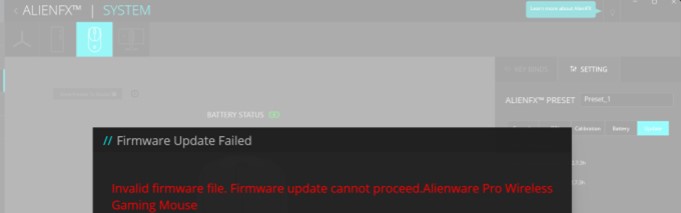
この問題は、次のシナリオで発生します。
- Alienware Command Center (AWCC) 6.5がインストールされ、起動されます。
- Alienware Proワイヤレス ゲーミング マウスは、ドングルと有線接続の両方で接続されています。
- Alienware Proワイヤレス ゲーミング マウスのファームウェア バージョンは、付属の2.4GHzドングル用ファームウェア バージョンとは異なります。たとえば、マウスはバージョン3.5で、ドングルはバージョン2.7です。
- [AlienFX]ページに移動し、[Alienware Proワイヤレス ゲーミング マウスの単一デバイス]ビューを選択します。
- [Settings]タブに移動し、[ Update ]タブをクリックします。
- [Update]ボタンをクリックすると、問題が発生します。
対象製品:
- Alienware Proワイヤレス ゲーミング マウス
影響を受けるアプリケーションのバージョン:
- Alienware Command Center 6.5
Cause
これは、Azureサーバーでの予期しないエラーが原因です。
Resolution
コンピューターをAWCCバージョン6.6以降にアップデートすると、問題が解決します。ファームウェアをダウンロードしてインストールするには、「 Dellドライバーをダウンロードしてインストールする方法」を参照してください。
Affected Products
Alienware Command Center, Alienware Pro Wireless Gaming MouseArticle Properties
Article Number: 000262078
Article Type: Solution
Last Modified: 06 Aug 2025
Version: 4
Find answers to your questions from other Dell users
Support Services
Check if your device is covered by Support Services.