NMDA: Erstellen eines neuen Oracle-Clients in NMC nicht möglich
Summary: Es kann kein neuer NMDA-Oracle-Client in NMC erstellt werden.
This article applies to
This article does not apply to
This article is not tied to any specific product.
Not all product versions are identified in this article.
Symptoms
Bei Verwendung des Clientassistenten kann kein neuer NMDA-Oracle-Client in NetWorker Management Console (NMC) erstellt werden. Dies schlägt mit dem folgenden Fehler fehl: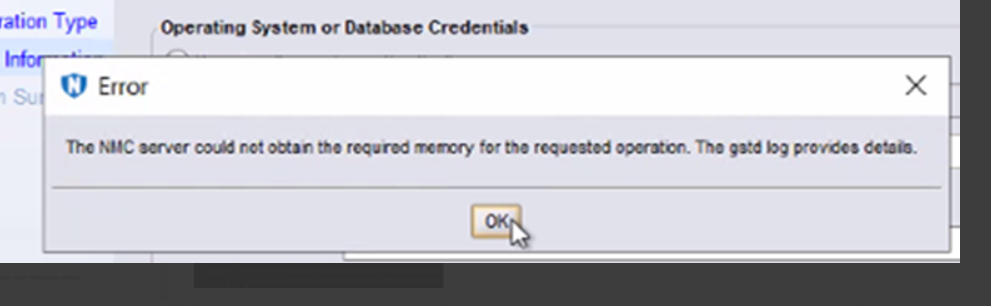
The NMC server could not obtain the required memory for the requested operation. The gstd log provides details.
Die ausführbare nsrorara.bin ist nicht auf dem Client vorhanden.
Cause
Zwei NSR-Remote-Agent-Ressourcen werden auf der nsrladb des Clients registriert, eine mit ausführbaren nsrorara.bin und die andere mit nsrorara.
Der Clientassistent von NMC stellt zuerst eine Verbindung zum nsrorara.bin-Agent her, was dazu führt, dass der Assistent nicht mehr reagiert.
Resolution
- Überprüfen Sie, ob "nsrorara" registriert ist.
nsradmin -p nsrexec
print type : nsr remote agent ; backup type : oracle
HINWEIS: Dies sollte nur einen Eintrag für "remote agent executable" mit "nsrorara" als Wert ergeben.
- Löschen Sie alle unnötigen nsrorara-Ressourcen , z. B. eine mit einer ausführbaren Datei namens nsrorara.bin.
nsradmin -p nsrexec
print type: NSR remote agent;remote agent executable: nsrorara.bin
delete
Delete? Y
nsradmin>
Article Properties
Article Number: 000269639
Article Type: Solution
Last Modified: 14 Feb 2025
Version: 1
Find answers to your questions from other Dell users
Support Services
Check if your device is covered by Support Services.