NMDA:无法在 NMC 中创建新的 Oracle 客户端
Summary: 无法在 NMC 中创建新的 NMDA Oracle 客户端。
This article applies to
This article does not apply to
This article is not tied to any specific product.
Not all product versions are identified in this article.
Symptoms
使用客户端向导时,无法在 NetWorker 管理控制台 (NMC) 中创建新的 NMDA Oracle 客户端。它失败并显示以下错误: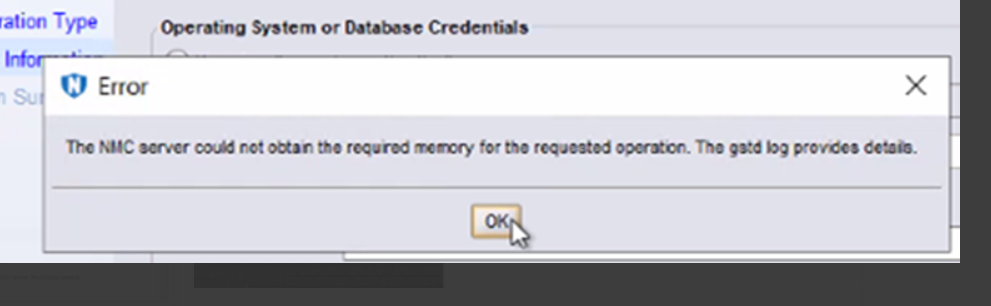
The NMC server could not obtain the required memory for the requested operation. The gstd log provides details.
客户端上不存在可执行nsrorara.bin。
Cause
在客户端的 nsrladb 上注册了两个 NSR 远程代理程序资源,一个具有可执行 nsrorara.bin ,另一个具有 nsrorara。
NMC 中的客户端向导首先连接到 nsrorara.bin 代理程序,导致向导停止响应。
Resolution
- 检查“nsrorara”是否已注册。
nsradmin -p nsrexec
print type : nsr remote agent ; backup type : oracle
NOTE: 这应该只为“远程代理可执行文件”提供一个条目,其值为“nsrorara”。
- 删除任何不必要的 nsrorara 资源,例如,具有名为 nsrorara.bin 的可执行文件的资源。
nsradmin -p nsrexec
print type: NSR remote agent;remote agent executable: nsrorara.bin
delete
Delete? Y
nsradmin>
Article Properties
Article Number: 000269639
Article Type: Solution
Last Modified: 14 Feb 2025
Version: 1
Find answers to your questions from other Dell users
Support Services
Check if your device is covered by Support Services.