NFS 遠端 I/O 錯誤;變更啟用 FS 容器的容器擁有者可能會導致應用程式及/或使用者無法存取 NFS 檔案
Summary: 不允許或限制以前的儲存桶擁有者 ObjectControllerException: 方法 updateObjectInternal 不允許以前的儲存桶擁有者
This article applies to
This article does not apply to
This article is not tied to any specific product.
Not all product versions are identified in this article.
Symptoms
使用者對使用者介面上的儲存桶擁有者頁面所做的變更:
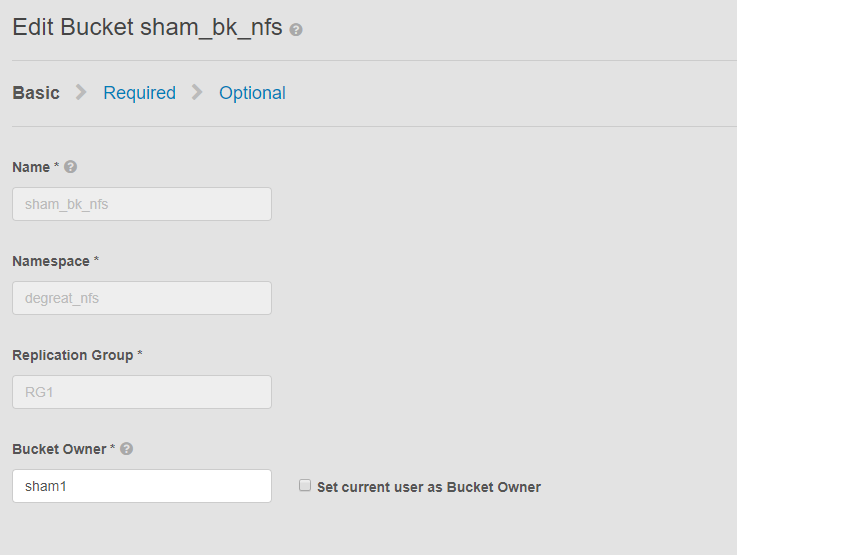
此問題適用於啟用 NFS 的容器以及使用者介面變更儲存桶擁有者的情況。這可能會導致連線的應用程式或使用者失去對 Linux 檔案系統上儲存桶的存取權。即使我們再次將變更還原回原始擁有者,也無法存取導致 DU。
在此示例中:
存儲桶擁有者使用使用者介面更改為“sham2”。由於 ECS 的限制,即使將儲存桶擁有者名稱變更回「sham1」。ECS 不會使用使用者介面將儲存桶擁有者變更回「sham1」。目前只能透過 CLI 使用具有裝載的 API 將擁有者旗標重設為 true 來完成。
識別問題的方法,在 Linux 機器上要求使用者觸摸檔,例如:
此問題適用於啟用 NFS 的容器以及使用者介面變更儲存桶擁有者的情況。這可能會導致連線的應用程式或使用者失去對 Linux 檔案系統上儲存桶的存取權。即使我們再次將變更還原回原始擁有者,也無法存取導致 DU。
在此示例中:
存儲桶擁有者使用使用者介面更改為“sham2”。由於 ECS 的限制,即使將儲存桶擁有者名稱變更回「sham1」。ECS 不會使用使用者介面將儲存桶擁有者變更回「sham1」。目前只能透過 CLI 使用具有裝載的 API 將擁有者旗標重設為 true 來完成。
識別問題的方法,在 Linux 機器上要求使用者觸摸檔,例如:
admin@node1~>touch file
touch: setting times of `file': Remote I/O error

se svc_log with the string  "method updateObjectInternal "

Command:
# svc_log -a -sr dataheadsvc | grep "method updateObjectInternal"
Example:
admin@node1~>svc_log -a -sr dataheadsvc | grep "method updateObjectInternal"
svc_log v1.0.22 (svc_tools v1.5.3)                 Started 2019-06-06 10:45:04

Running on nodes:              <All nodes>
Time range:                    2019-06-05 10:45:04 - 2019-06-06 10:45:04
Filter string(s):              <All messages>
Show nodename(s):              True
Search reclaim logs (if any):  False

com.emc.storageos.data.object.exception.ObjectControllerException: method updateObjectInternal not allowed for previous bucket owner sham1
Caused by: com.emc.storageos.data.object.exception.ObjectControllerException: method updateObjectInternal not allowed for previous bucket owner sham1
Cause
創建以特定使用者為擁有者的存儲桶,然後更改存儲桶的擁有權。最後,使用 ACL 頁面為原始擁有者提供完全控制權失敗,並出現 ECS 記錄例外:
ObjectControllerException: method updateObjectInternal not allowed for previous bucket owner <ownerid>
This is a known issue currently being evaluated by Dell EMC at this time.
Resolution
因應措施是透過具備裝載的 CLI 使用 API 將儲存桶擁有者變更為 true。
1.確定當前存儲桶擁有者。
2.使用 vi 編輯器創建一個簡單的 xml 檔。在以下範例中,稱為 /tmp/bucket-owner.xml。這是一個兩步過程。我們必須將其暫時設置為 sham2 的新擁有者。如下例所示,在設定回原始擁有者 sham1 之前,請先確認輸出:
。7.配置更改完成後,我們不應再看到相同的錯誤
1.確定當前存儲桶擁有者。
需要使用者介面根密碼以產生 TOKEN。例如:
admin@ecsnode1:~> tok=$(curl -iks https://XX.XX.XX.XX:4443/login -u 'root:ChangeMe' | grep X-SDS-AUTH-TOKEN)
驗證目前的儲存桶擁有者 (在您的情況下取代儲存桶和命名空間):
admin@node1:~> curl -s -k -X GET -H "$tok" https://XX.XX.XX.XX:4443/object/bucket/sham_bk_nfs/info?namespace=degreat_nfs | xmllint --format - | grep '<owner>'
  <owner>sham2</owner>
這將確認參數 reset_previous_owners 必須設置為 true。已還原的儲存桶擁有者位於使用者介面上,但透過 CLI 的 API 確認 ECS 仍會看到儲存桶擁有者為「sham2」。
2.使用 vi 編輯器創建一個簡單的 xml 檔。在以下範例中,稱為 /tmp/bucket-owner.xml。這是一個兩步過程。我們必須將其暫時設置為 sham2 的新擁有者。如下例所示,在設定回原始擁有者 sham1 之前,請先確認輸出:
admin@node1:~ # vi /tmp/bucket-owner.xml

admin@ecsnode1:~ # cat /tmp/bucket-owner.xml
<object_bucket_update_owner>
   <namespace>degreat_nfs</namespace>
   <new_owner>sham2</new_owner>
   <reset_previous_owners>true</reset_previous_owners>
</object_bucket_update_owner>

3. Change the bucket owner to the temporary owner.
透過 xml 檔案將儲存器擁有者變更為「sham2」所需的 API 語法如下:
admin@ecsnode1:~> curl -v -k -X "POST" "https://xx.xx.xx.xx:4443/object/bucket/sham_bk_nfs/owner" -H "$tok" -H "Content-Type: application/xml" -H "ACCEPT:application/xml" -d @/tmp/bucket-owner.xml -v
* Hostname was NOT found in DNS cache
*   Trying xx.xx.xx.xx...
* Connected to xx.xx.xx.xx (xx.xx.xx.xx) port 4443 (#0)
* successfully set certificate verify locations:
*   CAfile: none
  CApath: /etc/ssl/certs/
* SSLv3, TLS unknown, Certificate Status (22):
* SSLv3, TLS handshake, Client hello (1):
* SSLv3, TLS handshake, Server hello (2):
* SSLv3, TLS handshake, Certificate (11):
* SSLv3, TLS handshake, Server key exchange (12):
* SSLv3, TLS handshake, Server finished (14):
* SSLv3, TLS handshake, Client key exchange (16):
* SSLv3, TLS change cipher, Client hello (1):
* SSLv3, TLS handshake, Finished (20):
* SSLv3, TLS change cipher, Client hello (1):
* SSLv3, TLS handshake, Finished (20):
* SSL connection using TLSv1.2 / ECDHE-RSA-AES256-GCM-SHA384
* Server certificate:
*        subject: CN=localhost
*        start date: 2019-03-25 09:53:41 GMT
*        expire date: 2029-03-22 09:53:41 GMT
*        issuer: CN=localhost
*        SSL certificate verify result: self signed certificate (18), continuing anyway.
> POST /object/bucket/sham_bk_nfs/owner HTTP/1.1
> User-Agent: curl/7.37.0
> Host: xx.xx.xx.xx:4443
> X-SDS-AUTH-TOKEN: BAAcUy9KYlhxTlVYb2M0bnF3bTNscEsvSEdDeWhJPQMAjAQASHVybjpzdG9yYWdlb3M6VmlydHVhbERhdGFDZW50ZXJEYXRhOmJhOGQ3ZTkzLTMyMGYtNDNmNy05Y2FkLWM4YWQzMWFiMzY1MAIADTE1NTk3Mzk3OTA2MDgDAC51cm46VG9rZW46YjQ4NGNiZjEtNTkwNy00YWI3LTgzYTctM2Y3OGRhM2RiY2NiAgAC0A8=
> Content-Type: application/xml
> ACCEPT:application/xml
> Content-Length: 179
>
* upload completely sent off: 179 out of 179 bytes
< HTTP/1.1 200 OK
< Date: Thu, 06 Jun 2019 10:56:08 GMT
< Content-Length: 0
< Connection: keep-alive
<
* Connection #0 to host xx.xx.xx.xx left intact
4. Edit the simple.xml file previously created in step 2 and this time insert original owner of sham1
admin@node1:~ # vi /tmp/bucket-owner.xml

admin@ecsnode1:~ # cat /tmp/bucket-owner.xml
<object_bucket_update_owner>
   <namespace>degreat_nfs</namespace>
   <new_owner>sham1</new_owner>
   <reset_previous_owners>true</reset_previous_owners>
</object_bucket_update_owner>

5. Change the bucket owner back to the original owner
The API syntax required to change the bucket owner back to "sham1" through the xml file is as follows:
admin@ecsnode1:~> curl -v -k -X "POST" "https://xx.xx.xx.xx:4443/object/bucket/sham_bk_nfs/owner" -H "$tok" -H "Content-Type: application/xml" -H "ACCEPT:application/xml" -d @/tmp/bucket-owner.xml -v
* Hostname was NOT found in DNS cache
*   Trying xx.xx.xx.xx...
* Connected to xx.xx.xx.xx (xx.xx.xx.xx) port 4443 (#0)
* successfully set certificate verify locations:
*   CAfile: none
  CApath: /etc/ssl/certs/
* SSLv3, TLS unknown, Certificate Status (22):
* SSLv3, TLS handshake, Client hello (1):
* SSLv3, TLS handshake, Server hello (2):
* SSLv3, TLS handshake, Certificate (11):
* SSLv3, TLS handshake, Server key exchange (12):
* SSLv3, TLS handshake, Server finished (14):
* SSLv3, TLS handshake, Client key exchange (16):
* SSLv3, TLS change cipher, Client hello (1):
* SSLv3, TLS handshake, Finished (20):
* SSLv3, TLS change cipher, Client hello (1):
* SSLv3, TLS handshake, Finished (20):
* SSL connection using TLSv1.2 / ECDHE-RSA-AES256-GCM-SHA384
* Server certificate:
*        subject: CN=localhost
*        start date: 2019-03-25 09:53:41 GMT
*        expire date: 2029-03-22 09:53:41 GMT
*        issuer: CN=localhost
*        SSL certificate verify result: self signed certificate (18), continuing anyway.
> POST /object/bucket/sham_bk_nfs/owner HTTP/1.1
> User-Agent: curl/7.37.0
> Host: xx.xx.xx.xx:4443
> X-SDS-AUTH-TOKEN: BAAcUy9KYlhxTlVYb2M0bnF3bTNscEsvSEdDeWhJPQMAjAQASHVybjpzdG9yYWdlb3M6VmlydHVhbERhdGFDZW50ZXJEYXRhOmJhOGQ3ZTkzLTMyMGYtNDNmNy05Y2FkLWM4YWQzMWFiMzY1MAIADTE1NTk3Mzk3OTA2MDgDAC51cm46VG9rZW46YjQ4NGNiZjEtNTkwNy00YWI3LTgzYTctM2Y3OGRhM2RiY2NiAgAC0A8=
> Content-Type: application/xml
> ACCEPT:application/xml
> Content-Length: 179
>
* upload completely sent off: 179 out of 179 bytes
< HTTP/1.1 200 OK
< Date: Thu, 06 Jun 2019 10:56:08 GMT
< Content-Length: 0
< Connection: keep-alive
<
* Connection #0 to host xx.xx.xx.xx left intact


6.  Confirm the bucket owner change is reflected.
確認儲存桶擁有者的變更現在是「sham1」。
admin@ecsnode1:~> curl -s -k -X GET -H "$tok" https://XX.XX.XX.XX:4443/object/bucket/sham_bk_nfs/info?namespace=degreat_nfs | xmllint --format - | grep '<owner>'
<owner>sham1</owner>
在 API 上還原儲存桶擁有者後,確認主機現在可以存取 Linux 檔案系統上的儲存桶。
。7.配置更改完成後,我們不應再看到相同的錯誤
svc_log -f "method updateObjectInternal not allowed" -start "20 hour ago" -sr all -sh -st hour
svc_log v1.0.22 (svc_tools v1.6.8)                 Started 2020-01-23 09:28:17

Running on nodes:              <All nodes>
Time range:                    2020-01-22 13:28:17 - 2020-01-23 09:28:17
Filter string(s):              'method updateObjectInternal not allowed'
Show nodename(s):              True
Search reclaim logs (if any):  False

Count of message occurrences per hour:

2020-01-22 13:xx - 5066
2020-01-22 14:xx - 9580
2020-01-22 15:xx - 9574
2020-01-22 16:xx - 9580
2020-01-22 17:xx - 9570
2020-01-22 18:xx - 9576
2020-01-22 19:xx - 9564
2020-01-22 20:xx - 9576
2020-01-22 21:xx - 9576
2020-01-22 22:xx - 9572
2020-01-22 23:xx - 9564
2020-01-23 00:xx - 9586
2020-01-23 01:xx - 9574
2020-01-23 02:xx - 9572
2020-01-23 03:xx - 4564
2020-01-23 04:xx - 0
2020-01-23 05:xx - 0
2020-01-23 06:xx - 0
2020-01-23 07:xx - 0
2020-01-23 08:xx - 0
2020-01-23 09:xx - 0


Dell EMC is aware of this issue and are working on a fix in a future release.
Additional Information
相關的 NFS KB:
- 如何建立基本的 NFS 匯出並將其掛接至用戶端
- ECS:dataheadsvc 記錄串流錯誤:要求 ReadLinkRequest 不支援 NFSv3 程序連結
- ECS、NFS 掛接失敗,沒有此類檔案、目錄或 ERROR_OBJECT_NOT_FOUND
- NFS 遠端 I/O 錯誤;變更啟用 FS 容器的容器擁有者可能會導致應用程式/使用者無法存取 NFS 檔案
- NFS 寫入會在一定數量的資料後擲回 I/O 錯誤。
- 使用 ECS 的 NFS 檔案共用搭配 VMware NFS 資料存放區
- 掛接 ECS NFS 匯出的最佳實務
- ECS, 如何在 Windows 用戶端掛接 NFS 共用
- 在 UI 中變更檔案匯出設定後,NFS 無法掛接
- Oracle WebCenter 內容 (WCC) 是否與 ECS 相容?
訂閱產品更新。
您可以依照下列知識文章中的指示訂閱更新:
DELL EMC:如何訂閱產品頁面 - Dell 支援?
Affected Products
Elastic Cloud StorageProducts
ECS Appliance, ECS Appliance Software with Encryption, ECS Appliance Software without Encryption, Elastic Cloud StorageArticle Properties
Article Number: 000055535
Article Type: Solution
Last Modified: 29 Jul 2026
Version: 5
Find answers to your questions from other Dell users
Support Services
Check if your device is covered by Support Services.