NetWorker REST API:HTTP GET 要求間歇性逾時
Summary: NetWorker 表徵狀態傳輸 (REST) 應用程式介面 (API) 可用來從環境中的 NetWorker 伺服器要求資訊 (HTTP GET)。REST API 查詢間歇性逾時,而且restapi.log顯示內部伺服器錯誤訊息,因為套接字逾時。
This article applies to
This article does not apply to
This article is not tied to any specific product.
Not all product versions are identified in this article.
Symptoms
NetWorker REST API 可用來要求資訊 (HTTP GET) 中。REST API 查詢間歇性逾時,且 restapi.log 顯示因套接字逾時而出現的內部伺服器錯誤訊息。
YYYY-MM-DD HH:MM:SS INFO [https-jsse-nio-9090-exec-26] c.e.n.w.WebApiResponse - Response status Method: 'GET', URI:'v3/global/backups', Status '200'
YYYY-MM-DD HH:MM:SS INFO [https-jsse-nio-9090-exec-26] c.e.n.w.WebApiResponse - Response status Method: 'GET', URI:'v3/global/backups', Status '500'
...
YYYY-MM-DD HH:MM:SS ERROR [https-jsse-nio-9090-exec-11] c.e.n.w.WebApiExceptionMapper - Status 'Internal Server Error', msg: java.io.IOException: Broken pipe
org.apache.catalina.connector.ClientAbortException: java.io.IOException: Broken pipe
	at org.apache.catalina.connector.OutputBuffer.realWriteBytes(OutputBuffer.java:333) ~[catalina.jar:9.0.10]
A curl NetWorker 伺服器 REST API 的命令顯示:
[root@NetworkerServer]# curl -X GET -H "Content-Type: application/json" "https://mynsr.mydomain.com:9090/nwrestapi/v3/global/backups" -u "administrator" -k -1
Enter host password for user 'administrator':
curl: (28) Operation timed out after 300406 milliseconds with 0 out of 0 bytes received
Cause
REST API 會呼叫「
NetWorker REST API 服務託管在 Java 虛擬機器 (JVM) 上執行的 Apache Tomcat Java servlet 容器上。REST API 使用 JVM 記憶體來處理每個請求,並且可以看到在資源密集型查詢后並非所有記憶體都會釋放。JVM 記憶體利用率的增加最終可能導致其他資源密集度較低的 REST API 請求超時。
v3/global/backups," "v3/global/jobs“或”v3/global/volumes」本身是資源密集型查詢,可能會導致要求在較大型環境中逾時。
注意:此問題不限於列出的 REST API 端點。它可以發生在任何大型全域終結點上,並且觀測結果可能因伺服器而異。
NetWorker REST API 服務託管在 Java 虛擬機器 (JVM) 上執行的 Apache Tomcat Java servlet 容器上。REST API 使用 JVM 記憶體來處理每個請求,並且可以看到在資源密集型查詢后並非所有記憶體都會釋放。JVM 記憶體利用率的增加最終可能導致其他資源密集度較低的 REST API 請求超時。
Resolution
避免使用資源密集的要求從 NetWorker 伺服器擷取資訊。例如,”v3/global/backups“或”v3/global/clients/CLIENT_NUMBER/backups“可以使用定義的時間範圍代替使用全域”v3/global/backups」以擷取所有備份。
例如,限制結果 saveTime 介於任何指定的時間範圍之間。針對過去 24 小時內完成的作業的查詢範例:
../global/backups 範例:
https://NETWORKER_SERVER_ADDRESS:9090/nwrestapi/v3/global/backups?q=saveTime:["START" TO "END"]
https://nsr.amer.lan:9090/nwrestapi/v3/global/backups?q=saveTime:["2024-07-24T00:00:01" TO "2024-07-24T23:59:59"]
../global/clients/client_resourceId_number/backups
https://NETWORKER_SERVER_ADDRESS:9090/nwrestapi/v3/global/clients/client_resourceID_number/backups?q=saveTime:["START" TO "END"]
https://nsr.amer.lan:9090/nwrestapi/v3/global/clients/87.0.90.20.0.0.0.0.196.80.99.102.192.168.9.150/backups?q=saveTime:["2024-07-24T00:00:01" TO "2024-07-24T23:59:59"]
../global/jobs:
https://NETWORKER_SERVER_ADDRESS:9090/nwrestapi/v3/global/jobs?q=endTime:["START" TO "END"]
https://nsr.amer.lan:9090/nwrestapi/v3/global/jobs?q=endTime:["2024-07-29T00:00:01" TO "2024-07-29T23:59:59"]
注意:據此在開始和結束時間修改 YYYY-MM-DDTHH:mm:SS。這些範例僅用於演示目的。可能需要額外的 REST API 查詢規範或篩選函數才能返回所需的數據。更多資訊和範例,請參閱 REST API 說明文件:https://developer.dell.com/apis/2378/versions/v3/docs/GettingStarted.md
../global/volumes 範例:
https://NETWORKER_SERVER_ADDRESS:9090/nwrestapi/v3/global/volumes?q=type:"MEDIA_TYPE"&fl=location,name,mode,pool,written
https://nsr.amer.lan:9090/nwrestapi/v3/global/volumes?q=type:"Data Domain"&fl=location,name,mode,pool,written
Additional Information
請參閱有關 NetWorker API 呼叫的 REST API 開發人員指南 ,「查詢清單篩選器」(q) 和「欄位清單過濾器」(fl) 設定。
REST API 除錯定義如下:NetWorker:如何啟用 REST API 除錯
或者,可以使用
以下測試:在 REST API 命令中使用以下選項:
| 選項 | 用途 |
--max-time 3600 |
為整個傳輸(DNS、連接、TLS、請求和回應正文)設置 3600 秒(1 小時)的硬上限 - 如果整個操作未在 1 小時內完成, curl 停止並出現逾時錯誤。 |
--connect-timeout 60 |
將建立 TCP/TLS 連線所允許的時間限制為 60 秒。如果 curl 無法在 60 秒內連線,該嘗試會失敗。與 --retry 啟用後,電腦可再試一次 (須遵守以下重試規則)。此值可自行決定變更。 |
--retry 3 |
指示 curl 在暫時性故障時重試最多三次 - 此值可自行決定變更。
典型的重試觸發器:
|
--retry-delay 5 |
將重試嘗試之間的固定等待時間設置為 5 秒 - 在暫時性故障後, curl 在下次嘗試前等待 5 秒。此值可自行決定變更。 |
-H "X-NW-AUTHC-BASE-URL:REMOTE_AUTHC_SERVER_ADDRESS:9090" |
(可選。)只有在用於處理登入要求的 NetWorker 主機與 REST API 端點中的 NetWorker 伺服器分開時,才需要使用此功能。請參閱:
NetWorker REST API:如何在處理 RESTAPI 要求時使用遠端 AUTHC 伺服器 |
Windows Powershell:
curl.exe -k -v --compressed `
  --max-time 3600 `
  --connect-timeout 60 `
  --retry 3 `
  --retry-delay 5 `
  -u NETWORKER_USERNAME:'PASSWORD' `
  -H "Accept: application/json" `
  "https://NETWORKER_SERVER_ADDRESS:9090/nwrestapi/v3/global/volumes/ENDPOINT" `
| ConvertFrom-Json `
| ConvertTo-Json -Depth 20 `
| Out-File -Encoding UTF8 OUTPUT_FILE_NAME
注意:
-Depth 20 是 PowerShell 的 ConvertTo-Json cmdlet。它控制當 PowerShell 將資料序列化為 JSON 時,包含多少層級的嵌套物件和陣列。嵌套物件(如果有的話)的數量可能會有所不同,具體取決於所使用的 REST API 終結點和任何潛在的「查詢清單篩選器」(q) 或「欄位清單過濾器」(fl) 使用的參數。20 應該足以進行 NetWorker REST API 呼叫。
範例:
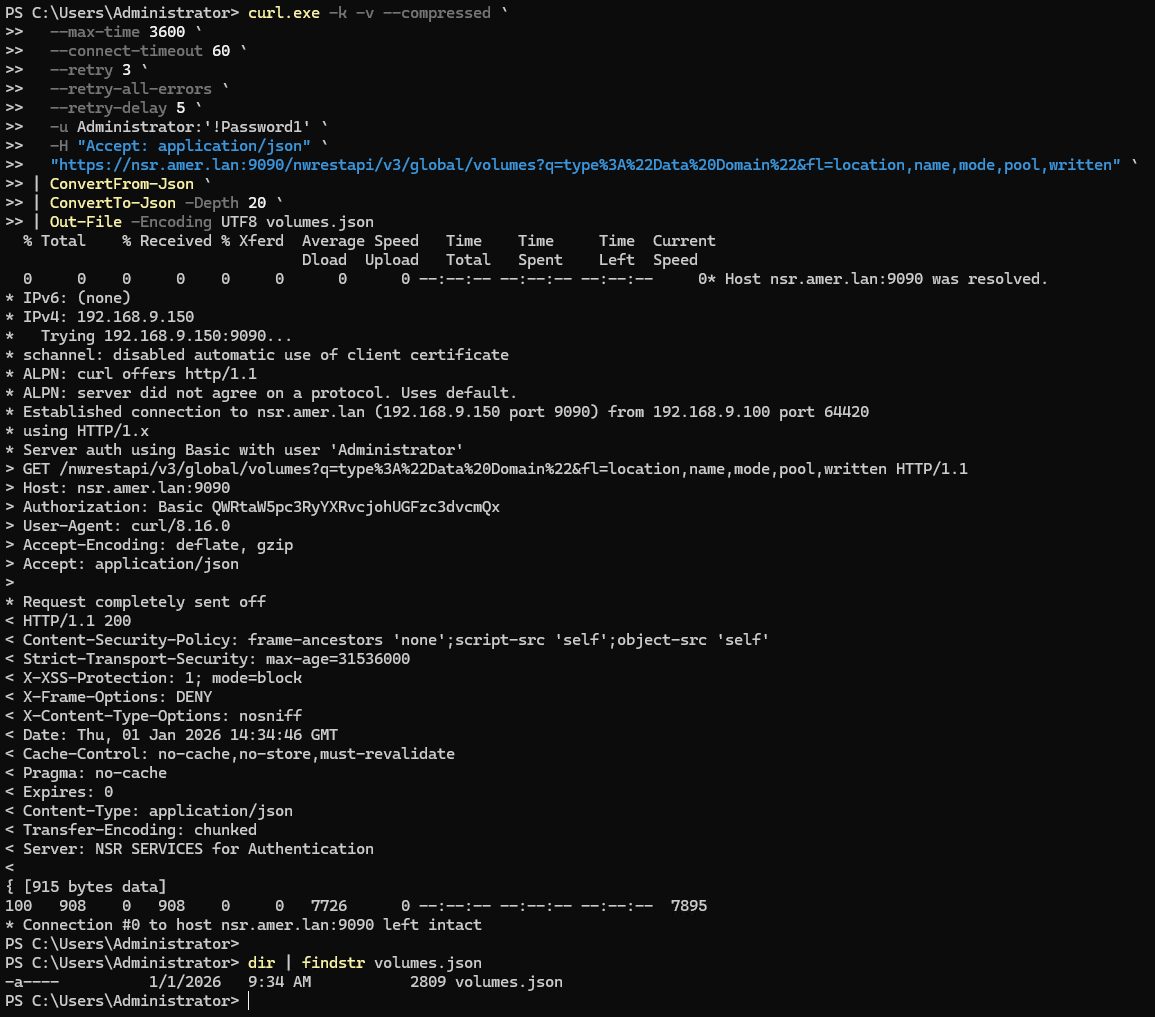
上面的範例建立了
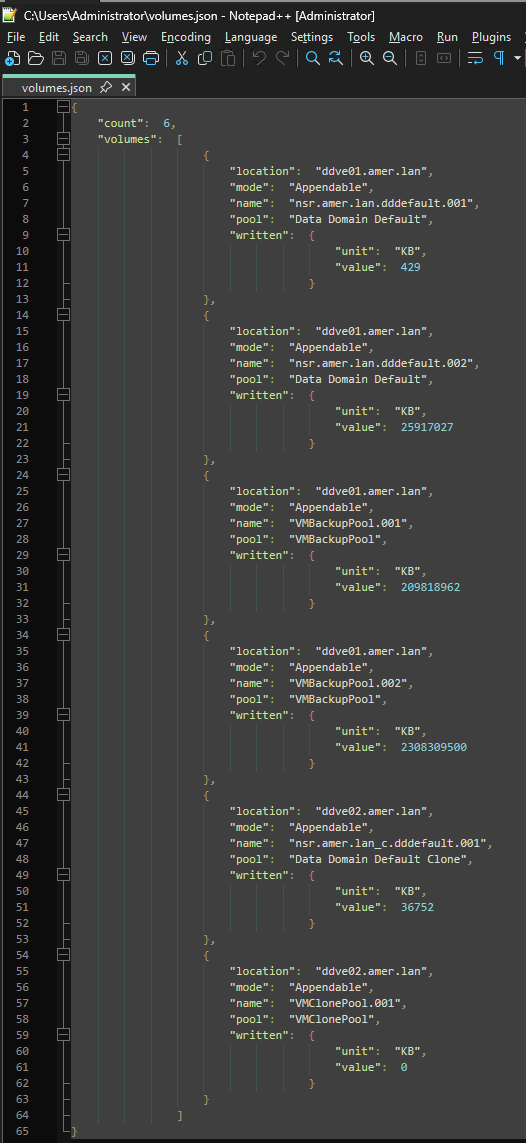
volumes.json 資料夾中的檔案 curl.exe 被運行了。檔案的內容包括 REST API 裝載:
Linux:
curl -k -v --compressed \
  --max-time 3600 \
  --connect-timeout 60 \
  --retry 3 \
  --retry-all-errors \
  --retry-delay 5 \
  -u NETWORKER_USERNAME:'PASSWORD' \
  -H "Accept: application/json" \
  "https://NETWORKER_SERVER_ADDRESS:9090/nwrestapi/v3/global/volumes/ENDPOINT" \
  -o volumes.json
範例 (不含 -v 為簡潔起見):
[root@nsr ~]# curl -k --compressed \
  --max-time 3600 \
  --connect-timeout 60 \
  --retry 3 \
  --retry-all-errors \
  --retry-delay 5 \
  -u Administrator:'!Password1' \
  -H "Accept: application/json" \
  "https://nsr.amer.lan:9090/nwrestapi/v3/global/volumes?q=type%3A%22Data%20Domain%22&fl=location,name,mode,pool,written" \
  -o volumes.json
  % Total    % Received % Xferd  Average Speed   Time    Time     Time  Current
                                 Dload  Upload   Total   Spent    Left  Speed
100   908    0   908    0     0  22700      0 --:--:-- --:--:-- --:--:-- 22146
在此範例中,檔案「volumes.json」是在執行命令的同一目錄中建立。可以使用不同的工具正確解析 json 格式,使用的工具可能會因安裝的作業系統和軟體而異。
[root@nsr ~]# cat volumes.json | python -m json.tool
{
    "count": 6,
    "volumes": [
        {
            "location": "ddve01.amer.lan",
            "mode": "Appendable",
            "name": "nsr.amer.lan.dddefault.001",
            "pool": "Data Domain Default",
            "written": {
                "unit": "KB",
                "value": 429
            }
        },
        {
            "location": "ddve01.amer.lan",
            "mode": "Appendable",
            "name": "nsr.amer.lan.dddefault.002",
            "pool": "Data Domain Default",
            "written": {
                "unit": "KB",
                "value": 25917027
            }
        },
        {
            "location": "ddve01.amer.lan",
            "mode": "Appendable",
            "name": "VMBackupPool.001",
            "pool": "VMBackupPool",
            "written": {
                "unit": "KB",
                "value": 209818962
            }
        },
        {
            "location": "ddve01.amer.lan",
            "mode": "Appendable",
            "name": "VMBackupPool.002",
            "pool": "VMBackupPool",
            "written": {
                "unit": "KB",
                "value": 2308309500
            }
        },
        {
            "location": "ddve02.amer.lan",
            "mode": "Appendable",
            "name": "nsr.amer.lan_c.dddefault.001",
            "pool": "Data Domain Default Clone",
            "written": {
                "unit": "KB",
                "value": 36752
            }
        },
        {
            "location": "ddve02.amer.lan",
            "mode": "Appendable",
            "name": "VMClonePool.001",
            "pool": "VMClonePool",
            "written": {
                "unit": "KB",
                "value": 0
            }
        }
    ]
}
Products
NetWorkerArticle Properties
Article Number: 000172472
Article Type: Solution
Last Modified: 30 Apr 2026
Version: 12
Find answers to your questions from other Dell users
Support Services
Check if your device is covered by Support Services.