PowerFlex 4.6: コンプライアンス バージョンの下にSETTINGS_Repositories_AddComponentボタンが正しく表示されない
Summary: PowerFlex Managerプラットフォーム(PFMP)バージョン4.6.1以降にアップグレードすると、[Compliance Versions]の下にある[Add Component]ボタンが[SETTINGS_Repositories_AddComponent]に置き換えられます。
This article applies to
This article does not apply to
This article is not tied to any specific product.
Not all product versions are identified in this article.
Symptoms
PowerFlex Managerプラットフォーム(PFMP)4.6.1にアップグレードした後、[Compliance Versions]の下に[Add Component]ボタンが導入されました。しかし、正しく表示されない代わりに、「SETTINGS_Repositories_AddComponent」と表示されます
このボタンをクリックしても、何のアクションも実行されません。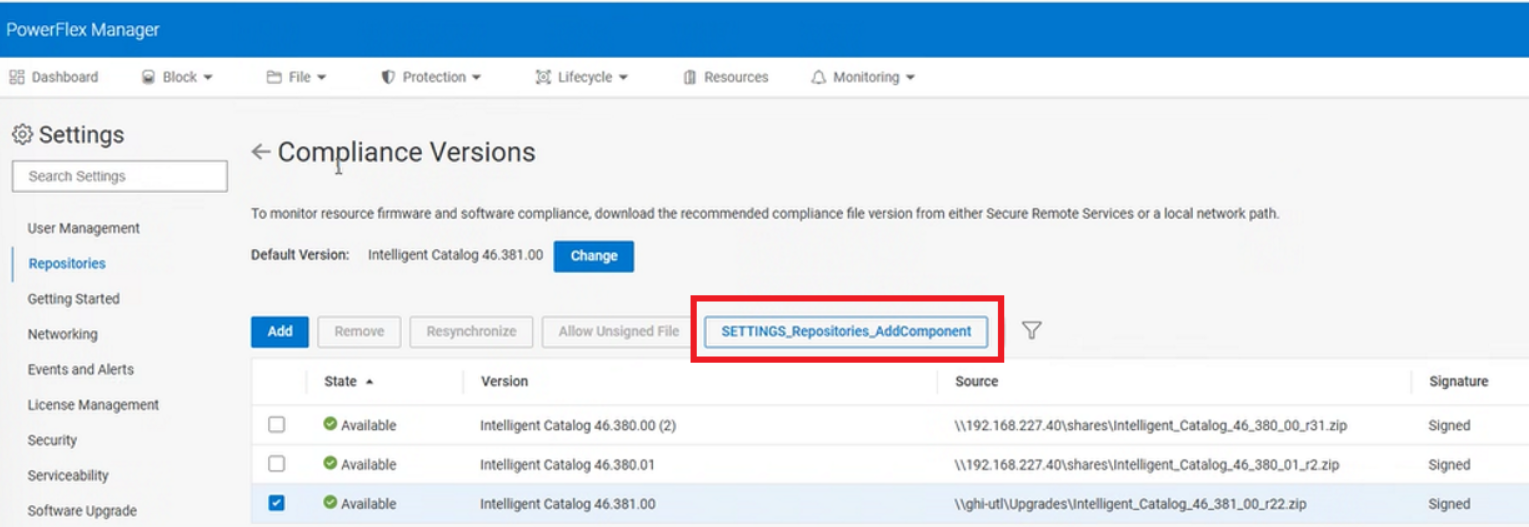
問題
「コンポーネントの追加」機能を使用できません。
Cause
この問題は、キャッシュの問題が原因で、UI に正しいボタン ラベルと機能が正しく表示されないことが原因である可能性があります。
Resolution
ブラウザーのキャッシュをクリアし、ログアウトしてPowerFlex Managerにログインします。
Additional Information
問題が発生するバージョン
PowerFlex Manager 4.6.1以降
修正バージョン
PowerFlex Managerの問題ではない
Products
PowerFlex rack, PowerFlex Appliance, ScaleIO, PowerFlex appliance connectivity, PowerFlex appliance R650, PowerFlex appliance R660, PowerFlex appliance R760, PowerFlex rack RCM SoftwareArticle Properties
Article Number: 000291011
Article Type: Solution
Last Modified: 03 Jul 2025
Version: 2
Find answers to your questions from other Dell users
Support Services
Check if your device is covered by Support Services.