NVP-vProxy: FLR 復原無法掛接備份映像,並顯示錯誤: 未設定用於設定匯出路徑的管理登入資料
Summary: NetWorker VMware Protection (NVP) 虛擬機器 (VM) FLR 在掛接作業期間失敗。傳回的錯誤指出 Data Domain 上未設定管理認證。
This article applies to
This article does not apply to
This article is not tied to any specific product.
Not all product versions are identified in this article.
Symptoms
透過 NMC 復原標籤對 vProxy 備份執行 FLR 復原時,代理無法掛接所選的備份映像。

檢查位於 NetWorker 伺服器上以下資料夾中的vproxy_flr復原記錄:
- Linux:/nsr/logs/adhoc/nsrvproxy_flr/jobid.log
- Windows (預設):C:\Program Files\EMC NetWorker\nsr\logs\adhoc\nsrvproxy_flr\jobid。記錄
155854:nsrvproxy_flr: Starting Saveset Mount...
155858:nsrvproxy_flr: Mounting Saveset Id '9803ba11-00000006-ad388579-59388579-00545000-92010156' on vCenter 'vCenter_Server' at VM 'vm-name(vm-##)' using NetWorker server 'NetWorker_Server' for user 'root'.
162830:nsrvproxy_flr: Mount Job Id '320082'.
167477:nsrvproxy_flr: Unable to retrieve device information for mount of clone 1496876409 of saveset 2906162553: Management credentials for setting up export path were not configured on NSR Data Domain 'Data_Domain'.
164881:nsrvproxy_flr: Operation completed with errors.
Cause
在檔案層級還原 (FLR) 或即時存取還原期間,vProxy 裝置會在 Data Domain 上建立 NFS 資料儲存區,NFS 資料存放區/磁碟會匯出至 VMware,以完成資料復原。這需要 Data Domain 上的管理存取權,才能建立和匯出所需的資料。NetWorker 上的 Data Domain 管理登入資料為空白 (或不正確):

Resolution
- 使用 sysadmin 登入資料登入 Data Domain Web 介面:
https://DD_ADDRESS/ddem/login
注意:這樣做的目的是確認正確的 sysadmin 憑證已知,且憑證未鎖定。如果您可以登入,請繼續接下來的步驟。如果您無法登入,請洽詢 Data Domain 管理員以取得正確的登入資料,或洽詢 Data Domain 支援以重設存取權限。
- 使用管理帳戶登入 NetWorker Management Console (NMC) 或 NetWorker Web 使用者介面 (NWUI)。例如,預設 的管理員 帳戶。
NetWorker 管理主控台 (NMC):
-
- 前往裝置 ->Data Domain 系統。
- 在 Data Domain 上按一下滑鼠右鍵,然後選取 內容。
- 輸入 管理使用者 (sysadmin) 和管理 密碼:
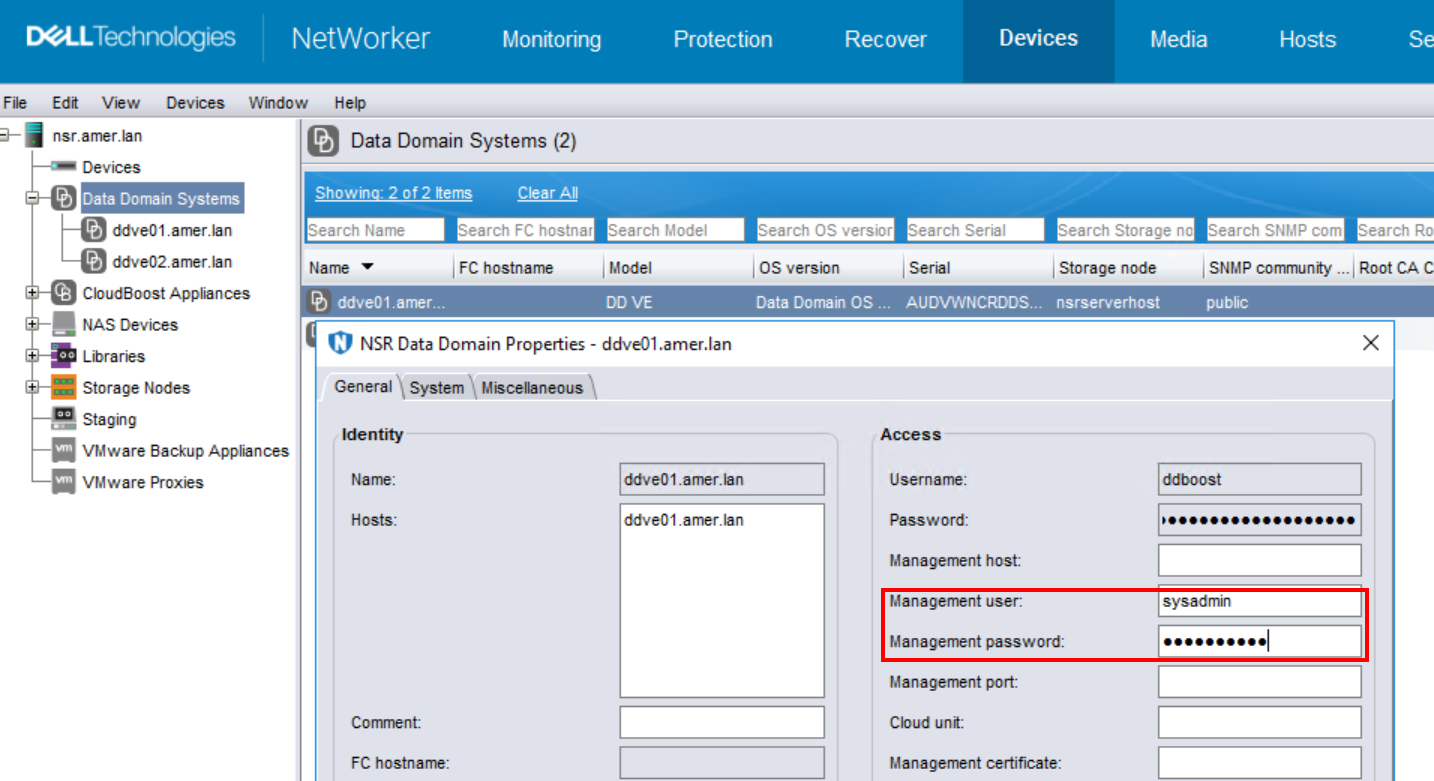
NetWorker Web 使用者介面 (NWUI):
-
- 前往 裝置與媒體 ->Data Domain 系統。
- 選取 Data Domain,然後按一下 編輯。
- 輸入管理使用者 (sysadmin) 和管理 密碼:

注意:管理主機與管理連接埠選項為選用,如果未指定任何內容,則使用預設值。Data Domain 會將自身用作管理主機。使用預設管理埠 (3009)。
- 再次執行 FLR 掛載作業。
Additional Information
如果使用 sysadmin 以外的其他帳戶,則該帳戶必須在 Data Domain 上具有「admin」權限: https://DD_ADDRESS/ddem/#/access

Affected Products
Data Backup & Protection Storage, NetWorkerArticle Properties
Article Number: 000026710
Article Type: Solution
Last Modified: 23 Sept 2025
Version: 5
Find answers to your questions from other Dell users
Support Services
Check if your device is covered by Support Services.