Dell EMC Unity: Come abilitare e configurare NDMP [correggibile dall'utente]
Summary: Come configurare NDMP sull'array
This article applies to
This article does not apply to
This article is not tied to any specific product.
Not all product versions are identified in this article.
Instructions
Dalla GUI di Unisphere:
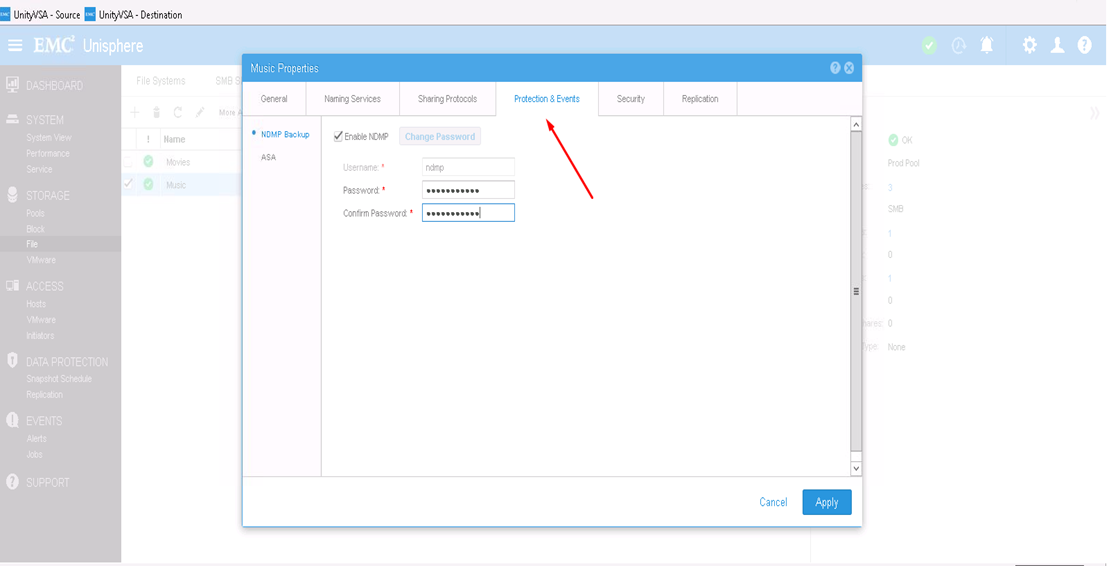
- Innanzitutto, selezionare il server NAS su cui si desidera configurare NDMP, quindi cliccare sull'icona di modifica per modificare
- Dalla scheda Protezione ed eventi, è possibile abilitare la casella di controllo NDMP con il nome utente e la password definiti

Dalla CLI:
1) Individuare l'ID risorsa del server NAS: uemcli -d <array_ip> -u admin -p <admin_pwd> /net/nas/server show
2) Abilitare e impostare la password NDMP tramite: uemcli -d <array_ip> -u admin -p <admin_pwd> /net/nas/ndmp -server <nas_x> set enabled yes passwd ndmp_pwd
precedente abilita NDMP su Unity con nome utente "ndmp".
Dai backup client, è possibile utilizzare l'indirizzo IP del server NAS, "ndmp" come utente di accesso e la password configurata per i backup NDMP.
Affected Products
Dell EMC Unity FamilyProducts
Dell EMC Unity Family, VNXe1 Series, VNXe2 SeriesArticle Properties
Article Number: 000022637
Article Type: How To
Last Modified: 16 Oct 2025
Version: 3
Find answers to your questions from other Dell users
Support Services
Check if your device is covered by Support Services.