NetWorker:发送到 Data Domain 的所有备份都失败,并显示“没有用于保存客户端的匹配设备”
Summary: 备份失败,并显示“no matching devices for save of client '[client_name]”;检查存储节点、设备或池“,但所有配置都正确。
This article applies to
This article does not apply to
This article is not tied to any specific product.
Not all product versions are identified in this article.
Symptoms
- 发送到 Data Domain 的所有备份开始失败,并显示“no matching devices”(无匹配的设备)。
- NetWorker Management Console (NMC) 报告:
no matching devices for save of client '[client_name]'; check storage nodes, devices or pools
- NetWorker 服务器daemon.raw报告以下错误:
SYSTEM critical Failed to connect to [Data_Domain]
- 在测试与 DD 的连接时,所有连接都会测试 (
ping开始,nslookup,依此类推)恢复正常。
Cause
ddboost 用户密码已过期,导致帐户被锁定。
Resolution
更新 ddboost 用户密码。
1.在网页浏览器中,转至 Data Domain 用户界面: https://DD_ADDRESS
2.使用 sysadmin 帐户登录。
2.单击 Administration ->Access,然后单击 Local Users。
3.选择 NetWorker 设备使用的 ddboost 用户帐户。
4.单击 Change Password(更改密码)
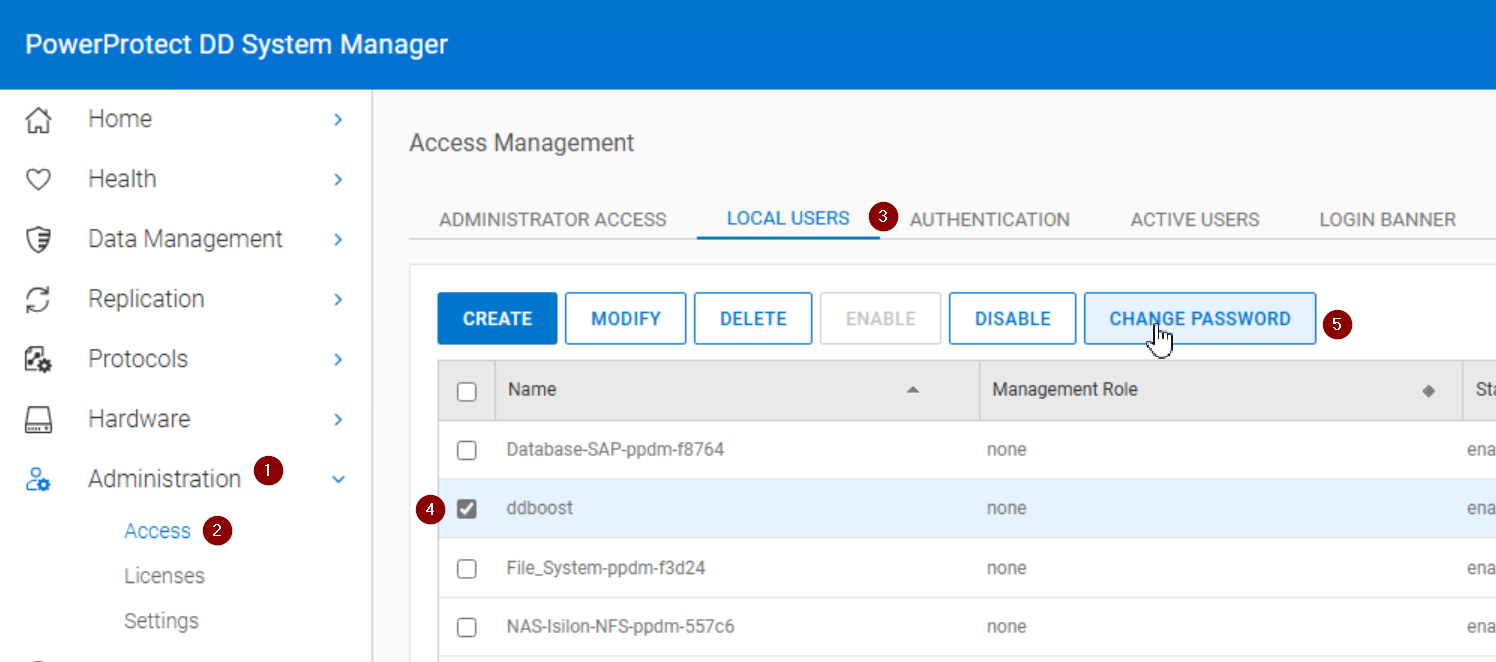
5.确保 ddboost 用户帐户显示 Enabled,如果锁定或禁用,请单击 Enable。
6.登录到 NetWorker Management Console。
7.转到“设备”->“设备”。
8.对于针对受影响的 Data Domain 配置的每个设备,更新 ddboost 用户密码。
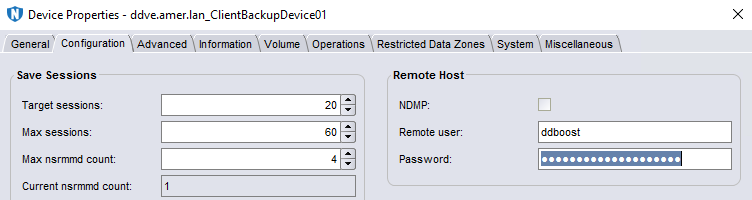
9.确保可以装载设备。
10.重新运行失败的作业。
Additional Information
此错误还有其他潜在原因。如果 ddboost 帐户未锁定,请参阅:NetWorker:对介质等待事件进行故障处理 - 正在等待一个可写卷或没有匹配的设备
Affected Products
NetWorkerProducts
NetWorker FamilyArticle Properties
Article Number: 000052953
Article Type: Solution
Last Modified: 14 Aug 2025
Version: 5
Find answers to your questions from other Dell users
Support Services
Check if your device is covered by Support Services.