NetWorker: Data Domain에 보낸 모든 백업이 실패하고 "클라이언트 저장과 일치하는 디바이스 없음"이 표시됩니다.
Summary: 백업이 실패하고 "클라이언트 '[client_name]'의 저장과 일치하는 디바이스가 없습니다. 스토리지 노드, 디바이스 또는 풀을 확인하십시오"라는 메시지가 표시되지만 모든 구성이 올바릅니다.
This article applies to
This article does not apply to
This article is not tied to any specific product.
Not all product versions are identified in this article.
Symptoms
- Data Domain으로 전송된 모든 백업이 "no matching devices"와 함께 실패하기 시작합니다.
- NMC(NetWorker Management Console)는 다음을 보고합니다.
no matching devices for save of client '[client_name]'; check storage nodes, devices or pools
- NetWorker Server daemon.raw에서 다음 오류를 보고합니다.
SYSTEM critical Failed to connect to [Data_Domain]
- DD에 대한 연결을 테스트할 때 모든 연결 테스트(
ping,nslookup, 등등)은 잘 돌아옵니다.
Cause
ddboost 사용자 비밀번호가 만료되어 계정이 잠겼습니다.
Resolution
ddboost 사용자 비밀번호를 업데이트합니다.
1. 웹 브라우저에서 Data Domain 사용자 인터페이스로 이동합니다. https://DD_ADDRESS
2. sysadmin 계정으로 로그인합니다.
2. Administration ->Access를 클릭한 다음 Local Users를 클릭합니다.
3. NetWorker 디바이스에서 사용하는 ddboost 사용자 계정을 선택합니다.
4. Change Password를 클릭합니다.
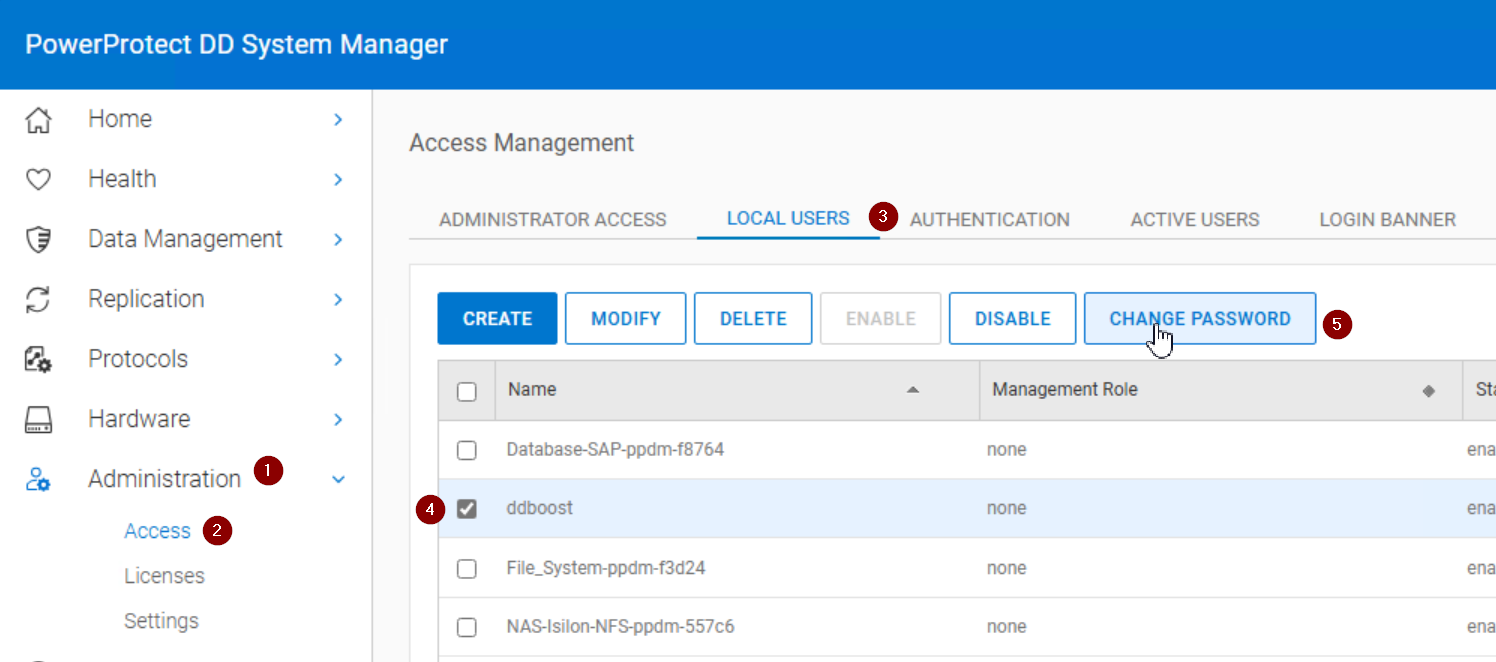
5. ddboost 사용자 계정에 Enabled가 표시되는지 확인합니다. 잠겨 있거나 비활성화되어 있는 경우 Enable을 클릭합니다.
6. NetWorker Management Console에 로그인합니다.
7. 장치->장치로 이동합니다.
8. 영향을 받는 Data Domain에 대해 구성된 각 디바이스에 대해 ddboost 사용자 암호를 업데이트합니다.
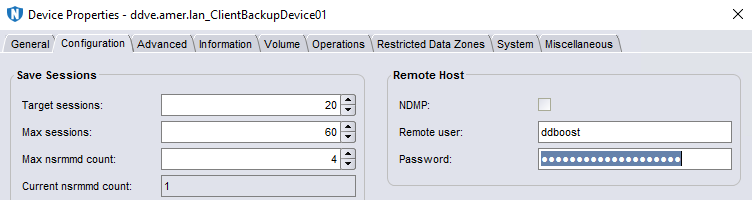
9. 디바이스를 마운트할 수 있는지 확인합니다.
10. 실패한 작업을 다시 실행합니다.
Additional Information
이 오류에는 다른 잠재적인 원인이 있습니다. ddboost 계정이 잠겨 있지 않은 경우 다음을 참조하십시오. NetWorker: 미디어 대기 이벤트 문제 해결 - 하나의 쓰기 가능 볼륨 대기 중 또는 일치하는 디바이스 없음
Affected Products
NetWorkerProducts
NetWorker FamilyArticle Properties
Article Number: 000052953
Article Type: Solution
Last Modified: 14 Aug 2025
Version: 5
Find answers to your questions from other Dell users
Support Services
Check if your device is covered by Support Services.