Avamar Hyper-V Plugin: How to Check for Orphan Hyper-V VM Groups and Checkpoints on a Hyper-V Host
Summary: This article provides a method to determine if there are any Virtual Machine (VM) orphaned groups and checkpoints on a Hyper-V Host.
This article applies to
This article does not apply to
This article is not tied to any specific product.
Not all product versions are identified in this article.
Instructions
During the Avamar Hyper-V Plug-in backups, the VM Collection Groups and VM Recovery Checkpoints are created as part of the process. Upon backup completion, the Groups and Checkpoints are automatically deleted.
Understand that:
Steps to identify any orphan VM Groups or VM Checkpoints in the Hyper-V environment:


Understand that:
- Occasionally this automatic process may fail the deleted task due to environmental reasons. As a result, VM Groups and VM Recovery Checkpoints are left behind.
- These orphaned VM Collection Groups and VM Recovery Checkpoints may cause backup failures. The orphaned VM Recovery Checkpoints also consume space on the Hyper-V Storage.
- In this scenario, work with your Hyper-V Administrator to remove the orphaned items from the Hyper-V node. Work with Microsoft Support if necessary.
Steps to identify any orphan VM Groups or VM Checkpoints in the Hyper-V environment:
- Check that no backups are running on the hyper-v client. This may be a federated client (for Hyper-V cluster), or a stand-alone client (for Hyper-V Node in a non-clustered environment).
- Check for any Hyper-V Plugin backup job in "Running" state within the Avamar UI "Activity screen" for the client in question.
- If there is a backup running, allow it to complete before proceeding with the next step.
- On the Hyper-V Node, start the PowerShell as Administrator. Run the following commands:
- To list all VM Groups on the Node:
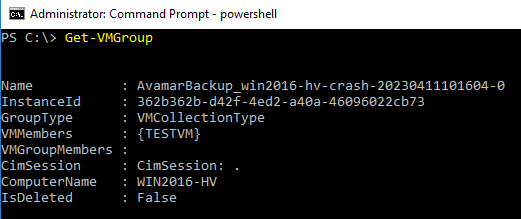
Get-VMGroup
As per the output below, there is one VM Collection Group named
AvamarBackup_win2016-hv-crash-20230411101604-0.
- To list VM Checkpoints for all VMs on the Node:
Get-VM | Get-VMSnapshot
As per the below output, there is one Recovery Checkpoint for VM (VMTEST), which was created during Avamar Backup (SnapshotType - Recovery).
Similarly, a Recovery Checkpoint is shown in Hyper-V Manager:
- In a clustered Hyper-V environment, run the commands above on each Hyper-V Node (member of the cluster).
Affected Products
AvamarProducts
Avamar ClientArticle Properties
Article Number: 000212171
Article Type: How To
Last Modified: 27 Mar 2024
Version: 3
Find answers to your questions from other Dell users
Support Services
Check if your device is covered by Support Services.