PowerProtect: UPG0126과 함께 업그레이드 실패
Summary: PPDM(PowerProtect Data Manger) 업그레이드가 실패하고 UPG0126 - Unable to update one or more disruptive PowerProtect Data Manager sub-components. 이 문제는 vCenter를 PPDM에 등록하는 데 사용된 VMware 계정에 필요한 권한이 없을 때 발생합니다. ...
Symptoms
PowerProtect Data Manager 업그레이드 실패, 오류:
UPG0126 - 운영을 중단시키는 하나 이상의 PowerProtect Data Manager 하위 구성 요소를 업데이트할 수 없습니다.
NAS 보호 엔진 업데이트 실패: 보호 엔진 'proxy01.domain.com'를 업데이트할 수 없습니다. 자동 업그레이드 요청이 실패했습니다.
vProxy
자동 업그레이드 불가 vProxy proxy01.domain.com 배포할 수 없습니다.
VM을 배포할 수 없습니다.
vCenter Server에서 vProxy 'proxy01.domain.com'를 삭제할 수 없습니다.
vCenter Server에서 vProxy VM proxy01.domain.com 삭제할 수 없습니다.
서버 오류 코드: Permission to perform this operation was denied.
Cause
vCenter를 PPDM에 등록하는 데 사용된 VMware 계정에 필요한 사용 권한이 없습니다.
Resolution
vCenter를 PPDM에 등록하는 데 사용된 계정에 사용 권한이 없습니다.
PPDM에서 사용자 확인 기능 사용: 선택: InfrastructureAsset > SourcesvCenter > EditVerify >> User..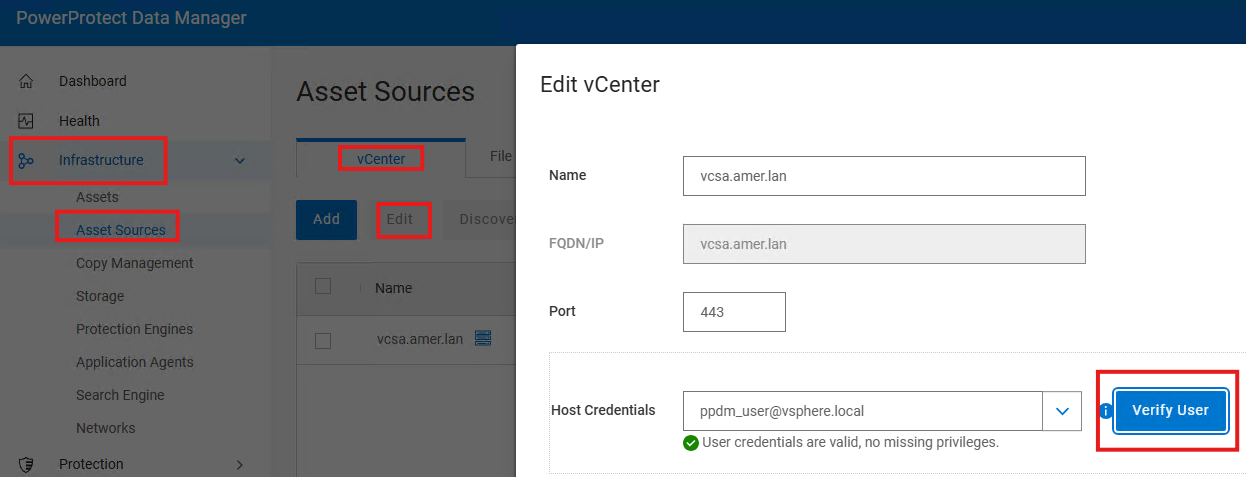
필요한 vCenter 권한의 전체 목록은 PowerProtect Data Manager 가상 머신 사용자 가이드의 "전용 vCenter 사용자 계정에 필요한 권한 지정" 섹션을 참조하십시오.
PPDM 설명서:
https://www.dell.com/support/product-details/en-us/product/enterprise-copy-data-management/docs