Dell Unity: Konfigurieren von FTP und SFTP mit allen Funktionen
Summary: In diesem Artikel wird erläutert, wie Sie FTP (File Transfer Protocol) und SFTP (Secure File Transfer Protocol) für NAS-Server auf Dell Unity-Arrays konfigurieren.
Instructions
So aktivieren und konfigurieren Sie FTP über Unisphere (UI):
Navigieren Sie zu Unisphere > File > NAS Servers > Edit > Sharing Protocols > FTP: 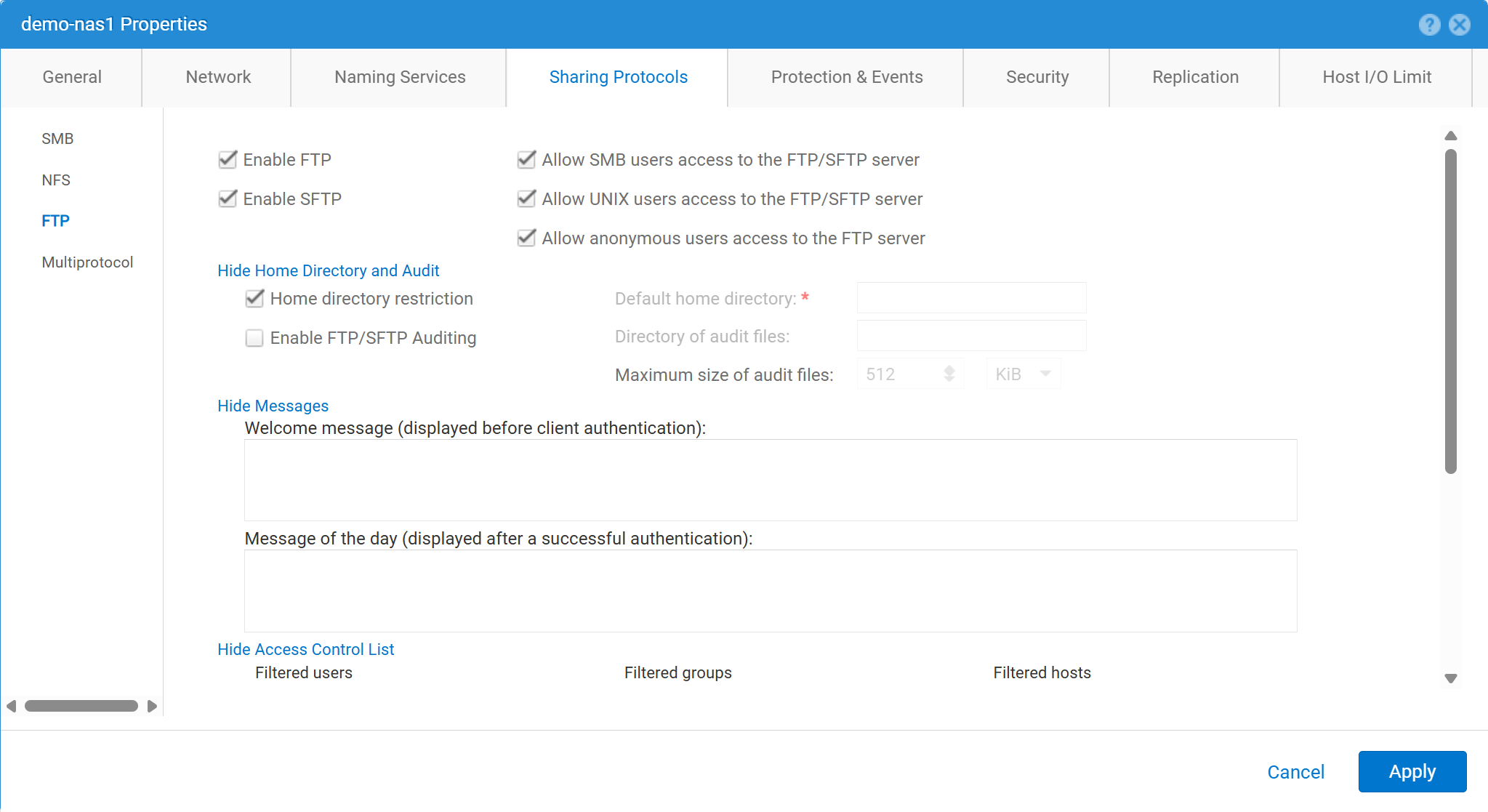
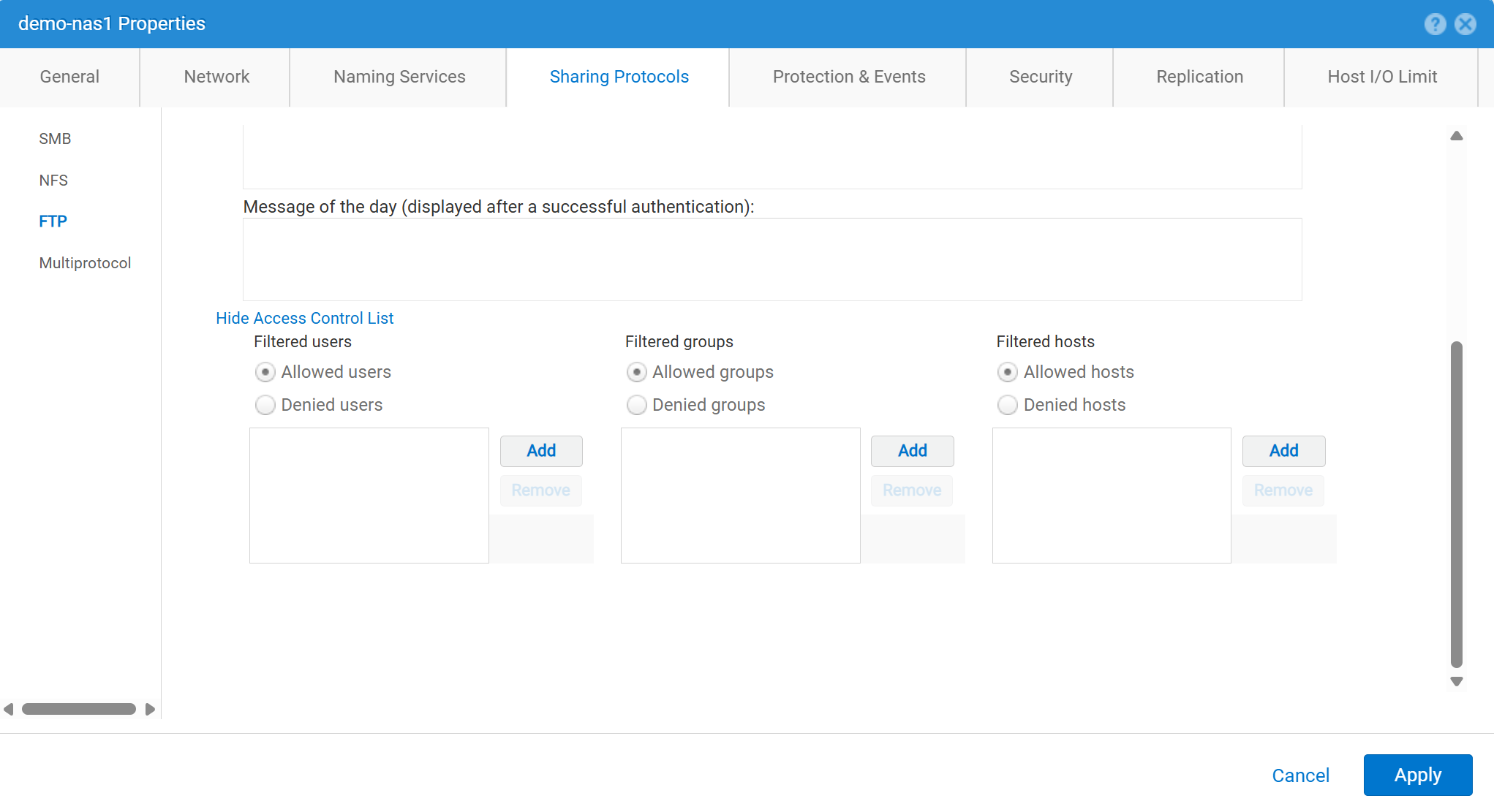
So aktivieren und konfigurieren Sie FTP über Unisphere (UI):
service@spa spa:~> uemcli -no -u admin -p mypasswd /net/nas/ftp -server nas_8 set -ftpEnabled yes -sftpEnabled yes -anonymousUserEnabled yes -cifsUserEnabled yes -unixUserEnabled yes
Operation completed successfully.


Note : Refer to "uemcli /net/nas/ftp -help" for all other available options
So melden Sie sich als FTP-Nutzer an:
Wenn dem NAS-Server eine Domain hinzugefügt wurde CIFS-Server (Common Internet File System) kann sich der Domänennutzer als einer der folgenden anmelden:
domain\user or user@domain

Example (domain name is EXAMPLE):
EXAMPLE\user100 or user100@example.com
Wenn der NAS-Server ein eigenständiger CIFS-Server auf Unity ist, ermöglicht die folgende Methode die Anmeldung:
servername\user or user@servername or local\user or user@local

Example (standalone nas server name is MYCIFS):

MYCIFS\user100 or user100@mycifs or local\user100 or user100@local

C:\>ftp ftp02
Connected to ftp02
220 NASFTP FTP server (EMC:upc_Unity_6_HF5_upcBuilder:9328432) ready.
User ( ftp02   :( none)): Local\administrator
331 Password required for Local\administrator.
Password:
230- No directory! Logging in with home=/nasftp_fs01.
230 NT User Local\administrator logged in.
ftp>
Wenn der NAS-Server verwendet wird für Nur NFS (Network File System). Unity erfordert einen Verzeichnisdienst (z. B. LDAP (Lightweight Directory Access Protocol) oder Network Information Service (NIS)) für die Nutzerauthentifizierung. Lokale Dateien können auch verwendet werden, wenn kein LDAP oder NIS verfügbar ist (was eine manuelle Nutzer-/Kennwortkonfiguration erfordert).
C:\>ftp ftp02
Connected to ftp02
220 FTP02 FTP server (EMC:upc_Unity_6_HF5_upcBuilder:9328432) ready.
User (ftp02 :(none)): user100
331 Password required for user100.
Password:
230 UNIX User user100 logged in.
ftp> ls
200 PORT command successful.
150 Opening ASCII mode data connection for 'file list'.
lost+found
etc
publicftp
226 Transfer complete.
ftp: 29 bytes received in 0.00Seconds 29000.00Kbytes/sec.
ftp> bye
221 Goodbye.
Anonyme Anmeldung (auch als ftp bezeichnet):
C:\>ftp ftp02
Connected to ftp02
220 FTP02 FTP server (EMC:upc_Unity_6_HF5_upcBuilder:9328432) ready.
User (ftp02  :(none)): anonymous
331 Guest login ok, type your name as password.
Password:
230 Guest login ok, access restrictions apply.
ftp> _
So konfigurieren Sie lokale Nutzer:
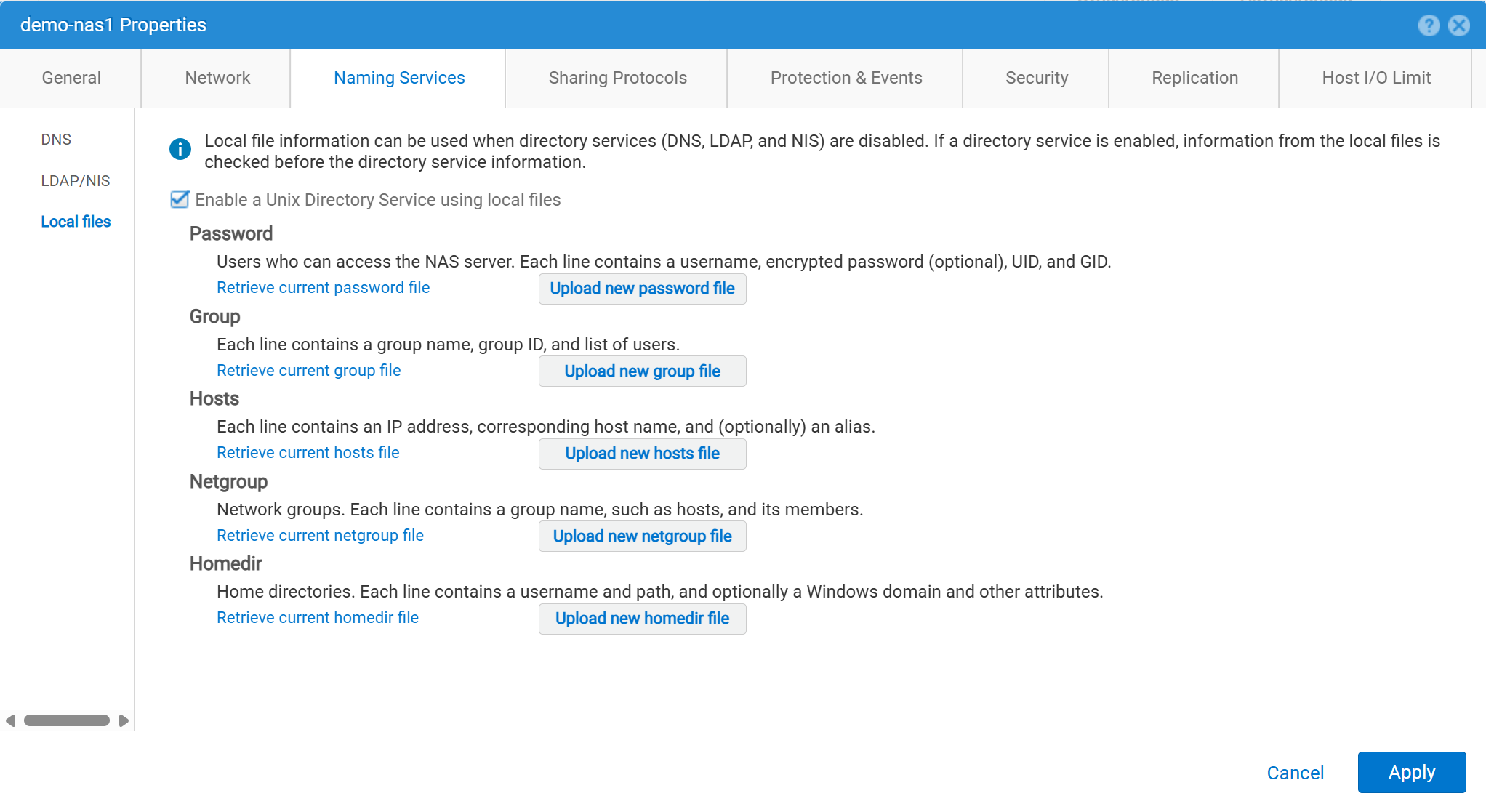
Die Benutzerdaten müssen wie folgt eingegeben werden:
01:42:18 service@spa spa:~> cat passwd
# The passwd file contains the users who can access the NAS server.
#
# Each line of the passwd file defines a user and has the format:
#   username:password:uid:gid:gcos
# where:
# - username is the user's login name.
#   When querying for Windows users, the system checks for CIFS usernames without domain extensions.
# - password is an empty field. The encrypted password for the user is in the
# corresponding entry in the shadow file.
# - uid is the user's unique numerical ID for the system.
# - gid is the unique numerical ID of the group to which the user belongs.
#
# user:password:uid:gid:gcos:homedir:
ftp:ffX6M7x34lzYI:2000:2000::/fs01:
user100:ffX6M7x34lzYI:2001:2001::/fs01:
user200:l8Yykofh8ckbU:2002:2002:
user300:ABVmdrEehFnsI:2002:2002:QLs4hM#3w2s1drrYowsXsaPMuz:/fs01/publicftp:
user400:QQueVwnnAFCjc:2003:2003:PZraGM#K321ldrWKowssLaPVgp::
usertest:eeRJFmFoGS4lw:2004:2004::/fs01/publicftp:
usertest2:8II12yC6iqFEY:2004:2004::/fs01/publicftp:
Verwenden Sie UEMCLI zum Herunterladen:
uemcli -u admin -p password -download /net/nas/server -name server_name -type passwd


EXAMPLE:
03:37:51 service@spa spa:~> uemcli -u admin -p mypasswd -upload -f /home/service/passwd /net/nas/server -name FTP02 -type passwd

Uploaded 962 byte of 962 byte [ 100.0% ] -PROCESSING-
Operation completed successfully.
Verwenden Sie UEMCLI zum Hochladen:
uemcli -u admin -p password -upload -f /cores/service/passwd /net/nas/server -name server_name -type passwd


EXAMPLE:
03:37:40 service@spa spa:~> uemcli -download -f /cores/service/passwd /net/nas/server -name FTP02 -type passwd

Downloaded 962 byte of 962 byte [ 100.0% ] -STALLED-
Operation completed successfully.
Additional Information
Hinweise:
- Damit der anonyme Benutzer funktioniert, muss es einen Benutzer mit dem Namen
ftpmöglicherweise nicht mitUIDmuss im Verzeichnisanbieter oder in lokalen Dateien definiert werden.- Beispiel für lokale Dateien:
ftp:*:1000:1000::/fs01/publicftp:
- Beispiel für lokale Dateien:
- Wenn die lokalen Dateien verwendet werden, kann das Kennwortfeld mithilfe von
openssl(direkt aus dem Unity):- Beispiel:
User user100, Password to be "Password123#", uid and gid as 3000, homedir as /fshomedir/data - Dieser Befehl verwendet einen SHA256-basierten Kennwortalgorithmus. Verwenden Sie den Befehl
'openssl passwd -6 Password123#'ob der SHA512-basierte Kennwortalgorithmus erforderlich ist.
- Beispiel:
$ openssl passwd Password123#
Warning: truncating password to 8 characters              <-- note, it takes only 1st 8 char
9QWNQEDjvlRog
$ openssl passwd
Password:                     <-- password can be typed here if not to be seen
Verifying - Password:
yT4C/OPx6AHXM
Entry on "passwd" file should be: user100:9QWNQEDjvlRog:3000:3000::/fshomedir/data:- SFTP erfordert, dass das Stammverzeichnis dem angemeldeten Nutzer gehört.
- Dies kann dazu führen, dass ein anonymer Nutzer blockiert wird.
- SFTP kann fehlschlagen, wenn
LACPverwendet wird.- Wenn Port 22 blockiert zu sein scheint, finden Sie weitere Informationen unter Dell Unity: Unity SFTP funktioniert nicht, wenn LACP aktiviert ist.