Dell Unity : Configuration du FTP et du SFTP avec toutes les fonctionnalités
Summary: Cet article explique comment configurer le protocole FTP (File Transfer Protocol) et le protocole SFTP (Secure File Transfer Protocol) pour les serveurs NAS sur les baies Dell Unity.
Instructions
Pour activer et configurer FTP à partir de Unisphere (interface utilisateur) :
Accédez à Unisphere > File > NAS Servers > Edit > Sharing Protocols > FTP : 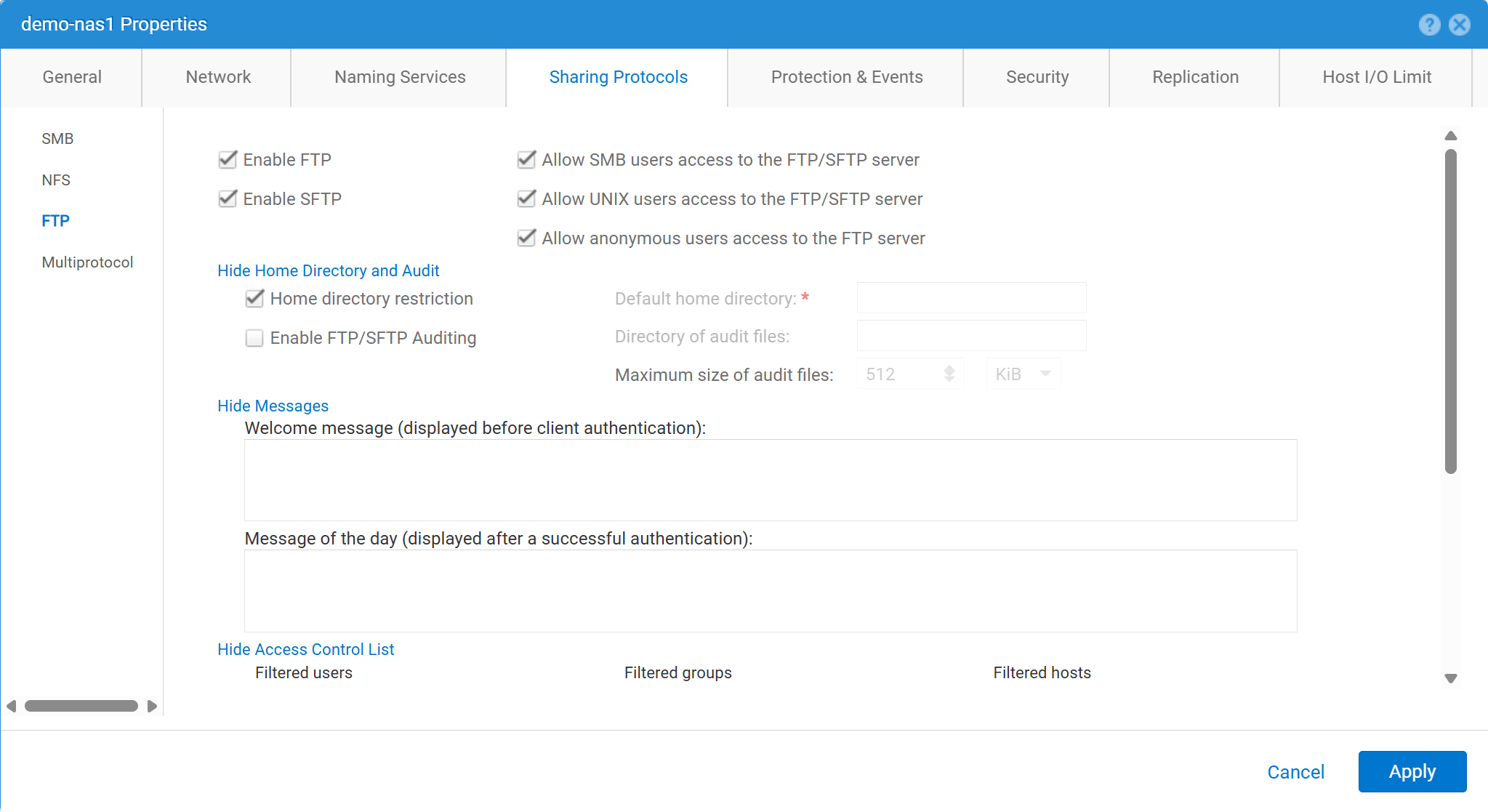
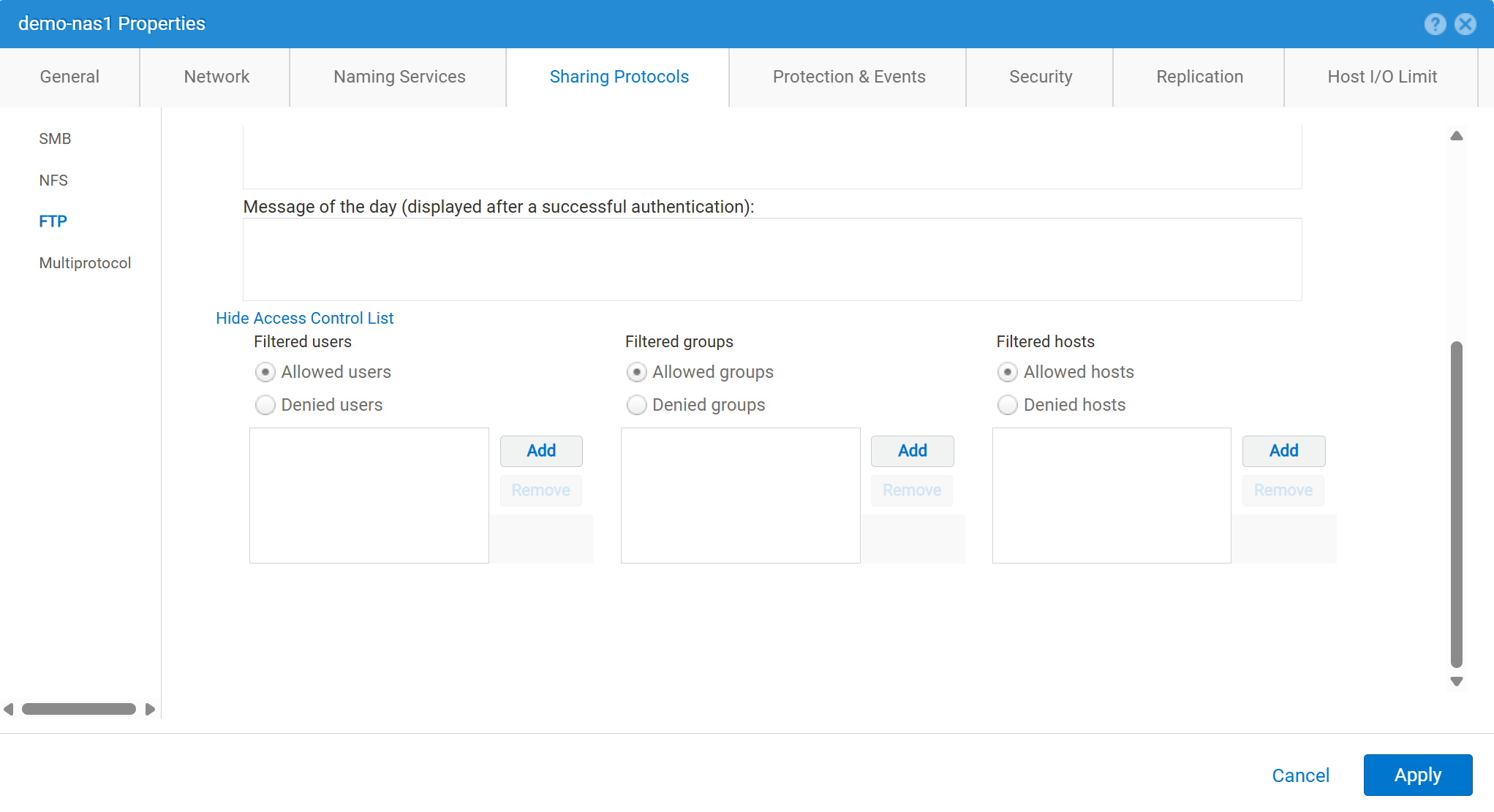
Pour activer et configurer FTP à partir de Unisphere (interface utilisateur) :
service@spa spa:~> uemcli -no -u admin -p mypasswd /net/nas/ftp -server nas_8 set -ftpEnabled yes -sftpEnabled yes -anonymousUserEnabled yes -cifsUserEnabled yes -unixUserEnabled yes
Operation completed successfully.


Note : Refer to "uemcli /net/nas/ftp -help" for all other available options
Pour vous connecter en tant qu’utilisateur FTP :
Si le serveur NAS a un domaine joint CIFS (Common Internet File System ), l’utilisateur de domaine peut se connecter à l’aide de l’un des serveurs suivants :
domain\user or user@domain

Example (domain name is EXAMPLE):
EXAMPLE\user100 or user100@example.com
Si le serveur NAS est un serveur CIFS autonome sur Unity, la méthode suivante permet la connexion :
servername\user or user@servername or local\user or user@local

Example (standalone nas server name is MYCIFS):

MYCIFS\user100 or user100@mycifs or local\user100 or user100@local

C:\>ftp ftp02
Connected to ftp02
220 NASFTP FTP server (EMC:upc_Unity_6_HF5_upcBuilder:9328432) ready.
User ( ftp02   :( none)): Local\administrator
331 Password required for Local\administrator.
Password:
230- No directory! Logging in with home=/nasftp_fs01.
230 NT User Local\administrator logged in.
ftp>
Si le serveur NAS est utilisé pour NFS (Network File System) uniquement, Unity nécessite un service d’annuaire (tel que le protocole LDAP (Lightweight Directory Access Protocol) ou NIS (Network Information Service)) pour l’authentification des utilisateurs. Les fichiers locaux peuvent également être utilisés en l’absence de LDAP ou de NIS disponible (ce qui nécessite une configuration manuelle des utilisateurs/mots de passe).
C:\>ftp ftp02
Connected to ftp02
220 FTP02 FTP server (EMC:upc_Unity_6_HF5_upcBuilder:9328432) ready.
User (ftp02 :(none)): user100
331 Password required for user100.
Password:
230 UNIX User user100 logged in.
ftp> ls
200 PORT command successful.
150 Opening ASCII mode data connection for 'file list'.
lost+found
etc
publicftp
226 Transfer complete.
ftp: 29 bytes received in 0.00Seconds 29000.00Kbytes/sec.
ftp> bye
221 Goodbye.
Connexion anonyme (également appelée ftp) :
C:\>ftp ftp02
Connected to ftp02
220 FTP02 FTP server (EMC:upc_Unity_6_HF5_upcBuilder:9328432) ready.
User (ftp02  :(none)): anonymous
331 Guest login ok, type your name as password.
Password:
230 Guest login ok, access restrictions apply.
ftp> _
Pour configurer les utilisateurs locaux :
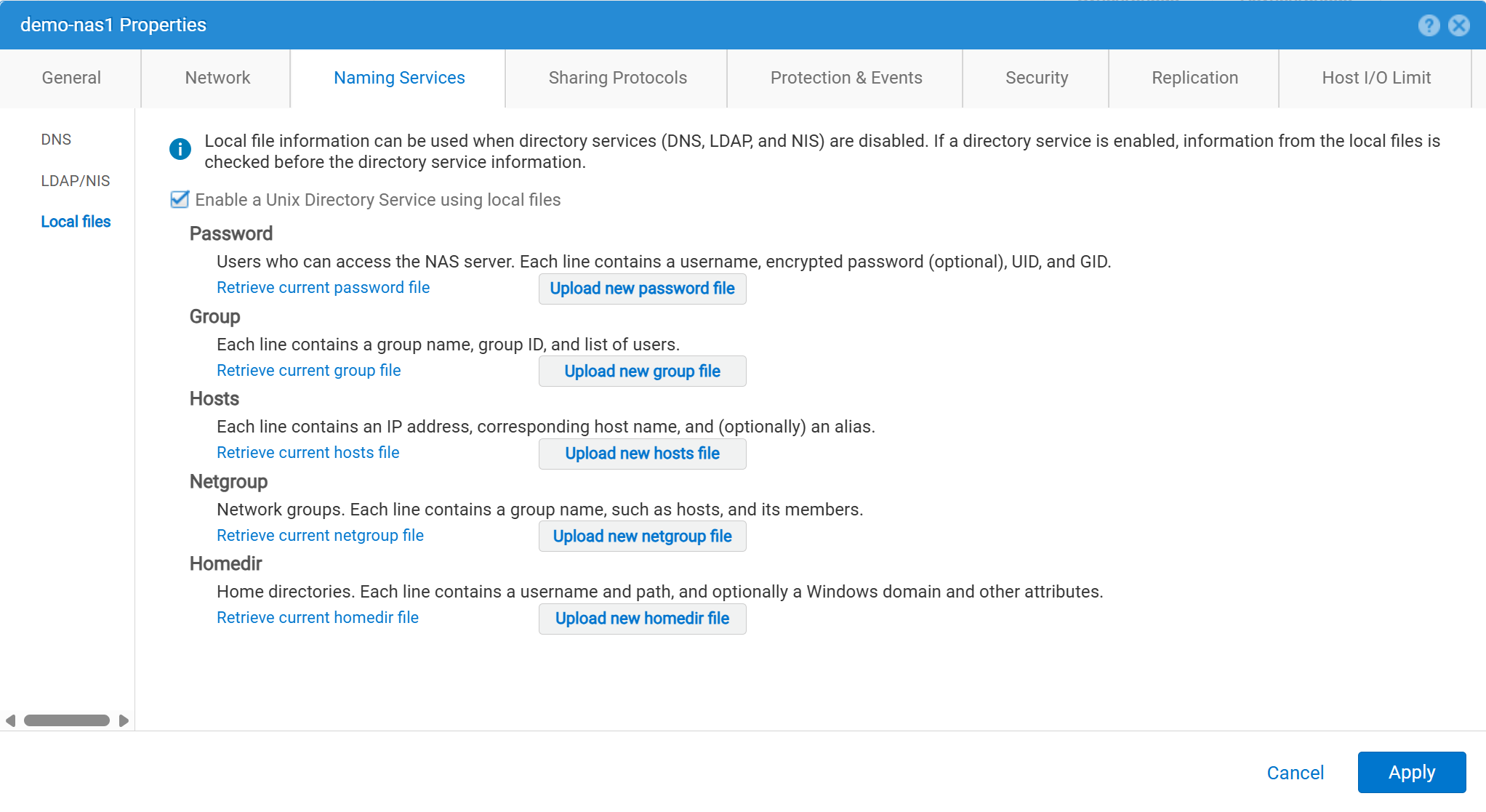
Les détails de l’utilisateur doivent être saisis comme suit :
01:42:18 service@spa spa:~> cat passwd
# The passwd file contains the users who can access the NAS server.
#
# Each line of the passwd file defines a user and has the format:
#   username:password:uid:gid:gcos
# where:
# - username is the user's login name.
#   When querying for Windows users, the system checks for CIFS usernames without domain extensions.
# - password is an empty field. The encrypted password for the user is in the
# corresponding entry in the shadow file.
# - uid is the user's unique numerical ID for the system.
# - gid is the unique numerical ID of the group to which the user belongs.
#
# user:password:uid:gid:gcos:homedir:
ftp:ffX6M7x34lzYI:2000:2000::/fs01:
user100:ffX6M7x34lzYI:2001:2001::/fs01:
user200:l8Yykofh8ckbU:2002:2002:
user300:ABVmdrEehFnsI:2002:2002:QLs4hM#3w2s1drrYowsXsaPMuz:/fs01/publicftp:
user400:QQueVwnnAFCjc:2003:2003:PZraGM#K321ldrWKowssLaPVgp::
usertest:eeRJFmFoGS4lw:2004:2004::/fs01/publicftp:
usertest2:8II12yC6iqFEY:2004:2004::/fs01/publicftp:
Utilisez UEMCLI pour télécharger :
uemcli -u admin -p password -download /net/nas/server -name server_name -type passwd


EXAMPLE:
03:37:51 service@spa spa:~> uemcli -u admin -p mypasswd -upload -f /home/service/passwd /net/nas/server -name FTP02 -type passwd

Uploaded 962 byte of 962 byte [ 100.0% ] -PROCESSING-
Operation completed successfully.
Utilisez UEMCLI pour télécharger :
uemcli -u admin -p password -upload -f /cores/service/passwd /net/nas/server -name server_name -type passwd


EXAMPLE:
03:37:40 service@spa spa:~> uemcli -download -f /cores/service/passwd /net/nas/server -name FTP02 -type passwd

Downloaded 962 byte of 962 byte [ 100.0% ] -STALLED-
Operation completed successfully.
Additional Information
Remarques :
- Pour que l’utilisateur anonyme fonctionne, il doit y avoir un utilisateur appelé
ftpparUIDdoit être défini dans le fournisseur d’annuaire ou dans les fichiers locaux.- Exemple pour les fichiers locaux :
ftp:*:1000:1000::/fs01/publicftp:
- Exemple pour les fichiers locaux :
- Si les fichiers locaux sont utilisés, le champ mot de passe peut être généré en utilisant
openssl(directement à partir de l’Unity) :- Exemple :
User user100, Password to be "Password123#", uid and gid as 3000, homedir as /fshomedir/data - Cette commande utilise l’algorithme de mot de passe basé sur SHA256. Utilisez la commande
'openssl passwd -6 Password123#'si l’algorithme de mot de passe basé sur SHA512 est nécessaire.
- Exemple :
$ openssl passwd Password123#
Warning: truncating password to 8 characters              <-- note, it takes only 1st 8 char
9QWNQEDjvlRog
$ openssl passwd
Password:                     <-- password can be typed here if not to be seen
Verifying - Password:
yT4C/OPx6AHXM
Entry on "passwd" file should be: user100:9QWNQEDjvlRog:3000:3000::/fshomedir/data:- SFTP nécessite que le répertoire de base soit détenu par l’utilisateur connecté.
- Cela peut bloquer un utilisateur anonyme.
- Le SFTP peut échouer dans les cas suivants :
LACPest utilisé.- Si le port 22 semble bloqué, reportez-vous à Dell Unity : Unity SFTP ne fonctionne pas lorsque le protocole LACP est activé.