Dell Unity: FTP en SFTP configureren met alle functies
Summary: In dit artikel wordt uitgelegd hoe u FTP (File Transfer Protocol) en SFTP (Secure File Transfer Protocol) configureert voor NAS-servers op Dell Unity arrays.
Instructions
FTP inschakelen en configureren vanuit Unisphere (UI):
Ga naar Unisphere > File > NAS-servers > Edit > Sharing Protocols > FTP: 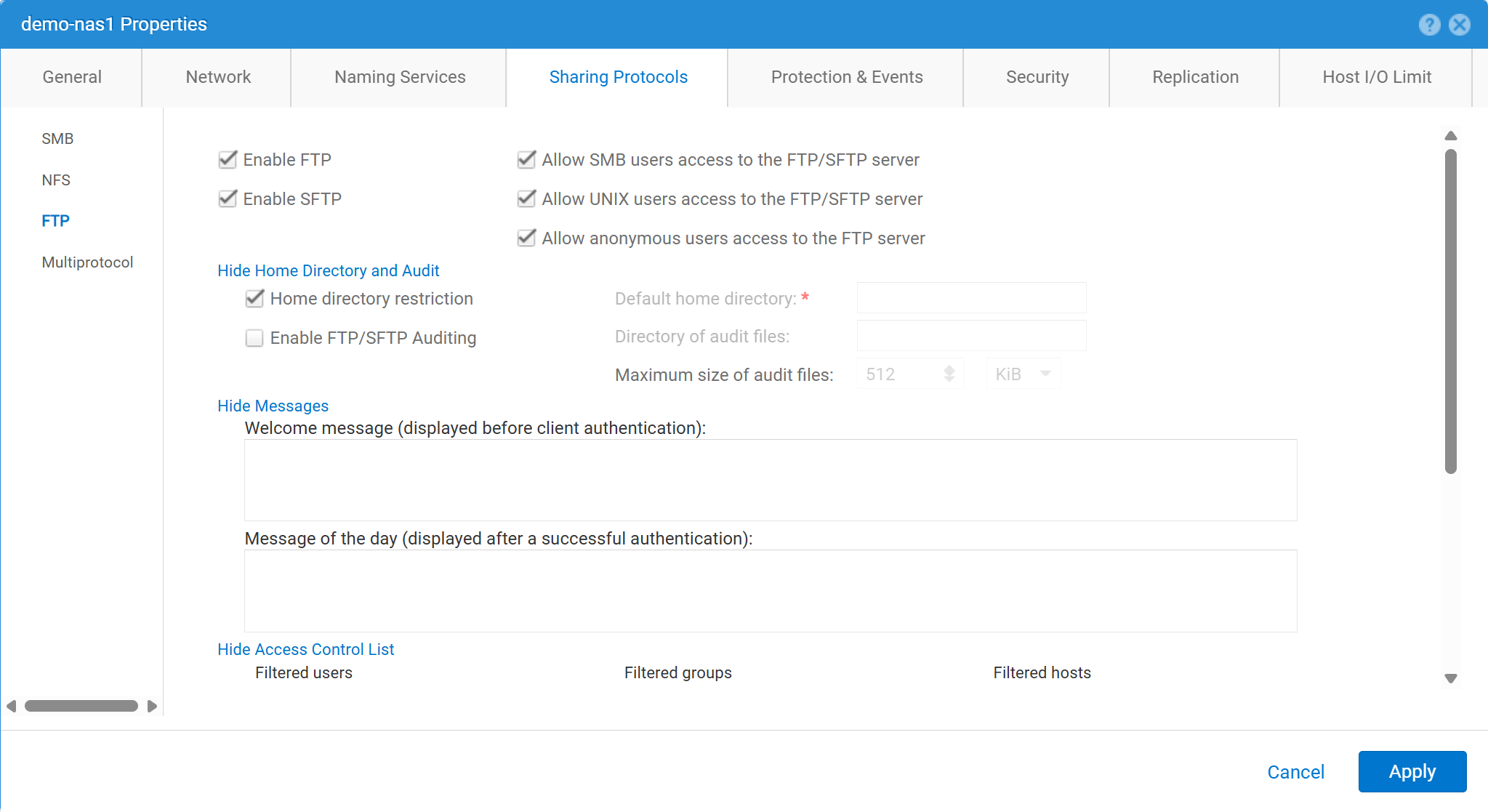
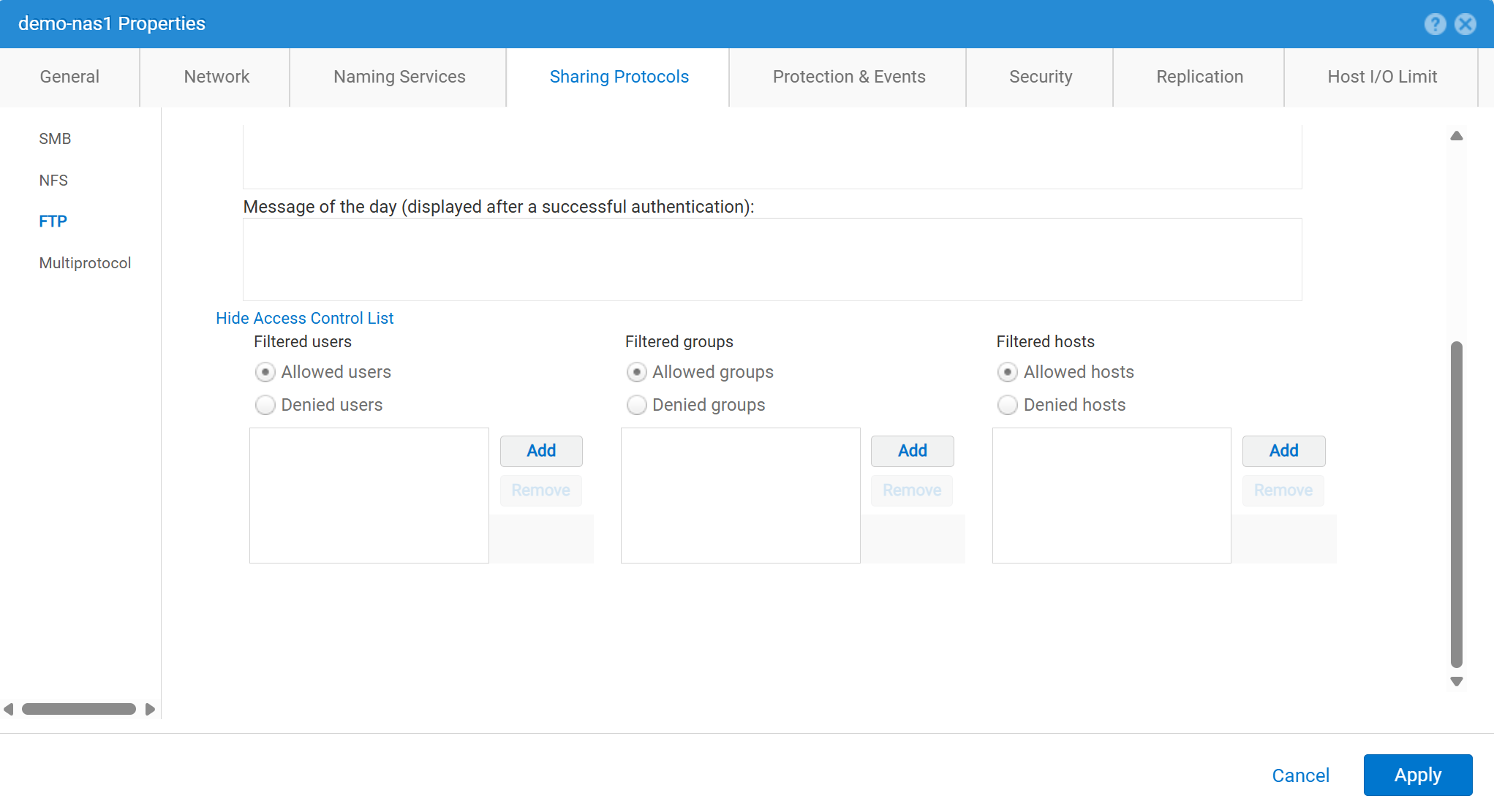
FTP inschakelen en configureren vanuit Unisphere (UI):
service@spa spa:~> uemcli -no -u admin -p mypasswd /net/nas/ftp -server nas_8 set -ftpEnabled yes -sftpEnabled yes -anonymousUserEnabled yes -cifsUserEnabled yes -unixUserEnabled yes
Operation completed successfully.


Note : Refer to "uemcli /net/nas/ftp -help" for all other available options
Aanmelden als FTP-gebruiker:
Als de NAS-server een domein heeft dat is gekoppeld aan Common Internet File System (CIFS) server kan de domeingebruiker zich aanmelden als een van de volgende opties:
domain\user or user@domain

Example (domain name is EXAMPLE):
EXAMPLE\user100 or user100@example.com
Als de NAS-server een standalone CIFS-server op Unity is, kunt u zich met de volgende methode aanmelden:
servername\user or user@servername or local\user or user@local

Example (standalone nas server name is MYCIFS):

MYCIFS\user100 or user100@mycifs or local\user100 or user100@local

C:\>ftp ftp02
Connected to ftp02
220 NASFTP FTP server (EMC:upc_Unity_6_HF5_upcBuilder:9328432) ready.
User ( ftp02   :( none)): Local\administrator
331 Password required for Local\administrator.
Password:
230- No directory! Logging in with home=/nasftp_fs01.
230 NT User Local\administrator logged in.
ftp>
Als de NAS-server wordt gebruikt voor Alleen NFS (Network File System), Unity vereist een directoryservice (zoals LDAP (Lightweight Directory Access Protocol) of Network Information Service (NIS)) voor gebruikersverificatie. Lokale bestanden kunnen ook worden gebruikt als er geen LDAP of NIS beschikbaar is (waarvoor een handmatige gebruikers- en wachtwoordconfiguratie vereist is).
C:\>ftp ftp02
Connected to ftp02
220 FTP02 FTP server (EMC:upc_Unity_6_HF5_upcBuilder:9328432) ready.
User (ftp02 :(none)): user100
331 Password required for user100.
Password:
230 UNIX User user100 logged in.
ftp> ls
200 PORT command successful.
150 Opening ASCII mode data connection for 'file list'.
lost+found
etc
publicftp
226 Transfer complete.
ftp: 29 bytes received in 0.00Seconds 29000.00Kbytes/sec.
ftp> bye
221 Goodbye.
Anoniem inloggen (ook wel ftp genoemd):
C:\>ftp ftp02
Connected to ftp02
220 FTP02 FTP server (EMC:upc_Unity_6_HF5_upcBuilder:9328432) ready.
User (ftp02  :(none)): anonymous
331 Guest login ok, type your name as password.
Password:
230 Guest login ok, access restrictions apply.
ftp> _
U kunt als volgt lokale gebruikers configureren:
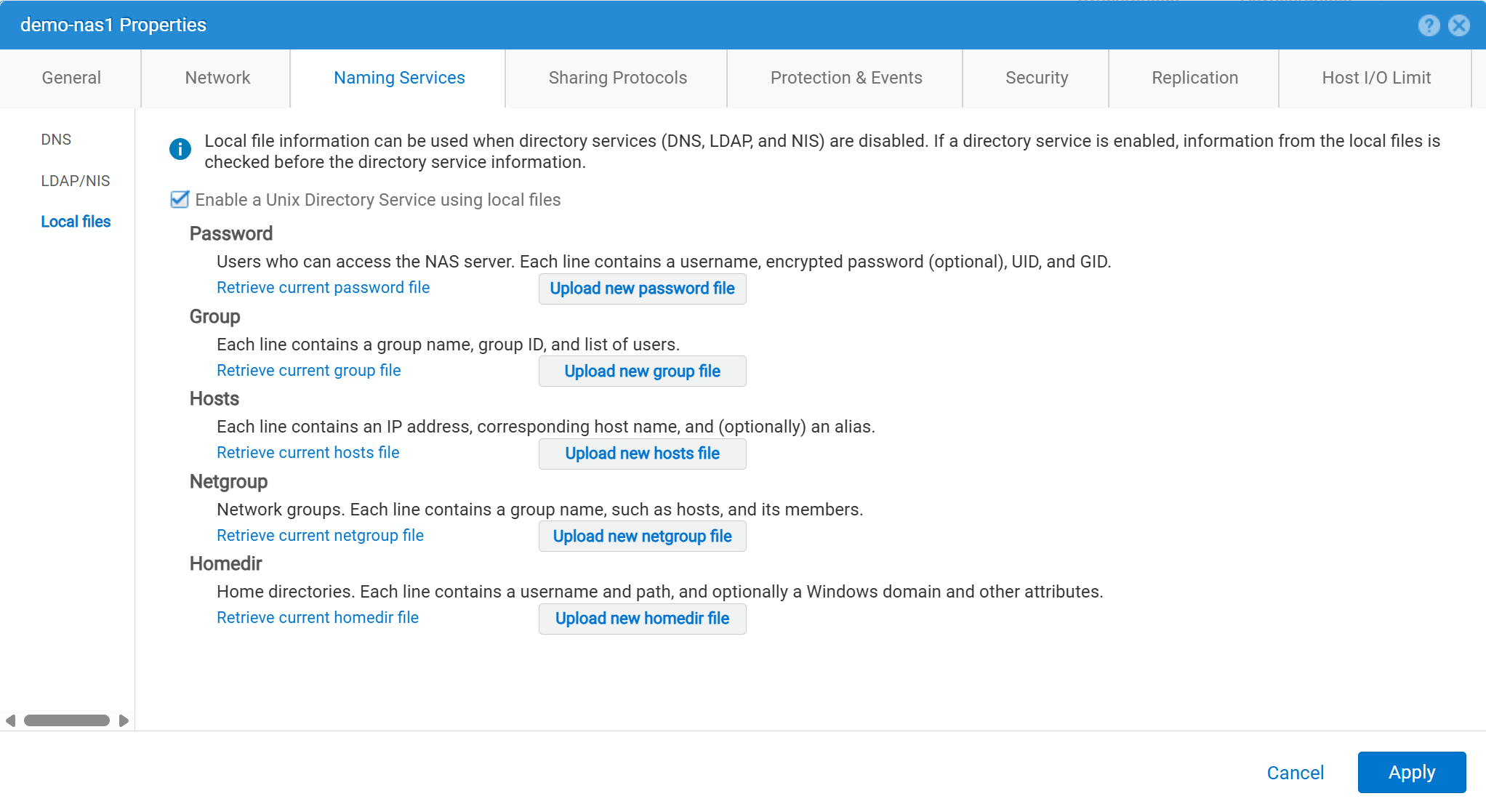
De gebruikersgegevens moeten als volgt worden ingevoerd:
01:42:18 service@spa spa:~> cat passwd
# The passwd file contains the users who can access the NAS server.
#
# Each line of the passwd file defines a user and has the format:
#   username:password:uid:gid:gcos
# where:
# - username is the user's login name.
#   When querying for Windows users, the system checks for CIFS usernames without domain extensions.
# - password is an empty field. The encrypted password for the user is in the
# corresponding entry in the shadow file.
# - uid is the user's unique numerical ID for the system.
# - gid is the unique numerical ID of the group to which the user belongs.
#
# user:password:uid:gid:gcos:homedir:
ftp:ffX6M7x34lzYI:2000:2000::/fs01:
user100:ffX6M7x34lzYI:2001:2001::/fs01:
user200:l8Yykofh8ckbU:2002:2002:
user300:ABVmdrEehFnsI:2002:2002:QLs4hM#3w2s1drrYowsXsaPMuz:/fs01/publicftp:
user400:QQueVwnnAFCjc:2003:2003:PZraGM#K321ldrWKowssLaPVgp::
usertest:eeRJFmFoGS4lw:2004:2004::/fs01/publicftp:
usertest2:8II12yC6iqFEY:2004:2004::/fs01/publicftp:
Gebruik UEMCLI om te downloaden:
uemcli -u admin -p password -download /net/nas/server -name server_name -type passwd


EXAMPLE:
03:37:51 service@spa spa:~> uemcli -u admin -p mypasswd -upload -f /home/service/passwd /net/nas/server -name FTP02 -type passwd

Uploaded 962 byte of 962 byte [ 100.0% ] -PROCESSING-
Operation completed successfully.
Gebruik UEMCLI om te uploaden:
uemcli -u admin -p password -upload -f /cores/service/passwd /net/nas/server -name server_name -type passwd


EXAMPLE:
03:37:40 service@spa spa:~> uemcli -download -f /cores/service/passwd /net/nas/server -name FTP02 -type passwd

Downloaded 962 byte of 962 byte [ 100.0% ] -STALLED-
Operation completed successfully.
Additional Information
Opmerkingen:
- Om de anonieme gebruiker te laten werken, moet er een gebruiker zijn met de naam
ftpmetUIDmoet worden gedefinieerd in de directoryprovider of Local Files.- Voorbeeld voor lokale bestanden:
ftp:*:1000:1000::/fs01/publicftp:
- Voorbeeld voor lokale bestanden:
- Als de Local Files wordt gebruikt, kan het wachtwoordveld worden gegenereerd met behulp van
openssl(rechtstreeks van de Eenheid):- Voorbeeld:
User user100, Password to be "Password123#", uid and gid as 3000, homedir as /fshomedir/data - Deze opdracht maakt gebruik van een op SHA256 gebaseerd wachtwoordalgoritme. Opdracht gebruiken
'openssl passwd -6 Password123#'als het op SHA512 gebaseerde wachtwoordalgoritme nodig is.
- Voorbeeld:
$ openssl passwd Password123#
Warning: truncating password to 8 characters              <-- note, it takes only 1st 8 char
9QWNQEDjvlRog
$ openssl passwd
Password:                     <-- password can be typed here if not to be seen
Verifying - Password:
yT4C/OPx6AHXM
Entry on "passwd" file should be: user100:9QWNQEDjvlRog:3000:3000::/fshomedir/data:- SFTP vereist dat de home directory eigendom is van de aangemelde gebruiker.
- Dit kan een anonieme gebruiker blokkeren.
- SFTP kan mislukken als:
LACPwordt gebruikt.- Als poort 22 lijkt te zijn geblokkeerd, raadpleegt u Dell Unity: Unity SFTP werkt niet wanneer LACP is ingeschakeld.