DM5500: SSH 서버에 사용 중인 SHA1의 취약성 "SSH 취약한 메시지 인증 코드 알고리즘"
Summary: 이 문서에서는 DM5500 어플라이언스의 SSH 서버에서 SHA-1(Secure Hash Algorithm 1) 관련 암호를 비활성화하는 방법에 대해 설명합니다. PowerProtect Data Manager DM5500 시스템에서 식별된 "SSH MAC(Weak Message Authentication Code) Algorithms" 취약성을 해결하려면 SHA-1 관련 암호를 비활성화해야 합니다. ...
This article applies to
This article does not apply to
This article is not tied to any specific product.
Not all product versions are identified in this article.
Symptoms
보안 취약성 스캐너는 다음을 보고할 수 있습니다. "SSH Weak Message Authentication Code (MAC) Algorithms" DM5500 어플라이언스에 대한 SSH 연결에 SHA-1 기반 암호화를 사용할 수 있음을 나타내는 알림입니다.
Cause
2026년 2월 1일 현재 SHA-1은 충돌 공격에 대한 취약성으로 인해 공식적으로 취약하고 암호화 사용에 적합하지 않은 것으로 간주됩니다. 현재 DM5500 소프트웨어 릴리스는 이 지원이 중단되기 전의 릴리스입니다. 따라서 SSH 서버에서는 SHA-1 관련 알고리즘이 계속 활성화됩니다.
다음 DM5500 소프트웨어 릴리스에서는 SSH 구성이 강화되고 모든 SHA-1 관련 암호가 제거됩니다.
해당 업데이트를 사용할 수 있을 때까지 고객은 Dell 지원에 문의하여 DM5500 SSH 서버에서 SHA-1 암호를 비활성화하는 해결 방법을 적용해야 합니다.
Resolution
참고: DM5500은 폐쇄형 어플라이언스입니다. Linux 수준의 셸 액세스는 Dell 직원 또는 파트너로 제한됩니다. 필요한 경우 Dell 지원 부서 또는 권한이 있는 사람에게 문의하여 다음 해결 방법을 실행하십시오.
참고: 고객이 시스템 구성을 수행하는 경우 해결 방법을 다시 적용해야 합니다.
- SSH를 통해 DM5500에 "admin"으로 로그인하고 Linux BASH에 액세스합니다.
- 다음 SSH 서버에서 SHA-1 암호를 사용할 수 있는지 확인합니다.
sshd -T |grep -i sha1
예시 출력:
!!!! ppoe YOUR DATA IS IN DANGER !!!! # sshd -T |grep -i sha1 macs hmac-sha2-256-etm@openssh.com,hmac-sha2-512-etm@openssh.com,hmac-sha1-etm@openssh.com,hmac-sha2-256,hmac-sha2-512,hmac-sha1 kexalgorithms ecdh-sha2-nistp256,ecdh-sha2-nistp384,ecdh-sha2-nistp521,diffie-hellman-group-exchange-sha256,diffie-hellman-group14-sha1 !!!! ppoe YOUR DATA IS IN DANGER !!!! # - 의 복사본을 만듭니다.
/etc/ssh/sshd_config다음 명령을 사용하는 파일:
cp -p /etc/ssh/sshd_config /etc/ssh/sshd_config.default - 에 다음 두 줄을 추가합니다.
/etc/ssh/sshd_config파일 아래의HostKey항목:
MACs hmac-sha2-512-etm@openssh.com,hmac-sha2-512,hmac-sha2-256-etm@openssh.com,hmac-sha2-256
kexalgorithms ecdh-sha2-nistp256,ecdh-sha2-nistp384,ecdh-sha2-nistp521,kex-strict-s-v00@openssh.com
예상되는 변경 내용: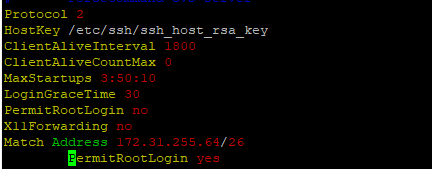
수정 후:
- 다음 명령을 사용하여 SSH 서버를 재시작합니다.
systemctl restart sshd - 재시작 후 SSH 서버가 가동(활성)되고 실행 중인지 확인합니다.
systemctl status sshd
예상 출력:
!!!! ppoe YOUR DATA IS IN DANGER !!!! # systemctl status sshd ● sshd.service - OpenSSH Daemon Loaded: loaded (/usr/lib/systemd/system/sshd.service; enabled; vendor preset: disabled) Active: active (running) since Mon 2026-03-09 05:01:09 UTC; 5min ago Process: 54258 ExecStartPre=/usr/sbin/sshd -t $SSHD_OPTS (code=exited, status=0/SUCCESS) Process: 54255 ExecStartPre=/usr/sbin/sshd-gen-keys-start (code=exited, status=0/SUCCESS) Main PID: 54261 (sshd) Tasks: 1 Memory: 1.9M CPU: 2.939s CGroup: /system.slice/sshd.service └─54261 /usr/sbin/sshd -D ... skipped ... !!!! ppoe YOUR DATA IS IN DANGER !!!! # - SHA-1 암호가 더 이상 사용되지 않는지 확인합니다.
sshd -T |grep -i sha1 - DM5500에 대한 새 SSH 세션을 열어 사용자가 DM5500에 성공적으로 로그인할 수 있는지 확인합니다.
Affected Products
PowerProtect Data Manager Appliance, PowerProtect DM5500Article Properties
Article Number: 000436070
Article Type: Solution
Last Modified: 16 Mar 2026
Version: 1
Find answers to your questions from other Dell users
Support Services
Check if your device is covered by Support Services.