Dell Unity:如何使用 UI 或 CLI 重命名现有 LUN 或数据存储
Summary: 本文介绍如何使用 Unisphere 或 UEMCLI 重命名现有数据块存储资源的过程。
This article applies to
This article does not apply to
This article is not tied to any specific product.
Not all product versions are identified in this article.
Instructions
在调配 LUN 资源(包括 VMware Data Store)期间,存储资源通过其全球通用名称 (WWN) 进行映射,其行为类似于唯一标识符。在创建过程中,LUN 名称将被视为管理员识别和管理的用户标识符。重命名现有资源是安全的,因为在此过程中 WWN 不会更新或更改。
可以从 LUN 属性中查看 WWN:
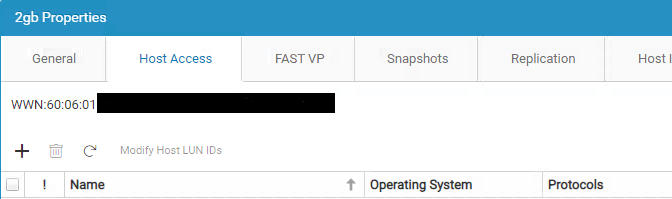
图 1:UI — 主机访问 LUN 属性
要从 UI
重命名,请编辑“属性”中的“名称”字段,然后“保存”或“应用”: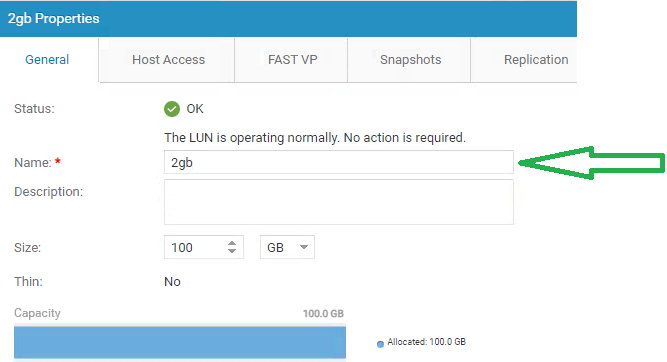
图 2:UI 常规属性重命名
要从 uemcli 重命名:
使用以下命令编辑数据块资源名称。以下命令将更新名称为 NewName:
Syntax 的 LUN lun_1:
uemcli -d <managemenet_ip> -u <local/ldap_user>-p <specefied_user_password> /stor/prov/luns/lun -id <LUN_ID> set -name <new_name_to_be_reflected>
例如:
uemcli -d 10.0.0.1 -u admin  -p MyPassword456! /stor/prov/luns/lun -id lun_1 set -name NewName

To get the LUN id, use below command:
uemcli -d 10.0.0.1 -u admin  -p MyPassword456! /stor/prov/luns/lun show

To edit the VMware vStorage VMFS resources:
uemcli -d 10.0.0.1 -u admin -p MyPassword456! /stor/prov/vmware/vmfs –id VMFS_1 set – name Accounting4
Additional Information
有关更多 uemcli 处理,请参阅戴尔支持产品页面上
的 Dell Unity™ 系列 Unisphere® 命令行界面用户指南 全球通用名称 (WWN) 充当唯一标识符,不受重命名过程的影响。
Affected Products
Dell EMC UnityArticle Properties
Article Number: 000210994
Article Type: How To
Last Modified: 27 Mar 2025
Version: 5
Find answers to your questions from other Dell users
Support Services
Check if your device is covered by Support Services.