Data Domain: DD3300 Supported connection types
Summary: The DD3300 platform has several external connections that are not necessary, and as such are not used or supported. This article describes the supported connection types and the preferred connection method. ...
This article applies to
This article does not apply to
This article is not tied to any specific product.
Not all product versions are identified in this article.
Instructions
The Data Domain DD3300 is built on a customized version of the Dell PowerEdge R740 server platform. The DD3300 platform has several external connections that are not necessary and so are not used or supported. Reference the included charts to determine which connection types are supported and the preferred connection method.
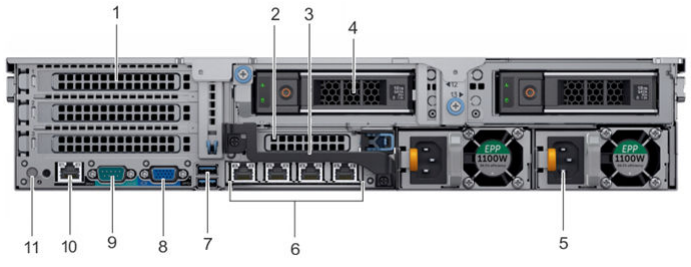
Supported connection types:
- 1: Optional dual-port 10G Ethernet PCI card
- 6: Quad-port 1Gig Ethernet daughter card
- 8: VGA port front and rear (DDOS 6.2.x and higher)
- 9: DB9 Male Serial port (SSH at115200 baud)
- 10: iDRAC9 dedicated management port (browser)
Unsupported connection types:
- 7: USB 3.0 ports
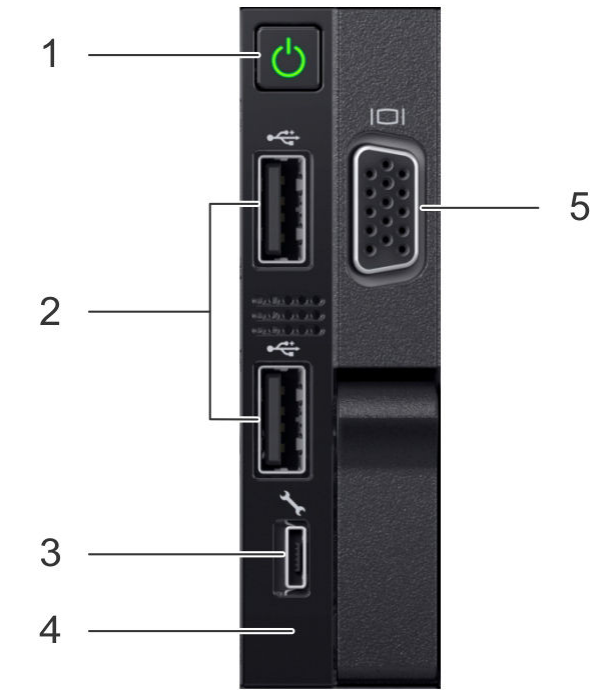
Supported connection types:
- 3: iDRAC Direct port (micro USB 2.0)
- 5: Front VGA (DDOS 6.2.x and higher)
Unsupported connection types:
- 2: Two USB 2.0 ports (can be manually enabled in the BIOS to facilitate USB reimaging)
- 4: Near Field Communication (NFC) with mobile app
Affected Products
Data Domain, DD3300 ApplianceProducts
Data DomainArticle Properties
Article Number: 000009376
Article Type: How To
Last Modified: 17 Mar 2026
Version: 6
Find answers to your questions from other Dell users
Support Services
Check if your device is covered by Support Services.