Avamar:Jettyサービスが実行されていないため、ターゲットVMホストがプロキシに到達できない
Summary: この記事では、ターゲットVMがプロキシにアクセスできず、長時間実行した後に最終的にタイムアウトした場合に、仮想マシン(VM)のファイル レベル リストア(FLR)が失敗する理由について説明します。
This article applies to
This article does not apply to
This article is not tied to any specific product.
Not all product versions are identified in this article.
Symptoms
仮想マシンのFLR中に、Avamar管理コンソールに次のウィンドウ メッセージが表示されます。
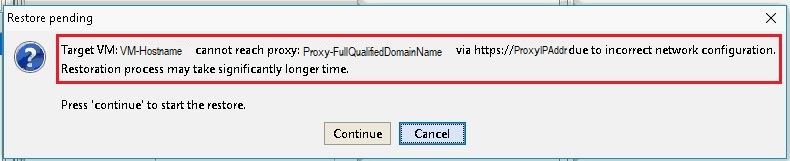
Error message:
Target VM: <VM-hostname> cannot reach proxy: <avamar-proxy-FQDN_or_IP_Address> via https://<proxy-hostname-IP-Address> due to incorrect network configuration.
Restoration may take significantly longer time Press "Continue" to start the restore
Cause
プロキシのポート443でのリスニングを担当するサービスが実行されていません。
root@avamar-proxy:~/>: netstat -plnt |egrep "Proto|443"
Proto Recv-Q Send-Q Local Address Foreign Address State PID/Program name
root@avamar-proxy:~/>: service jetty status
Jetty Info: Jetty Service is not running.
Resolution
次のアクションを実行します。
- サービスを開始してから、FLRを再試行します。
root@avamar-proxy:~/>: service jetty start
Shutting down vami-lighttpd:done.
Jetty Info: Jetty daemon started.
root@avamar-proxy:~/>: service jetty status
Jetty Info: Jetty Service is running.[13234]
root@avamar-proxy:~/>: netstat -plnt |egrep "Proto|443"
Proto Recv-Q Send-Q Local Address           Foreign Address         State       PID/Program name
tcp        0      0 :::443                  :::*                    LISTEN      13234/java
- サービスがマルチユーザーの実行レベルで自動的に開始するように構成されていることを確認します。
root@avamar-proxy:~/>: chkconfig --list |grep jetty
jetty 0:off 1:off 2:on 3:on 4:on 5:on 6:off
- 指定した実行レベルでサービスが自動的に開始されるようにするには、次のコマンドを使用してサービス構成を更新します。
root@avamar-proxy:~/>: chkconfig --level 2345 jetty on
上記の手順で問題が解決しない場合は、次の追加手順を実行します。
-
編集
/usr/local/avamarclient/bin/config.xmlファイルを作成し、wgetパラメーターの値を0から1に変更します。<enablewgetrestore>1</enablewgetrestore>
Affected Products
AvamarArticle Properties
Article Number: 000050308
Article Type: Solution
Last Modified: 25 Mar 2026
Version: 7
Find answers to your questions from other Dell users
Support Services
Check if your device is covered by Support Services.