Dell PowerPath for Windowsのインストールがエラー 0x800401f4で失敗する
Summary: Dell PowerPath for Windowsのインストールが失敗し、エラー メッセージ「0x800401f4 - Error in ::IDFromString: 無効なインターフェイス文字列です」
This article applies to
This article does not apply to
This article is not tied to any specific product.
Not all product versions are identified in this article.
Symptoms
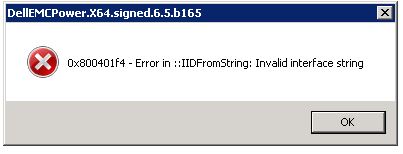
Dell PowerPath for Windowsのインストールが失敗し、次のエラー メッセージが表示されます。
0x800401f4 - Error in ::IDFromString: Invalid interface string
### Bootstrapper.log
2019-10-30 15:05:31     --- Loaded 3 supported component(s)
2019-10-30 15:05:33     Error: 0x800401f4 - Error in ::IIDFromString: Invalid interface string
2019-10-30 15:05:33     EMC PowerPath installer finished, return code=-1
Cause
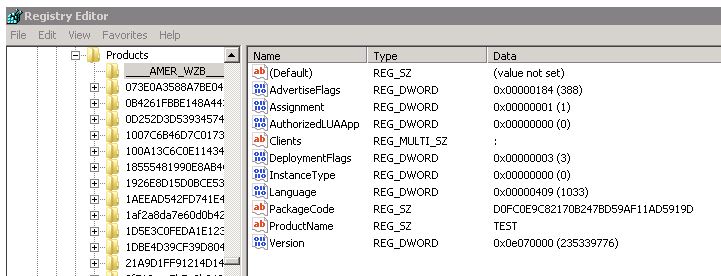
この問題は、HKEY_CLASSES_ROOT\Installer\Productsの下に無効なレジストリー キーが存在する場合に発生します。
この例では、数字ではなく_(アンダースコア文字)で始まるキーがありました。
Resolution
この問題を解決するには、次の手順に従います。
- 管理者アカウントとしてRegeditを実行します
- 影響を受けるサーバーからHKEY_CLASSES_ROOT\Installer\Products\にあるアンダースコア「___」で始まるキーをエクスポートするようお客様に依頼します。
- これらのキーを削除します。
- PowerPathのインストールを再実行する
Additional Information
レジストリの免責事項: レジストリ設定を誤って変更すると、コンピュータの正常な起動を妨げる重大な問題が発生する可能性があります。Dellでは、レジストリー設定の構成に起因する問題の解決を保証できません。これらの設定の変更は、自己責任で行ってください。
Affected Products
PowerPath for WindowsProducts
PowerPath for WindowsArticle Properties
Article Number: 000055739
Article Type: Solution
Last Modified: 28 May 2026
Version: 5
Find answers to your questions from other Dell users
Support Services
Check if your device is covered by Support Services.