오류 0x800401f4와 함께 Windows용 Dell PowerPath 설치가 실패함
Summary: Windows용 Dell PowerPath 설치가 실패하고 "0x800401f4 - Error in ::IDFromString: 잘못된 인터페이스 문자열"
This article applies to
This article does not apply to
This article is not tied to any specific product.
Not all product versions are identified in this article.
Symptoms
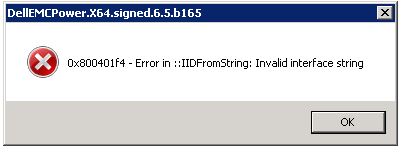
Windows용 Dell PowerPath 설치가 실패하고 다음 오류 메시지가 표시됩니다.
0x800401f4 - Error in ::IDFromString: Invalid interface string
### Bootstrapper.log
2019-10-30 15:05:31     --- Loaded 3 supported component(s)
2019-10-30 15:05:33     Error: 0x800401f4 - Error in ::IIDFromString: Invalid interface string
2019-10-30 15:05:33     EMC PowerPath installer finished, return code=-1
Cause
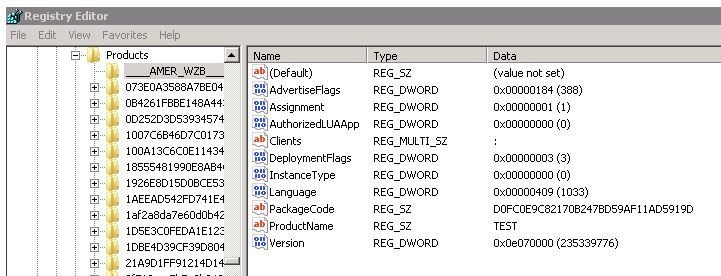
이 문제는 HKEY_CLASSES_ROOT\Installer\Products 아래에 잘못된 레지스트리 키가 있을 때 나타납니다.
이 예제에는 숫자 대신 _(밑줄 문자)로 시작하는 키가 있습니다.
Resolution
이 문제를 해결하려면 다음 단계를 수행하십시오.
- 관리자 계정으로 Regedit를 실행합니다.
- 영향을 받는 서버에서 HKEY_CLASSES_ROOT\Installer\Products\에 밑줄 "___"로 시작하는 키를 내보내도록 고객에게 요청합니다.
- 해당 키를 삭제합니다.
- PowerPath 설치를 다시 실행합니다.
Additional Information
레지스트리 면책 조항: 레지스트리 설정을 잘못 수정하면 컴퓨터가 제대로 부팅되지 않을 수 있는 심각한 문제가 발생할 수 있습니다. Dell은 레지스트리 설정 구성으로 인해 발생하는 모든 문제의 해결 가능성을 보장할 수 없습니다. 이러한 설정의 수정에 따른 위험은 사용자가 감수해야 합니다.
Affected Products
PowerPath for WindowsProducts
PowerPath for WindowsArticle Properties
Article Number: 000055739
Article Type: Solution
Last Modified: 28 May 2026
Version: 5
Find answers to your questions from other Dell users
Support Services
Check if your device is covered by Support Services.