Dell PowerPath for Windows 安装失败并显示错误 0x800401f4
Summary: Dell PowerPath for Windows 安装失败,并显示错误消息“0x800401f4 - Error in ::IDFromString:接口字符串无效”
This article applies to
This article does not apply to
This article is not tied to any specific product.
Not all product versions are identified in this article.
Symptoms
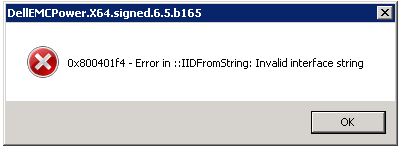
Dell PowerPath for Windows 安装失败,并显示如下错误消息:
0x800401f4 - Error in ::IDFromString: Invalid interface string
### Bootstrapper.log
2019-10-30 15:05:31     --- Loaded 3 supported component(s)
2019-10-30 15:05:33     Error: 0x800401f4 - Error in ::IIDFromString: Invalid interface string
2019-10-30 15:05:33     EMC PowerPath installer finished, return code=-1
Cause
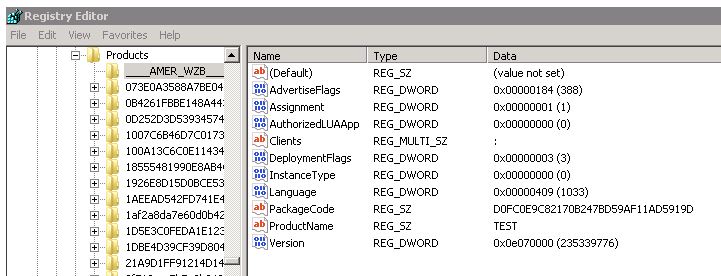
当 HKEY_CLASSES_ROOT\Installer\Products 下存在无效注册表项时,会出现此问题。
在此示例中,有些键以_(下划线字符)而不是数字开头。
Resolution
要解决此问题:
- 以管理员帐户身份运行 Regedit
- 请求客户从受影响的服务器导出 HKEY_CLASSES_ROOT\Installer\Products\ 中以下划线“___”开头的密钥。
- 删除这些密钥。
- 再次运行 PowerPath 安装
Additional Information
注册表免责声明:注册表设置修改不当可能会导致严重的问题,从而阻止计算机正确启动。戴尔不能保证因配置注册表设置而导致的任何问题都能得到解决。修改这些设置的风险由您自行承担。
Affected Products
PowerPath for WindowsProducts
PowerPath for WindowsArticle Properties
Article Number: 000055739
Article Type: Solution
Last Modified: 28 May 2026
Version: 5
Find answers to your questions from other Dell users
Support Services
Check if your device is covered by Support Services.