OptiPlex 7460 (AIO): Visuelle Anleitung für den Computer
Summary: Der folgende Artikel enthält eine visuelle Anleitung zu Ihrem OptiPlex 7460 AIO (All-in-One)-Computer und listet die externen Anschlüsse und Funktionen des Desktop-PCs auf.
This article applies to
This article does not apply to
This article is not tied to any specific product.
Not all product versions are identified in this article.
Symptoms
Hinweis: Eine detailliertere Beschreibung zu jedem Ort finden Sie in den Systemhandbüchern unter www.dell.com/support
Inhaltsverzeichnis:
Vorderseite
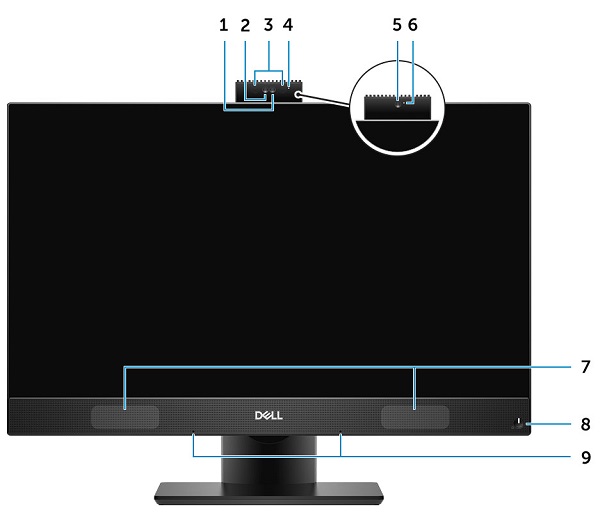
(Abb. 1 Vorderseite)
| 1 | FHD-Kamera (Full High Definition) (optional) | 2 | FHD-Infrarotkamera (IR) (optional) |
| 3 | Infrarotsender (optional) | 4 | Kamerastatus-LED (optional) |
| 5 | FHD-Kamera (optional) | 6 | Kamerastatus-LED (optional) |
| 7 | Lautsprecher | 8 | Betriebsschalter/Ein-/Aus-Status-LED |
| 9 | Mikrofon-Array |
Rückansicht
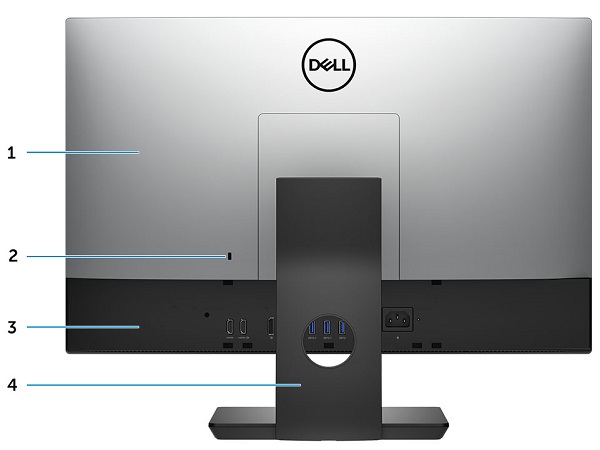
(Abb. 2 Rückansicht)
| 1 | Hintere Abdeckung | 2 | Sicherheitsverschlussöffnung |
| 3 | Bodenabdeckung | 4 | Ständer |
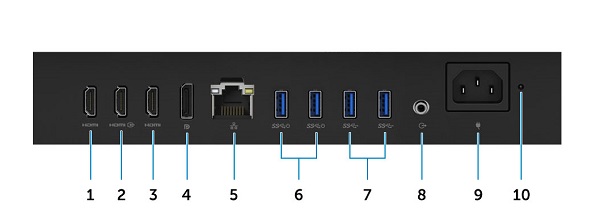
(Abb.3 Nahaufnahme der Ports)
| 1 | HDMI-Out-Anschluss (mit separater Grafikkarte) | 2 | HDMI-In-Anschluss |
| 3 | HDMI-Out-Anschluss (mit integrierter Grafikkarte) | 4 | DisplayPort-Anschluss |
| 5 | Netzwerkanschluss (NIC) | 6 | USB 3.1 Gen1-Anschluss mit zweimal Power-On-/Wake-Up-Unterstützung |
| 7 | 2 USB 3.1 Gen1-Anschlüsse | 8 | Audioausgang |
| 9 | Netzanschluss | 10 | LED-Diagnoseanzeige für Stromversorgung |
Unterseite
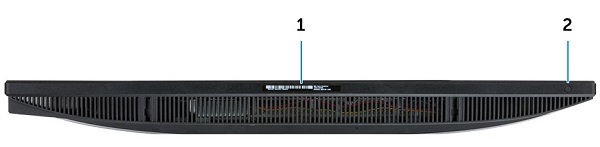
(Abb. 4, Ansicht von unten)
| 1 | Service-Tag-Etikett | 2 | Taste für Bildschirm-BIST (Built in Self Test)/Videoeingangsauswahl |
Ansicht von links
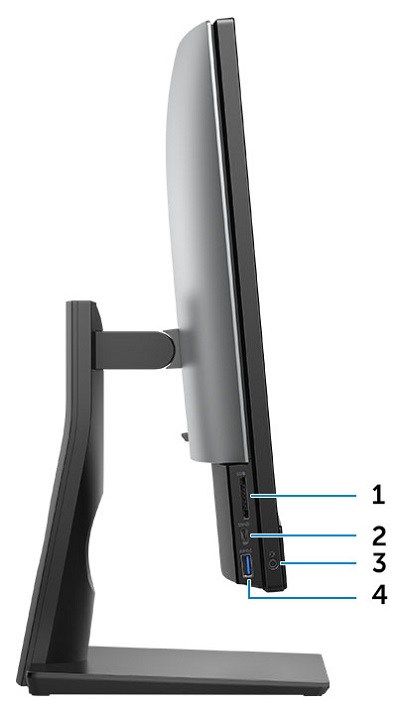
(Abb. 5 Seitenansicht von links)
| 1 | SD-Kartenlesegerät | 2 | USB 3.1 Gen2 Type-C |
| 3 | Headset/universeller Audioanschluss | 4 | USB 3.1 Gen1-Anschluss mit PowerShare |
Rechte Seitenansicht
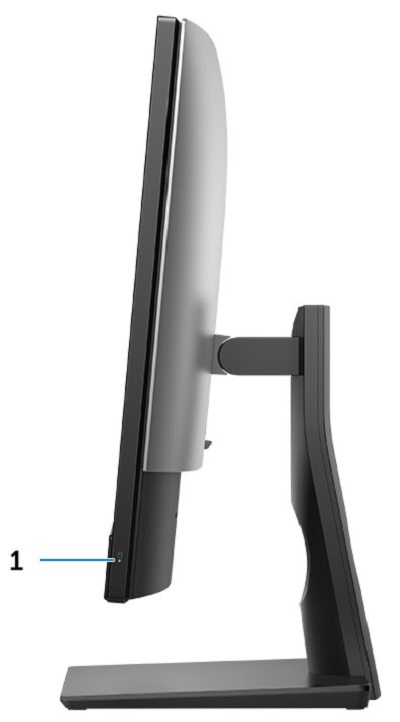
(Abb.6 Rechte Seite des Grundständers)
| 1 | LED für Festplattenaktivität |
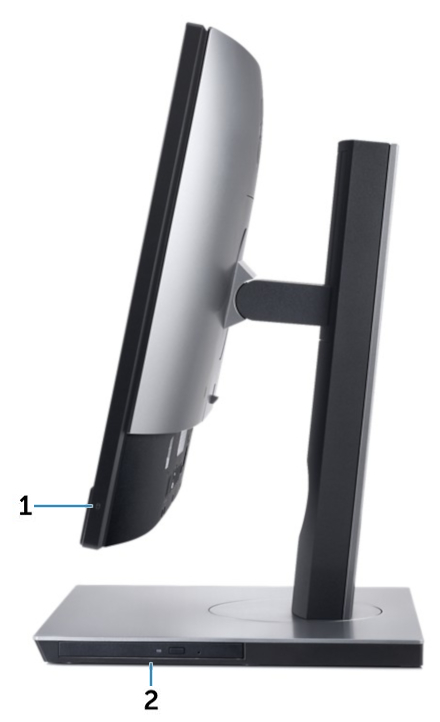
(Abb. 7 Ansicht des höhenverstellbaren Ständers von rechts)
| 1 | LED für Festplattenaktivität | 2 | Optisches Laufwerk auf dem höhenverstellbaren Ständer verfügbar |
Cause
Nicht zutreffend.
Resolution
Nicht zutreffend.
Additional Information
Ergänzende Informationen:
- OptiPlex 7460 (AIO) – Demontagehandbuch für vom Kunden austauschbare Einheiten (CRUs)
- Dell OptiPlex 7460 All-in-One – Wartungshandbuch
Affected Products
OptiPlex 7460 All-In-OneArticle Properties
Article Number: 000123682
Article Type: Solution
Last Modified: 29 May 2025
Version: 6
Find answers to your questions from other Dell users
Support Services
Check if your device is covered by Support Services.