Latitude 12 Rugged Extreme 7212:電腦視覺指南
Summary: 本文為 Dell Latitude 12 Rugged Extreme 7212 平板電腦的外部連接埠和功能指南。
This article applies to
This article does not apply to
This article is not tied to any specific product.
Not all product versions are identified in this article.
Symptoms
 注意:如需每個位置的詳細說明,請至 www.dell.com/manuals 參閱系統手冊
下列文章提供 Latitude 12 Rugged Extreme 7212 平板電腦的外部連接埠和功能的外觀指南。
目錄:
前視圖
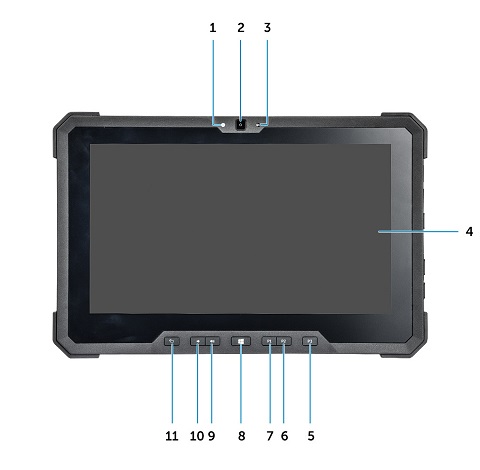
(圖 1 前視圖)
| 1 | 相機狀態 LED | 2 | 相機 |
| 3 | 環境光線感應器 | 4 | 液晶顯示器 |
| 5 | 可程式設計按鈕 3 | 6 | 可程式設計按鈕 2 |
| 7 | 可程式設計按鈕 1 | 8 | Windows 按鈕 |
| 9 | 提高音量按鈕 | 10 | 降低音量按鈕 |
| 11 | 螢幕旋轉鎖定按鈕 |
後視圖
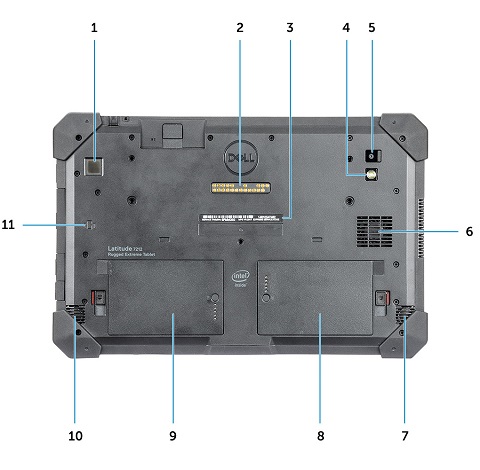
(圖 2 後視圖)
| 1 | 指紋辨識器 | 2 | 擴充模組 Pogo 插腳 |
| 3 | 產品服務編號標籤 | 4 | 相機閃光鏡頭 |
| 5 | 後置攝影機 | 6 | Quad 散熱通風孔 |
| 7 | 喇叭 | 8 | 電池 1 |
| 9 | 電池 2 | 10 | 喇叭 |
| 11 | 非接觸式智慧卡讀卡機 |
上視圖
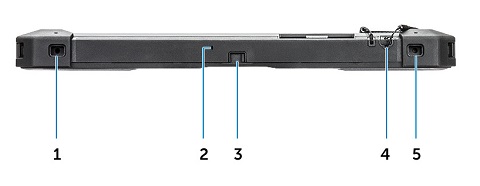
(圖 3 上視圖)
| 1 | 擴充基座導引插槽 | 2 | 麥克風 |
| 3 | 攝影機快門開關 | 4 | 手寫筆掛繩連接器插槽 |
| 5 | 配件連接點 |
下視圖
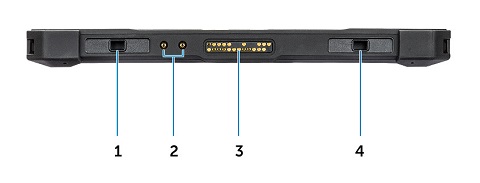
(圖 4 下視圖)
| 1 | 擴充基座固定夾 | 2 | 無線電天線傳輸連接器 |
| 3 | 擴充基座 Pogo 插腳 | 4 | 擴充基座固定夾 |
左側視圖
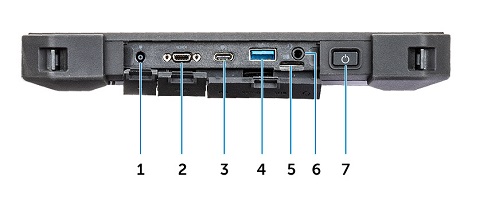
(圖 5 左側檢視)
| 1 | 電源連接器 | 2 | Micro 序列連接器 |
| 3 | USB 3.1 Gen1 Type-C 連接器 | 4 | USB 3.0 連接器 |
| 5 | Micro SD 卡讀卡機 | 6 | 耳機連接器 |
| 7 | 電源按鈕 |
右側視圖
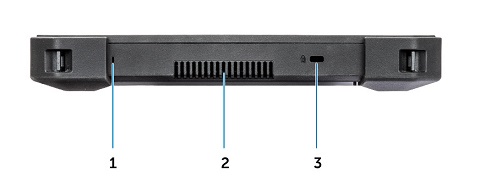
(圖 6 右側檢視)
| 1 | 麥克風 | 2 | Quad 散熱通風孔出口 |
| 3 | 防盜纜線鎖插槽 |
AC 變壓器檢視
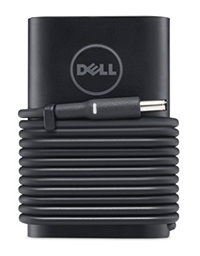
(圖 7 45W AC 變壓器檢視)
| 類型 45W 系列 | 規格 |
| 輸入電壓 | 100 V AC 至 240 V AC |
| 輸出電流 | 2.31 A-45 W |
| 輸出電壓 | 19.5 V 直流 |
其他資訊:
- Latitude 12 Rugged Extreme 7212 擴充基座與配件選項
- Latitude 12 Rugged Extreme 7212 平板電腦的按鈕和輸入法指南
- Latitude 12 Rugged Extreme 7212 平板電腦手冊
Cause
N/A
Resolution
N/A
Affected Products
Latitude 7212 Rugged Extreme TabletArticle Properties
Article Number: 000125621
Article Type: Solution
Last Modified: 13 May 2025
Version: 7
Find answers to your questions from other Dell users
Support Services
Check if your device is covered by Support Services.