Isilon:使用 Powershell 與平台 API - 建立物件和 RAN
Summary: 本文說明如何使用 Powershell 搭配 OneFS 平台 API 建立物件和 RAN。
This article applies to
This article does not apply to
This article is not tied to any specific product.
Not all product versions are identified in this article.
Symptoms
不需要
Cause
不需要
Resolution
JSON 簡介
PAPI 使用 JSON 作為資料交換格式。瞭解如何利用它來使用PAPI創建、修改或刪除資源至關重要。有關 JSON 的其他資訊,請訪問 www.json.org
- 名稱與值對的集合
- 值的有序清單
取得 API 物件的範例輸出可能如下所示:
{
"<object>": {
     "<property>": <value>,
     ...
}
要知道哪些 JSON 文字輸出可用,我們必須發出 POST 命令來創建物件;透過發送以下請求查看PAPI自文檔:
GET /platform/1/quota/quotas?describe
以下是相關的 Powershell 程式碼:
#Get PAPI self documentation for quotas
$resource = "/platform/1/quota/quotas?describe"
$uri = $baseurl + $resource
$ISIObject = Invoke-RestMethod -Uri $uri -Headers $headers -Method Get
$ISIObject
下面的示例輸出概述了創建新配額必須 POST 的內容。請注意所需的屬性,因為它們可能與相應的屬性不同 isi 命令為貴組織設定主要和次要 IT 連絡人。
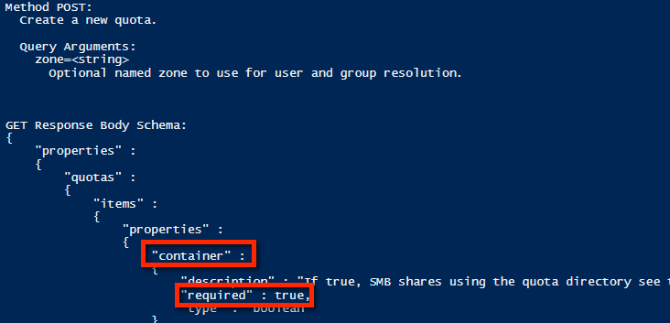
使用範例屬性,以下是可用於建立目錄硬配額的 JSON 字串範例:
$QuotaObject = @"
{"type":"directory","include_snapshots": false,"container": true, "path": /ifs/home/user1", "enforced": true, "thresholds": {"hard":10000000},"thresholds_include_overhead": false}
"@
完成 JSON 字串後,剩下的就是建置 Invoke-RestMethod 參數並提交。在下面的範例代碼中,JSON 字串是 POST 的主體,內容類型為 application/json:
$headers = @{"Authorization"="Basic $($EncodedPassword)"}
$uri = $baseurl + $resource
$ISIObject = Invoke-RestMethod -Uri $uri -Headers $headers -Body $QuotaObject -ContentType "application/json; charset=utf-8" -Method POST
Write-Host "   Resulting Quota ID: "  $ISIObject.id
把所有東西放在一起
舉個例子,假設您的環境在單一父目錄下有許多使用者主目錄,(範例: /ifs/home),並且您希望為每個主目錄設置目錄配額。使用 Isilon RESTful 存取命名空間 (RAN) API 取得每個使用者主目錄的路徑。以下代碼獲取指定路徑的子目錄,然後在每個子目錄上設置目錄配額:
# Get subdirectories of path specified
$resource = '/namespace/' + $path
$uri = $baseurl + $resource
$ISIObject = Invoke-RestMethod -Uri $uri -Headers $headers -Method Get
#Loop through each directory and set the quota
ForEach($folder in $ISIObject.children) {
#Create quota
$resource ="/platform/1/quota/quotas"
Write-Host "Setting a $quotasize byte quota on $quotapath"
$QuotaObject = @"
{"type":"directory","include_snapshots": false,"container": true, "path": "$quotapath", "enforced": true, "thresholds": {"hard":$quotasize},"thresholds_include_overhead": false}
"@
$headers = @{"Authorization"="Basic $($EncodedPassword)"}
$uri = $baseurl + $resource
$ISIObject2 = Invoke-RestMethod -Uri $uri -Headers $headers -Body $QuotaObject -ContentType "application/json; charset=utf-8" -Method POST
Write-Host "   Resulting Quota ID: "  $ISIObject2.id
}
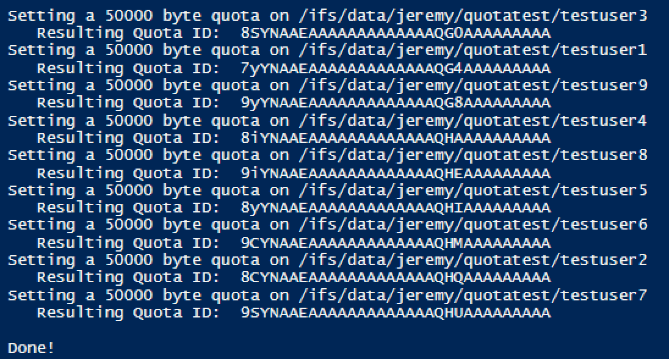
以下是運行此帖子附帶的腳本的輸出:

Affected Products
Isilon, PowerScale OneFS, Isilon Platform APIArticle Properties
Article Number: 000132770
Article Type: Solution
Last Modified: 02 Apr 2026
Version: 7
Find answers to your questions from other Dell users
Support Services
Check if your device is covered by Support Services.