PPMA 显示“Error:无法添加主机。“时添加运行 PowerPath for Linux 的主机
Summary: PPMA 显示“Error:Unable to add Host.“(无法添加主机。)时添加运行 PowerPath for Linux 的主机。
This article applies to
This article does not apply to
This article is not tied to any specific product.
Not all product versions are identified in this article.
Symptoms
运行 PowerPath for Linux 的新 Linux 主机已添加到环境中,
在将运行 PowerPath for Linux 的 Linux 主机添加到 PPMA 时,PPMA 返回错误:”Error: Unable to add Host”的输出。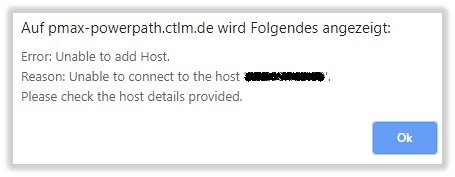
Cause
默认情况下,管理组件在 PowerPath for Linux 上处于禁用状态。
Resolution
按照以下步骤在 Linux 主机上启用 PowerPath for Linux 的管理组件:
在 Linux 上配置管理组件:
管理组件包含在 PowerPath 软件包中。不需要单独安装。此过程介绍如何配置管理组件。
- 启用管理组件。以根用户身份,输入
# /sbin/emcp_mond_edit
- 启动编辑器。如果
emcp_mond.conf机器上不存在文件,编辑器读取示例配置。
- 默认情况下,管理组件处于禁用状态。要使用默认配置参数值启用管理组件服务,请键入 1 和 6 以确认更改并保存。然后键入用于退出、保存和重新启动 Management Component 的选项的编号。
建议使用默认配置参数。
要修改配置参数,请转到“在 Linux 和 Unix 上修改配置参数”。
- 启动编辑器。如果
- 验证
emcp_mond正在运行,并且 PowerPath 管理组件已启动。# pgrep -xl emcp_mond
或者,验证消息日志,以便成功安装和启动管理组件。# tail /var/log/ messages
消息日志包含以下消息:<date time hostname>PowerPath: Management Component: Info: Attempting to start. Version: 5.3.SP1-b044.<date time hostname>PowerPath: Management Component: Info: Config parameters valid. Config: port#=9083, heartbeat interval=10 mins, singlePathGkOk=1<date time hostname>PowerPath: Management Component: Info: Service started.
- 验证在已安装 PowerPath 管理组件的主机上正确安装了管理组件。
# rpm -qa | grep EMC
将显示如下输出:EMCpower.MgmtComponent.LINUX-5.3.2.00.00-046EMCpower.LINUX-5.3.1.02.00-007
输出显示管理组件软件包已安装。
Additional Information
请参阅 PPMA 安装和管理指南:https://support.emc.com/docu91250_PowerPath_Management_Appliance_2.4_and_Minor_Releases_Installation_and_Configuration_Guide.pdf?language=en_US
Products
PowerPath/VE for VMwareArticle Properties
Article Number: 000168398
Article Type: Solution
Last Modified: 17 Feb 2026
Version: 4
Find answers to your questions from other Dell users
Support Services
Check if your device is covered by Support Services.