OpenManage Enterprise:SupportAssist 插件注册失败
Summary: 当客户尝试注册 SupportAssist (SA) 插件时,他们会收到一条错误,指示访问密钥或 PIN 无效。SA 插件注册失败。
This article applies to
This article does not apply to
This article is not tied to any specific product.
Not all product versions are identified in this article.
Symptoms
在 SA 插件程序版本中发现的问题:1.0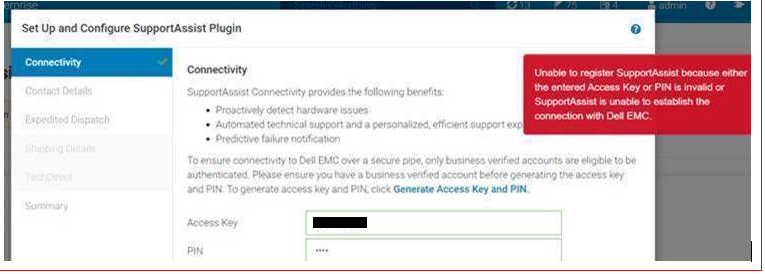
在应用程序日志中验证:确保您的应用程序日志具有调试模式。
- 在应用程序日志中,检查“SRSServiceAPI#enableConnectivity”。此 API 调用(其中 SRS 为给定序列号启用连接)响应失败。
[SRSServiceAPI#enableConnectivity] <--- HTTP/1.1 500 Internal Server Error (1341ms)
- 以下错误消息指示 enableSRSConnectivity:
UPDATE_SRS_CONNECTIVITY failed (RECIPIENT_FAILURE,-1) {"errorCode":"","errorMessage":"{\"status\":500,\"errorCode\":\"SRS028999\",\"message\":\"Error from downstream application: unknown error\"}","httpStatus":500,"errorReason":"Internal Server Error"} - 检查客户站点名称是否有“&.”
Cause
根本原因:客户站点名称中包含特殊字符,例如“&”(与号)。在插件程序注册期间,SRS 会生成一个证书,该证书会将“&”转换为“_”(带空格的下划线)。验证证书中的序列号时,SRS 调用失败。
SRS 团队在测试环境中修复了此问题,并且已经过测试和验证。团队尚未在生产环境中部署修复程序。
Resolution
解决办法:
- 更新客户站点名称以删除“&”字符,并将替换为“和”。如果客户批准站点名称中的此更改,则从客户处获得确认。客户批准后,联系 support@emc.com 更新现有客户站点名称,以删除“&”字符,并将其替换为“和”。共享站点 ID 和当前站点名称。
- 示例:更新当前站点名称”
XYZ Company & Co“更改为”XYZ Company and Co” - 有关指导,请参阅戴尔内部文章 000176637。
- 示例:更新当前站点名称”
- 更新站点名称后,重试 SA 插件程序注册。确保卸载并重新安装插件,生成新的访问密钥,然后重试。
Affected Products
OpenManage Enterprise SupportAssist, Dell EMC OpenManage Enterprise, OpenManage Enterprise SupportAssistArticle Properties
Article Number: 000184658
Article Type: Solution
Last Modified: 05 Nov 2025
Version: 3
Find answers to your questions from other Dell users
Support Services
Check if your device is covered by Support Services.