誤ったオペレーティング システムのバージョンが報告されるWindows 11
Summary: Windows 11の特定のアプリケーションとPC設定について確認すると、オペレーティング システムがWindows 10として検出されます。
This article applies to
This article does not apply to
This article is not tied to any specific product.
Not all product versions are identified in this article.
Symptoms
アプリケーションの非互換を防止するために、複数のアプリケーションとPC設定でWindows 11がWindows 10として認識されます。
Windows 10として識別されるシステム設定。
- Microsoft Edgeおよびその他のChromiumベースのブラウザー(Google Chromeブラウザー、Braveなど)では、ユーザー エージェント文字列にWindows 10が表示されます。
- Mozilla/5.0(Windows NT 10.0、Win64、x64)、AppleWebKit/537.36(KHTML、Geckoなど)、Chrome/95.0.4638.69、Safari/537.36
- ドライバーのダウンロードやセルフヘルプなど、デジタル コンテンツの実際のWindowsバージョンを識別するためにユーザー エージェント文字列を使用するWebサイトは、誤ったコンテンツに誘導される可能性があります。
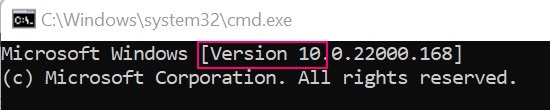
- Windowsコマンド プロンプトはバージョン10として認識します。
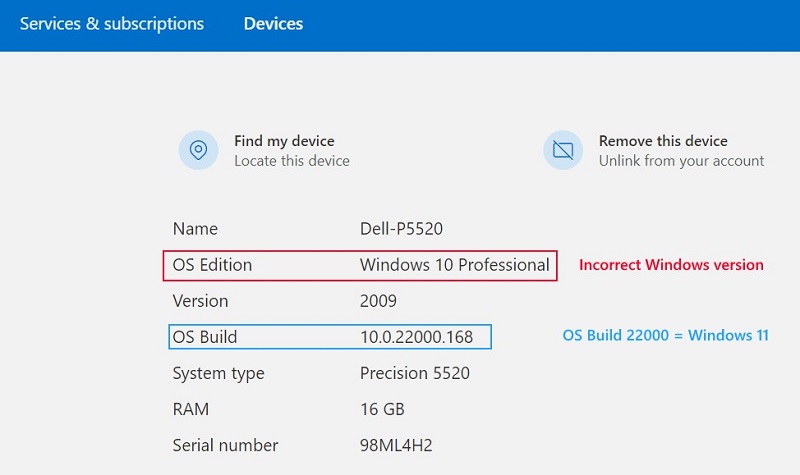
- Microsoftアカウント デバイスのプロパティ
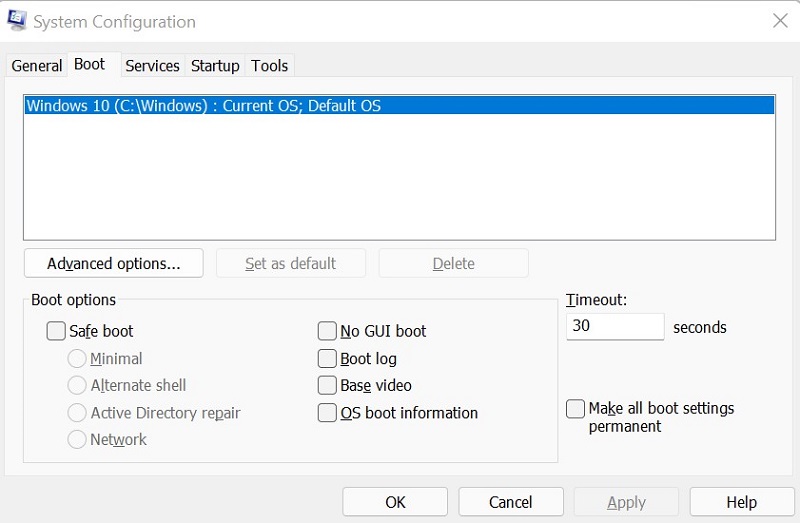
- システム構成(MSCONFIG)
Cause
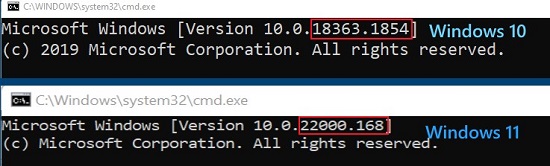
Windowsは、内部ビルド番号を使用して、Windows 11(ビルド22000以降)とWindows 10(ビルド22000より前)を区別します。
Resolution
コンピューターのWindowsバージョンを正しく識別するには、 Winverを使用します。手順については、Microsoftのナレッジベース記事『使用中のWindowsオペレーティング システムのバージョンを確認する
Affected Products
Alienware, Inspiron, OptiPlex, Vostro, XPS, G Series, G Series, Alienware, Inspiron, Latitude, Vostro, XPS, Fixed Workstations, Mobile WorkstationsProducts
Vostro, XPS, Vostro, XPSArticle Properties
Article Number: 000193571
Article Type: Solution
Last Modified: 12 May 2026
Version: 8
Find answers to your questions from other Dell users
Support Services
Check if your device is covered by Support Services.