Windows 11의 잘못된 운영 체제 버전이 보고됨
Summary: Windows 11의 특정 애플리케이션 및 컴퓨터 설정에 대해 알아보기 운영 체제가 Windows 10으로 감지됩니다.
This article applies to
This article does not apply to
This article is not tied to any specific product.
Not all product versions are identified in this article.
Symptoms
여러 애플리케이션 및 컴퓨터 설정에서 애플리케이션 비호환성을 방지하기 위해 Windows 11을 Windows 10으로 식별합니다.
Windows 10으로 식별되는 시스템 설정입니다.
- Microsoft Edge 및 기타 Chromium 기반 브라우저(예: Google Chrome 브라우저, Brave 등)는 사용자 에이전트 문자열에 Windows 10을 표시합니다.
- Mozilla/5.0 (Windows NT 10.0; Win64; x64) AppleWebKit/537.36 (KHTML, like Gecko) Chrome/95.0.4638.69 Safari/537.36
- 사용자 에이전트 문자열을 사용하여 드라이버 다운로드 및 자체 도움말과 같은 디지털 콘텐츠의 실제 Windows 버전을 식별하는 웹사이트는 잘못된 콘텐츠로 연결될 수 있습니다.
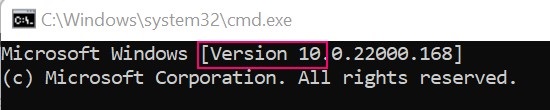
- Windows 명령 프롬프트는 버전 10으로 식별됩니다.
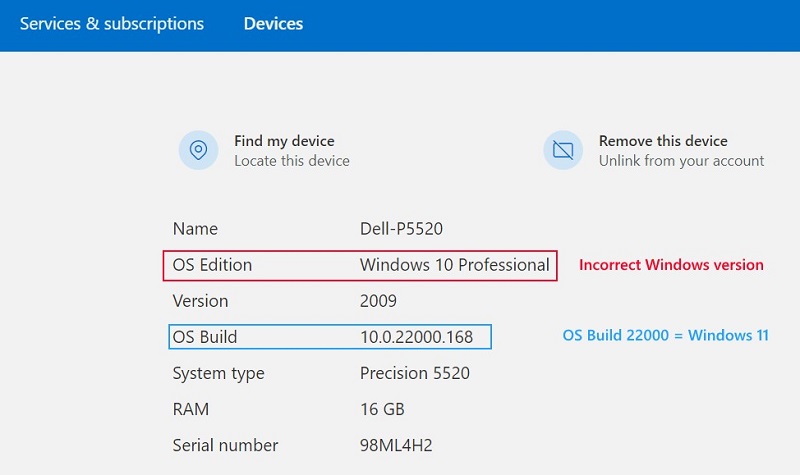
- Microsoft 계정 장치 속성
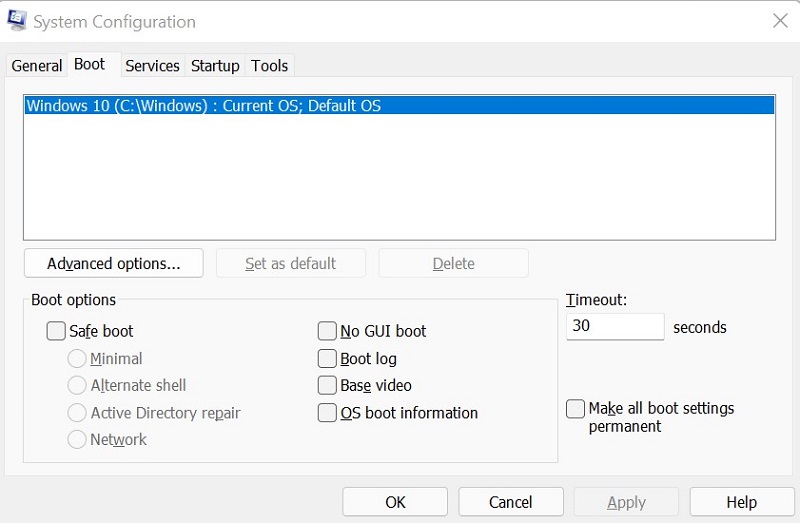
- 시스템 구성(MSCONFIG)
Cause
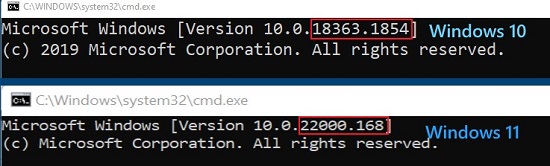
Windows는 내부 빌드 번호를 사용하여 Windows 11(빌드 22000 이상)과 Windows 10(빌드 22000 미만)을 구분합니다.
Resolution
컴퓨터에서 Windows 버전을 올바르게 식별하려면 Winver를 사용하십시오. 자세한 내용은 Microsoft 기술 자료 문서: 내가 실행 중인 Windows 운영 체제 버전은 무엇입니까?
Affected Products
Alienware, Inspiron, OptiPlex, Vostro, XPS, G Series, G Series, Alienware, Inspiron, Latitude, Vostro, XPS, Fixed Workstations, Mobile WorkstationsProducts
Vostro, XPS, Vostro, XPSArticle Properties
Article Number: 000193571
Article Type: Solution
Last Modified: 12 May 2026
Version: 8
Find answers to your questions from other Dell users
Support Services
Check if your device is covered by Support Services.