Dell Precisionワークステーションは、低ワークロードではパフォーマンスが低下する
Summary: 断続的にパフォーマンス低下の問題が発生している特定のDell Precisionワークステーションに関する情報。
This article applies to
This article does not apply to
This article is not tied to any specific product.
Not all product versions are identified in this article.
Symptoms
Dell Precisionワークステーション プロセッサー速度が0.8 GHzのままで停止している間、オペレーティング システム(OS)またはBIOSの両方で低ワークロードの条件下で、断続的に応答が遅くなることがあります。
この動作の例としては、テキスト アプリケーションでの入力中のマウスとキーボードの操作が遅くなったり遅れたりする、ExcelやWordアプリケーションの通常の使用が挙げられます。設定を変更すると、BIOSの応答も遅くなります。
影響を受けるモデル:
- Precision 5860 Tower
- Precision 5860 XL Tower
- Dell Precision 7960 Tower
- Precision 7960 XL Tower
- Dell Precision 7960 Rack
- Precision 7960 XL Rack
Cause
これはインテルの既知の問題です。インテルのEnergy Preference Bias(EPB)設定は、ワークロードが十分に高くない場合にプロセッサーが低速のままになるため、パフォーマンス低下の原因となっています。
Resolution
BIOSおよびパッチの修正
これは業界全体の問題であり、インテルはこれに対処するためのパッチを発行しました。この問題を解決するには、Dell Precision BIOSをダウンロードして、以下にリストされているバージョン以降のバージョンにアップグレードします。
- Precision 5860 Tower: 1.1.15以降
- Precision 5860 XL Tower: 1.1.15以降
- Precision 7960 Tower: 1.1.14以降
- Precision 7960 XL Tower: 1.1.14以降
注:Dellエンジニアリング チームは、Dell Precision 7960 RackおよびDell Precision 7960 XLラック システムに対して、次の回避策を提案しました。
回避 策:
短期的な回避策は、[Power Mode]設定を[High Performance]に変更することです。
- Microsoftの次の手順に従って、[電源オプション]に移動します。Windows PCの電源モードを変更する
- [Power Plan]モードを[High Performance]に変更します(図1)。
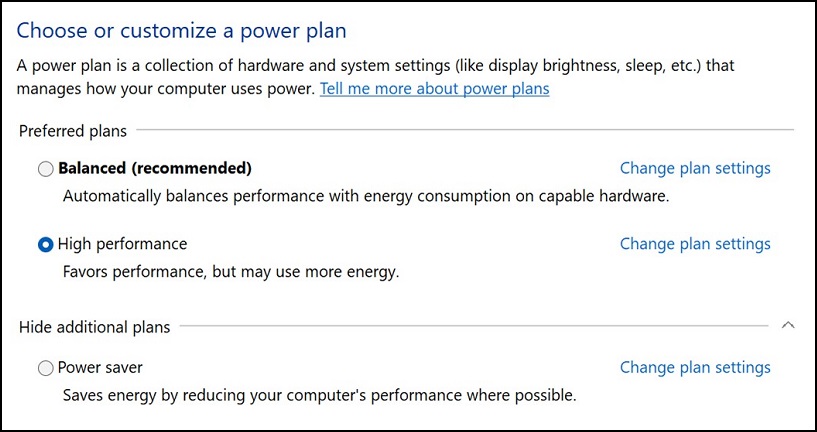
図1
- Dell Precisionワークステーションを再起動します。

注:この回避策では、BIOSを使用している間は問題は解決しません。
Affected Products
Precision 7960 XL Rack, Precision 5860 XL Tower, Precision 7960 XL Tower, Precision 5860 Tower, Precision 7960 Rack, Precision 7960 TowerArticle Properties
Article Number: 000215172
Article Type: Solution
Last Modified: 19 Apr 2025
Version: 8
Find answers to your questions from other Dell users
Support Services
Check if your device is covered by Support Services.