Precision 工作站的低工作負載效能緩慢
Summary: 某些 Precision 工作站發生間歇性效能緩慢問題的資訊。
This article applies to
This article does not apply to
This article is not tied to any specific product.
Not all product versions are identified in this article.
Symptoms
當處理器速度停滯在 0.8 GHz 時,Dell Precision 工作站使用者可能會在低工作負載情況下,在作業系統 (OS) 或 BIOS 中遇到間歇性緩慢的回應。
此行為的範例包括在文字應用程式中輸入、正常使用 Excel 或 Word 應用程式時,滑鼠和鍵盤操作緩慢或延遲。變更設定時,BIOS 的回應速度也會變慢。
受影響的機型:
- Precision 5860 直立式
- Precision 5860 XL 直立式
- Precision 7960 直立式
- Precision 7960 XL 直立式
- Precision 7960 機架式
- Precision 7960 XL 機架式
Cause
這是已知的 Intel 問題。Intel 的能源偏好偏差 (EPB) 設定會導致效能緩慢,因為如果工作負荷不夠高,處理器將維持在低速。
Resolution
BIOS 和修補程式修正
這是一個全行業的問題,英特爾已經發佈了一個補丁來解決這個問題。下載 Precision BIOS 並將其升級至下列版本或更新版本,以修正問題。
- Precision 5860 Tower:1.1.15 或更新版本
- Precision 5860 XL Tower:1.1.15 或更新版本
- Precision 7960 Tower:1.1.14 或更新版本
- Precision 7960 XL 直立式:1.1.14 或更新版本
注意:Dell 工程團隊針對 Precision 7960 機架式和 Precision 7960 XL 機架式系統建議下列因應措施。
因應措施:
短期因應措施是將「電源模式」設定變更為「高效能」。
- 使用下列 Microsoft 步驟前往「電源選項」:變更 Windows PC 的電源模式
- 將「電源計劃」模式變更為「高效能」(圖 1)。
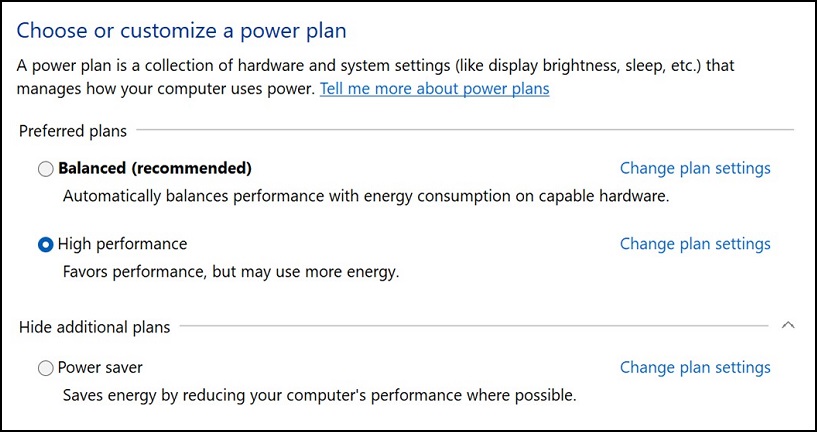
圖 1
- 重新啟動 Precision 工作站。

注意:此因應措施無法在 BIOS 中修正問題。
Affected Products
Precision 7960 XL Rack, Precision 5860 XL Tower, Precision 7960 XL Tower, Precision 5860 Tower, Precision 7960 Rack, Precision 7960 TowerArticle Properties
Article Number: 000215172
Article Type: Solution
Last Modified: 19 Apr 2025
Version: 8
Find answers to your questions from other Dell users
Support Services
Check if your device is covered by Support Services.