Precision 工作站在低工作负载下性能较低
Summary: 有关存在间歇性性能缓慢问题的某些 Precision 工作站的信息。
This article applies to
This article does not apply to
This article is not tied to any specific product.
Not all product versions are identified in this article.
Symptoms
Dell Precision 工作站 在低工作负载条件下,当处理器速度停滞在 0.8 GHz 时,用户可能会在操作系统 (OS) 或 BIOS 中遇到间歇性响应缓慢的问题。
此行为的示例包括在文本应用程序中键入、正常使用 Excel 或 Word 应用程序时鼠标和键盘操作缓慢或滞后。更改设置时,BIOS 中的响应也会变慢。
受影响的型号:
- Precision 5860 塔式机
- Precision 5860 XL塔式台式机
- Precision 7960 塔式机
- Precision 7960 XL塔式台式机
- Precision 7960 机架
- Precision 7960 XL 机架式工作站
Cause
这是一个已知的英特尔问题。英特尔的能源偏好偏好 (EPB) 设置导致性能下降,因为如果工作负载不够高,处理器将保持低速。
Resolution
BIOS 和修补程序修复
这是一个全行业范围的问题,英特尔已经发布了一个补丁来解决它。下载 Precision BIOS 并升级到下面列出的版本或更高版本,以解决此问题。
- Precision 5860 塔式工作站:1.1.15 或更高版本
- Precision 5860 XL 塔式工作站:1.1.15 或更高版本
- Precision 7960 塔式工作站:1.1.14 或更高版本
- Precision 7960 XL 塔式工作站:1.1.14 或更高版本
提醒:戴尔工程团队为 Precision 7960 Rack 和 Precision 7960 XL Rack 系统推荐了以下解决方法。
解决 方案:
短期解决方法是将“电源模式”设置更改为“高性能”。
- 使用以下步骤进入“电源选项”:更改 Windows PC 的电源模式
- 将“Power Plan”模式更改为“High Performance”(图 1)。
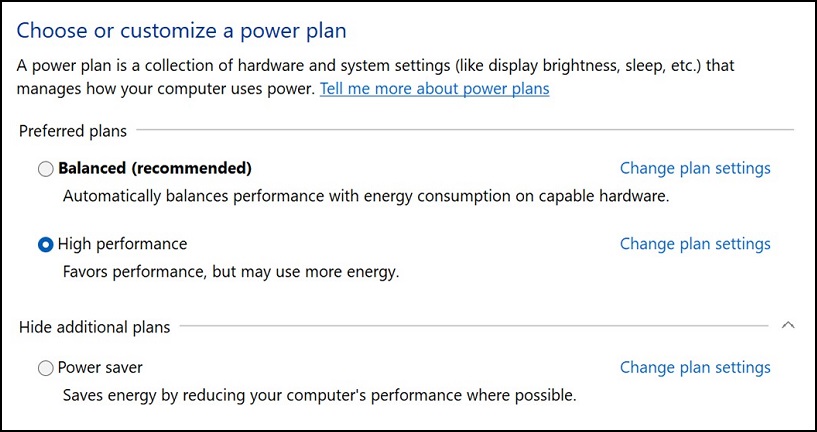
图 1
- 重新启动 Precision 工作站。

提醒:此解决方法无法修复 BIOS 中的问题。
Affected Products
Precision 7960 XL Rack, Precision 5860 XL Tower, Precision 7960 XL Tower, Precision 5860 Tower, Precision 7960 Rack, Precision 7960 TowerArticle Properties
Article Number: 000215172
Article Type: Solution
Last Modified: 19 Apr 2025
Version: 8
Find answers to your questions from other Dell users
Support Services
Check if your device is covered by Support Services.