Media Player Locks Up or Bluescreens When Using a Headset With a Dell Computer
Summary: Using a headset with the 3.5 mm audio jack may cause media players to lock up or may cause a 0x1A bluescreen on some Dell laptops.
Symptoms
When plugging a headset into the 3.5 mm audio jack and then playing locally-stored music, a media player locks up with no sound output. When left with no change, this may lead to the computer experiencing a 0x1A "MEMORY_MANAGEMENT" bluescreen. This issue can occur with any media player. This includes Media Player and third-party media players.
When Media Player locks up, restarting Media Player causes the error code 0x800705AA with an error message that says, "We can’t open <FILENAME>. It uses unsupported encoding settings." In the error message, <FILENAME> represents the name of the file that is being opened. This error is not seen with a third-party media player.
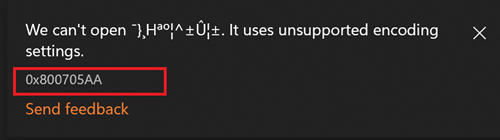
The symptoms disappear after closing the media player for around two to four minutes. Audio can be played using the 3.5 mm audio jack and the media player as expected.
Affected Platforms:
- Dell 14 DC14255
- Dell 14 Plus 2-in-1 DB04255
- Dell 14 Plus DB14255
- Dell 16 Plus DB16255
- Dell Pro 14 Essential PV14255
- Dell Pro 14 PC14255
- Dell Pro 16 PC16255
Cause
Compatibility issues with an AMD audio driver that is integrated with the AMD graphics driver causes this issue.
Resolution
- Back up all personal data. For more information, refer to Back Up and Recovery.
- Connect the AC adapter.
- Dell 14 DC14255: Updating the AMD Radeon 740M/780M/820M/860M Graphics Driver to version 32.0.13058.6004, A03 or later on the computer resolves the issue.
- Dell 14 Plus 2-in-1 DB04255: AMD Radeon 890M/880M/860M/840M/760M/740M Graphics Driver 32.0.22022.3, A06 or later on the computer resolves the issue.
- Dell 14 Plus DB14255: Updating the AMD Radeon 890M/880M/860M/840M/760M/740M Graphics Driver to version 32.0.22022.3, A06 or later on the computer resolves the issue.
- Dell 16 Plus DB16255: Updating the AMD Radeon 890M/880M/860M/840M/760M/740M Graphics Driver to version 32.0.22022.3, A06 or later on the computer resolves the issue.
- Dell Pro 14 Essential PV14255: Updating the AMD Radeon 740M/780M/820M/860M Graphics Driver to version 32.0.13058.6004, A03 or later on the computer resolves the issue.
- Dell Pro 14 PC14255: Updating the AMD Radeon 890M/880M/860M/840M/760M/740M Graphics Driver to version 32.0.22022.3, A06 or later on the computer resolves the issue.
- Dell Pro 16 PC16255: Updating the AMD Radeon 890M/880M/860M/840M/760M/740M Graphics Driver to version 32.0.22022.3, A06 or later on the computer resolves the issue.
To download and install the driver, refer to the Driver Update Guide