PowerProtect Data Manager: Virhe määritettäessä Disaster Recovery Replication Replication Target System -järjestelmää | TOHTORI
Summary: Disaster Recovery -määritys epäonnistuu DM5500-lähdejärjestelmässä, koska PowerProtect Data Manager -lähde- ja kohdejärjestelmän versiot eivät vastaa toisiaan.
Symptoms
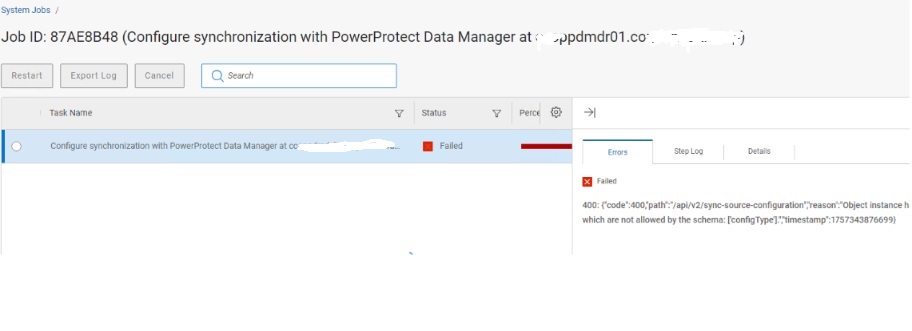
Prosessi epäonnistuu Configure Synchronization Job -vaiheessa, kun Disaster Recovery määritetään DM5500:sta PowerProtect Data Manager -kohteeseen.
- Ongelma havaittiin, kun lähteenä oli DM5500 ja kohteena PowerProtect Data Manager, mutta se voi ilmetä myös kahden DM5500-järjestelmän tai kahden PowerProtect Data Manager -järjestelmän välillä.
- Virheilmoitus näytettiin:
{"code":400,"path":"/api/v2/sync-source-configuration","reason":"Object instance has properties which are not allowed by the schema: ['configType'].","timestamp":1757343876699}
Cause
PowerProtect Data Manager -lähde- ja kohdejärjestelmän versioiden ristiriita aiheuttaa seuraavan ongelman:
- Lähde: DM5500, jossa on PowerProtect Data Manager -versio 19.19.0-27
- Kohde: PowerProtect Data Manager -järjestelmä, jossa on versio 19.19.0-15
Uudemmassa DM5500-laitteessa on configType Omaisuus sen REST API hyötykuorma, jota vanhempi kohdejärjestelmärakenne ei tunnista. Tämä johtaa 400 Bad Request Virhe /api/v2/sync-source-configuration puhelun
lokianalyysi näyttää myös:
configType: null in the payloadMultiple BeanCreationNotAllowedException warnings
Ongelma voi ilmetä missä tahansa DM5500- ja PowerProtect Data Manager -järjestelmien yhdistelmässä, jos niiden versioita ei ole kohdistettu toisiinsa.
Resolution
Päivitä PowerProtect Data Manager -kohdejärjestelmä versioon 19.19.0-20 tai uudempaan versioon.
- PowerProtect Data Manager -versiot 19.19.0-20 ja 19.19.0-27 ovat yhteensopivia Disaster Recovery -kokoonpanon kanssa.
- Kun versiot on kohdistettu, synkronointityön pitäisi valmistua onnistuneesti.
Additional Information
/var/log/brs/replmgr/sync.log Osoittaa:
[c.e.b.s.o.s.i.ConfigureSyncServiceImpl.checkSystemVersion(512)][512 ] - checkSystemVersion - remote ver: 19.19.0-15 and local ver: 19.19.0-27 <==== PLEASE NOTE Source and Destination revisions are not the same!