PowerProtect Data Manager:配置災難恢復複製目標系統時出錯 |災難回復
Summary: DM5500 來源系統上的災難回復組態失敗,因為來源和目標 PowerProtect Data Manager 系統之間的版本不相符。
This article applies to
This article does not apply to
This article is not tied to any specific product.
Not all product versions are identified in this article.
Symptoms
將災難回復從 DM5500 設定至 PowerProtect Data Manager 目標時,程序會在設定 同步工作 步驟期間失敗。
- 以 DM5500 為來源,並以 PowerProtect Data Manager 為目標時可觀察到此問題,但也可能發生在兩個 DM5500 系統或兩個 PowerProtect Data Manager 系統之間。
- 顯示的錯誤訊息:
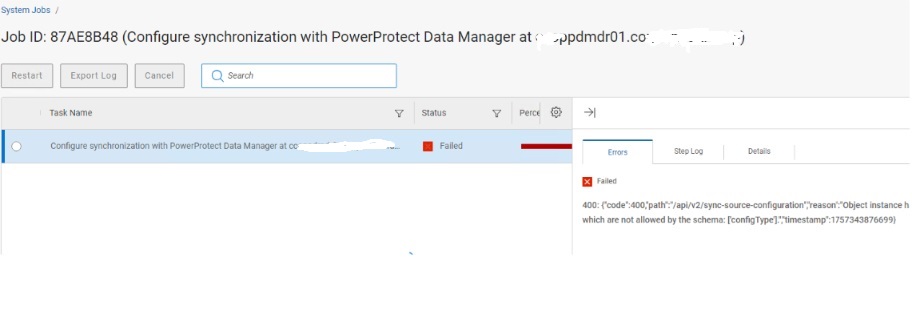
{"code":400,"path":"/api/v2/sync-source-configuration","reason":"Object instance has properties which are not allowed by the schema: ['configType'].","timestamp":1757343876699}
螢幕擷取畫面:
Cause
來源和目標 PowerProtect Data Manager 系統之間的版本不相符,會導致此問題:
- 來源:執行 PowerProtect Data Manager 版本 19.19.0-27 的 DM5500
- 目標:執行版本 19.19.0-15 的 PowerProtect Data Manager 系統
較新的 DM5500 應用裝置包括 configType 屬性在其 REST API 有效負載,較舊的目標系統架構無法識別。這會導致 400 Bad Request 在 /api/v2/sync-source-configuration 通話
記錄分析還顯示:
configType: null in the payloadMultiple BeanCreationNotAllowedException warnings
如果 DM5500 和 PowerProtect Data Manager 系統的版本不一致,則其任何組合都可能會發生此問題。
Resolution
將目標 PowerProtect Data Manager 系統升級至 版本 19.19.0-20 或更新版本。
- PowerProtect Data Manager 版本 19.19.0-20 和 19.19.0-27 與災難回復組態相容。
- 調整版本後,同步作業應成功完成。
Additional Information
/var/log/brs/replmgr/sync.log 顯示:
[c.e.b.s.o.s.i.ConfigureSyncServiceImpl.checkSystemVersion(512)][512 ] - checkSystemVersion - remote ver: 19.19.0-15 and local ver: 19.19.0-27 <==== PLEASE NOTE Source and Destination revisions are not the same!
Affected Products
PowerProtect Data Manager Appliance, PowerProtect Data Manager, PowerProtect DM5500, PowerProtect SoftwareArticle Properties
Article Number: 000386160
Article Type: Solution
Last Modified: 21 Nov 2025
Version: 2
Find answers to your questions from other Dell users
Support Services
Check if your device is covered by Support Services.