PowerScale:AD sudo 命令在升级后停止工作
Summary: 升级 PowerScale OneFS 时,sudo 命令会请求输入密码三次,然后无法执行命令,并显示“sudo:3 次错误的密码尝试”
This article applies to
This article does not apply to
This article is not tied to any specific product.
Not all product versions are identified in this article.
Symptoms
“系统管理员”角色中的 Active Directory 用户(在此例中 AD 用户名为“PowerScale”)仍允许进入 SSH,命令失败,如下所示:
cluster-1# ssh DOMAIN\\PowerScale@cluster-1
(DOMAIN\PowerScale@cluster-1) Password:
PowerScale OneFS 9.12.0.1
Could not chdir to home directory /ifs/home/DOMAIN/PowerScale: No such file or directory
cluster-1% sudo -s

We trust you have received the usual lecture from the local System
Administrator. It usually boils down to these three things:

    #1) Respect the privacy of others.
    #2) Think before you type.
    #3) With great power comes great responsibility.

For security reasons, the password you type will not be visible.

Password:
Sorry, try again.
Password:
Sorry, try again.
Password:
sudo: 3 incorrect password attempts
cluster0-1%
错误 /var/log/auth.log 类似于:
2026-01-09T14:08:46.964341-05:00 <4.6> isi-9510-1(id1) sshd[9292]: Accepted keyboard-interactive/pam for DOMAIN\PowerScale from 10.20.48.1 port 31599 ssh2
2026-01-09T14:09:02.165862-05:00 <4.1> isi-9510-1(id1) sudo[9315]: DOMAIN\PowerScale : 3 incorrect password attempts ; TTY=pts/1 ; PWD=/ ; USER=root ; COMMAND=/bin/zs
Cause
sudo 更新导致大写的 Active Directory 用户名失败。请注意,这仅适用于需要 Active Directory 用户获得密码提示的环境,无密码 sudo 命令应该不受影响。受密码保护的提示在 'isi_visudo' 喜欢这个:
DOMAIN\\powerscale ALL=(ALL) PASSWD: ALLResolution
PowerScale 工程部门已发现此问题,并正在开发永久修复方法。用户可以编辑 Active Directory 中的用户名,使其全部小写:
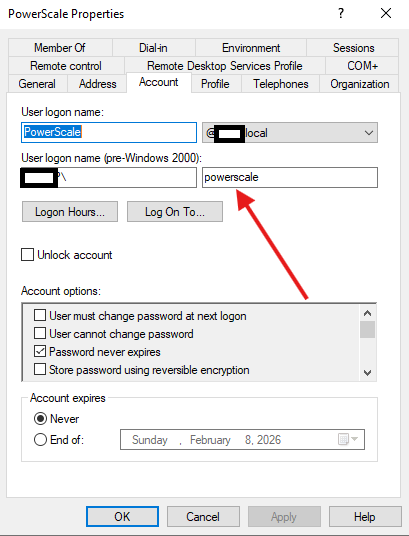
与任何 Active Directory 编辑一样,可能需要一些时间才能传播。如果用户仍无法正常工作,请启动日志收集并联系 PowerScale 支持。
Article Properties
Article Number: 000413077
Article Type: Solution
Last Modified: 12 Jan 2026
Version: 1
Find answers to your questions from other Dell users
Support Services
Check if your device is covered by Support Services.