VxRail: VCF- SDDC Manager heeft wachtwoord losgekoppeld voor beheerd ESXi knooppunt
Summary: VCF heeft het account losgekoppeld van het ESXi-knooppuntaccount voor het basisaccount en het ingebouwde serviceaccount.
Symptoms
Vanuit de SDDC Manager Password Manager zijn meerdere ESXi-knooppunten in hetzelfde domein of cluster losgekoppeld:
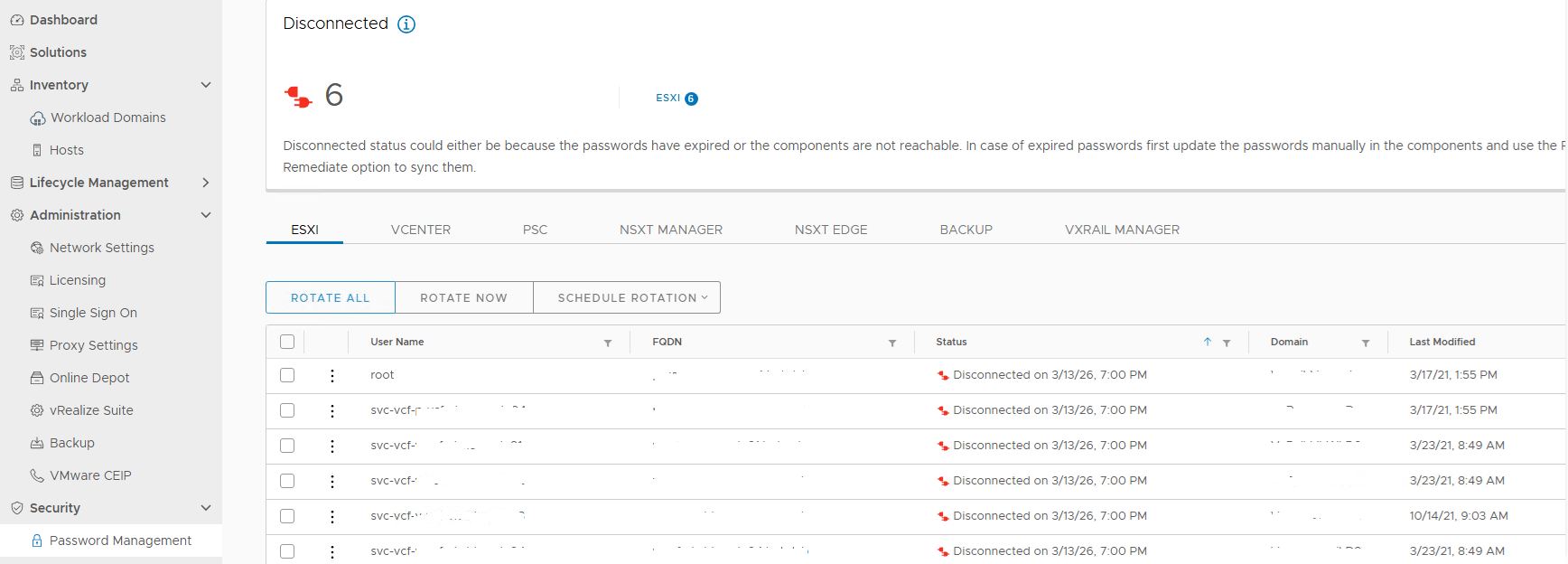
Afbeelding 1. Verbinding met account verbroken
Geprobeerd uit te voeren lookup_password Om de accountreferenties op te halen, klikt u vervolgens op het losgekoppelde account om de herstelworkflow uit te voeren, maar het mislukt:
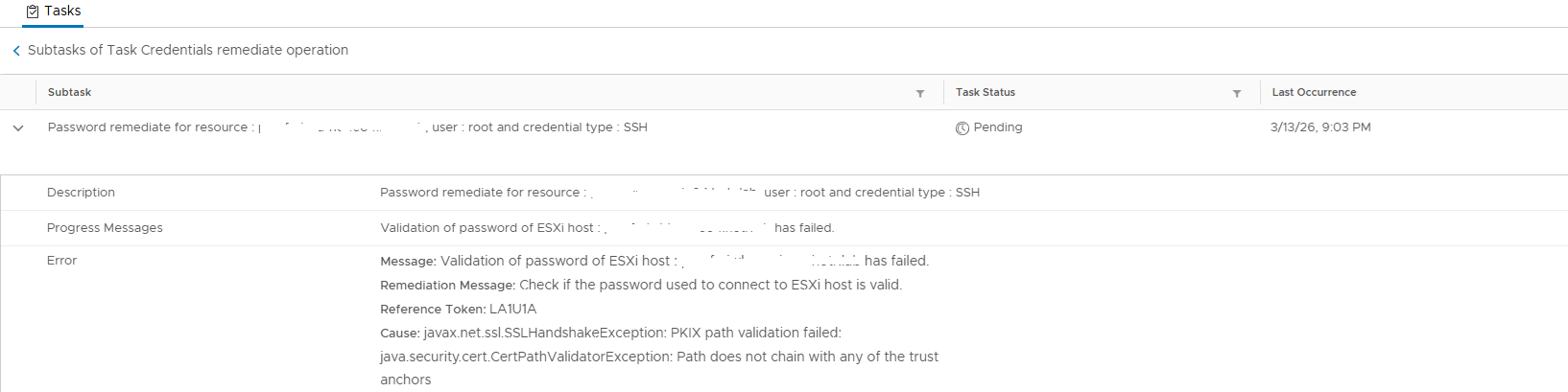
Afbeelding 2. Wachtwoordvalidatie mislukt
Bekijk het . /var/log/vmware/vcf/operationsmanager/operationsmanager.log en zoek de hostnaam die hetzelfde zou opleveren:
2026-03-14T01:00:10.660+0000 DEBUG [vcf_om,30208561d26fe9a5,8e8b] [c.v.v.p.s.PasswordExpirationService,pool-6-thread-1] Expiry retrieval status : UNKNOWN , Diagnostic message : {"errorCode":"PASSWORD_MANAGER_VALIDATE_ESXI_CREDENTIALS_FAILED","arguments":["hostname"],"errorMessage":"javax.net.ssl.SSLHandshakeException: PKIX path validation failed: java.security.cert.CertPathValidatorException: Path does not chain with any of the trust anchors","referenceToken":"1SN3RL","remediationMessage":"Please verify that the account is active and is not locked, you might need to fix the workflow(s) for resources marked in error state. If the password of the account has expired, manually reset the password in the product and then perform a REMEDIATE operation in the SDDC Manager, to update its stored copy of the password."}
Meld u aan bij het gerelateerde ESXi-knooppunt, controleer de root- en serviceaccounts om te zien of ze niet zijn vergrendeld. Gebruik ook het wachtwoord dat u hebt opgehaald uit de lookup_password uitvoer om in te loggen op de server.
Alle ESXi-knooppunten in hetzelfde cluster in de venter tonen de verbindingsstatus. De stap uitgevoerd om CA-certificaten op het certificaat te vernieuwen, maar het probleem blijft bestaan.
Cause
Het basiscertificaat dat het ESXi-hostcertificaat ondertekent, ontbreekt in de SDDC Manager commonsvcs en jre cacerts Winkel.
SDDC Manager probeert de ESXi-host te verbinden via het hostcertificaat en zoekt de vertrouwde ankers.
Resolution
Om dit probleem op te lossen en het account te koppelen, installeert u het basiscertificaat in de SDDC Manager commonsvcs en jre cacerts Certificeringen:
Maak de SDDC Manager-snapshot voordat u wijzigingen aanbrengt.
- Bevestig het basiscertificaat voor het ondertekenen van het hostcertificaat door een SSH-sessie op de host te loggen:
openssl x509 -in /etc/vmware/ssl/rui.crt -fingerprint -noout -text
- Controleer de uitvoer met de
Authority Key Identifier:
X509v3 Authority Key Identifier:
                keyid:E9:13:3D:13:2A:3F:0F:7C:EE:DA:5D:BF:C4:0B:D3:AF:E9:E3:67:54
- Gebruik een SSH-sessie om u aan te melden bij de vCenter-server die de ESXi-host beheert en de gerelateerde vermelding voor het basiscertificaat te vinden:
CN(id):         E9133D132A3F0F7CEEDA5DBFC40BD3AFE9E36754
Subject DN:     CN=CA, DC=vsphere, DC=local, C=US, ST=California, O=vcenter, OU=VMware Engineering
CRL present:    yes
- Voer de volgende opdracht uit om de bundel te verifiëren: Voer dit basiscertificaat uit naar een certificaatbestand en kopieer vervolgens de inhoud van het certificaat naar SDDC Manager met een hulpprogramma voor bestandsoverdracht:
/usr/lib/vmware-vmafd/bin/dir-cli  trustedcert list

/usr/lib/vmware-vmafd/bin/dir-cli trustedcert get  --id E9133D132A3F0F7CEEDA5DBFC40BD3AFE9E36754 --outcert /tmp/rootca.cer
- Zodra het certificaatbestand gereed is, voert u de volgende opdrachten uit om het certificaat in het certificaatarchief te importeren:
cat /etc/vmware/vcf/commonsvcs/trusted_certificates.key

keytool -import -v -alias xxx -file /home/vcf/xxx.cer -keystore /etc/vmware/vcf/commonsvcs/trusted_certificates.store

keytool -import -v -alias v-vcf-vsca-root -file /home/vcf/xxx.cer -keystore /etc/alternatives/jre/lib/security/cacerts --storepass changeit
- Zodra de bovenstaande import is voltooid, start u de SDDC Manager-service opnieuw en voert u de workflow opnieuw uit om het probleem met accountreferenties te verhelpen met het weergegeven wachtwoord.
/opt/vmware/vcf/operationsmanager/scripts/cli/sddcmanager_restart_services.sh