SupportAssist for Home PCs 无线网卡测试无法在 Alienware 计算机上取消
Summary: 了解为什么即使在单击“Cancel”按钮后,SupportAssist 中的无线网卡测试仍显示“Completed”。
This article applies to
This article does not apply to
This article is not tied to any specific product.
Not all product versions are identified in this article.
Symptoms
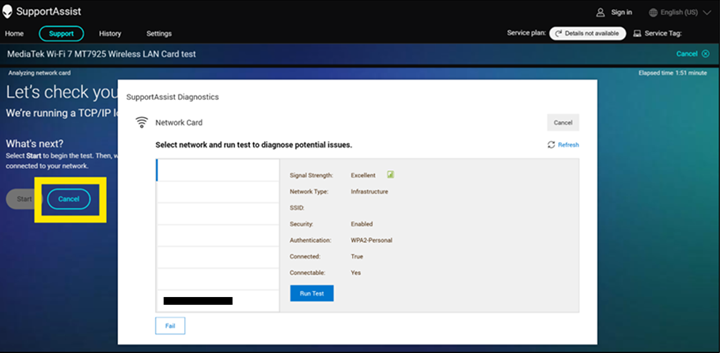
当 Alienware 15 DA15260 或 Alienware 15 DA15265连接到 Wi-Fi 网络时,SupportAssist for Home PCs 中的测试可能无法正确取消。在受影响的计算机上,打开 Dell SupportAssist 版本 5.0,转至 Support选项卡,然后单击 Test my hardware下的 Get Started按钮。单击无线网卡设备右侧通信设备下的运行测试。单击 开始 按钮,然后单击 取消 按钮。
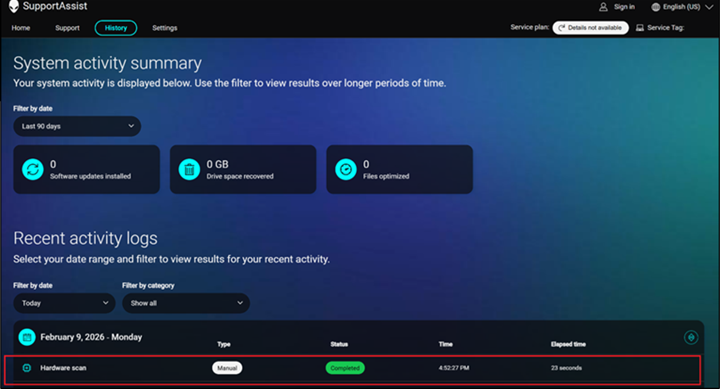
在 “历史记录 ”页面中,测试显示 “已完成” 而不是 “已取消”。
受影响的平台:
- Alienware 15 DA15260
- Alienware 15 DA15265
受影响的软件:
- SupportAssist for Home PCs 版本 5.0
Cause
发生这种情况是因为网络测试没有用户交互。SupportAssist for Home PCs 预计仅显示网络列表。
Resolution
注意: 开始更新之前,请执行以下操作:
- 备份所有个人数据。有关更多信息,请参阅备份和恢复。
- 如果笔记本电脑上正在运行更新,请连接交流适配器。
- 如果台式机上正在运行更新,请确保电源保持连接。
在计算机上将 SupportAssist for Home PCs 更新到版本 5.1.1 或更高版本可解决此问题。要下载并安装 SupportAssist for Home PCs,请参阅 SupportAssist for Home PCs。
Affected Products
Alienware 15 DA15260, Alienware 15 DA15265, SupportAssist for Home PCsArticle Properties
Article Number: 000467685
Article Type: Solution
Last Modified: 06 Jul 2026
Version: 3
Find answers to your questions from other Dell users
Support Services
Check if your device is covered by Support Services.