Dell Security Management Server Virtual v9.11 升級中的警示提醒錯誤
Summary: 在 Dell Security Management Server Virtual v9.11 升級期間,您可能會收到「alertReminder」錯誤。
This article applies to
This article does not apply to
This article is not tied to any specific product.
Not all product versions are identified in this article.
Symptoms
受影響的產品:
- Dell Security Management Server Virtual
受影響的版本:
- v9.10.1
嘗試從 Dell Security Management Server Virtual v9.10.1 升級至 9.11 時,還原可能會失敗並出現 「alertReminder」 錯誤。按照隨附的指示進行補救並成功升級。
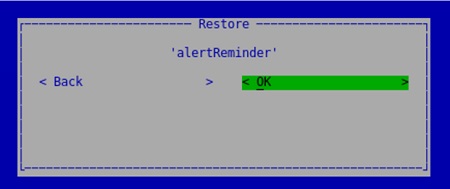
Cause
執行升級到 v9.11 時,先前存在的 SMTP 設定可能會導致失敗。
Resolution
必須更改 v9.10.x 伺服器上的 SMTP 設置,並且必須創建備份。執行下列步驟來解決並成功升級:
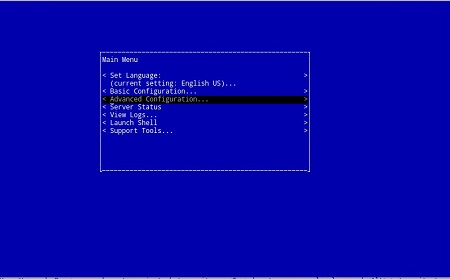
- 在 v9.10.1 伺服器主功能表上,選取 進階組態 標籤。
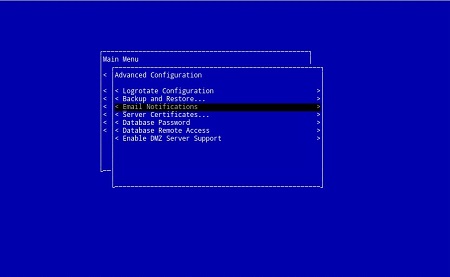
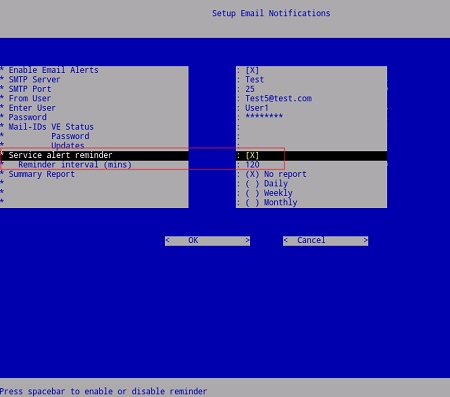
- 前往 電子郵件通知區段 。
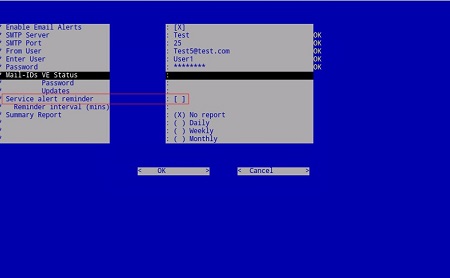
- 複製或截取所有設置的屏幕截圖。
- 清除 服務警示提醒 的設定,然後選擇 確定 以儲存變更。
- 從 v9.10.1 伺服器建立備份。
從相同的 高級配置 功能表中,選擇 備份和還原。
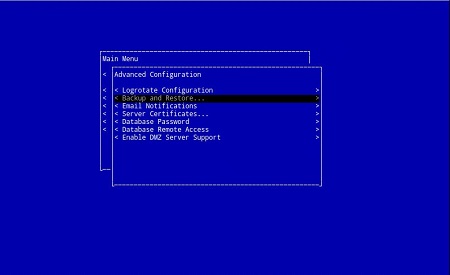
- 使用下列 Dell 知識文章,將備份還原至 9.11 電腦:
如何升級 Dell Security Management Server Virtual \ Dell Data Protection Virtual Edition - 升級完成後,在電子郵件通知畫面中重新輸入所需的服務警示提醒設定。請依照步驟 1 和 2,或前往 主功能表>進階組態>電子郵件通知 ,然後重新輸入先前的設定,然後按一下 確定 以儲存變更。
如要聯絡支援部門,請參閱 Dell Data Security 國際支援電話號碼。
請前往 TechDirect,以線上產生技術支援要求。
如需更多深入見解與資源,請加入 Dell 安全性社群論壇。
Affected Products
Dell EncryptionArticle Properties
Article Number: 000130512
Article Type: Solution
Last Modified: 23 Jul 2024
Version: 11
Find answers to your questions from other Dell users
Support Services
Check if your device is covered by Support Services.