vProxy:NVP VM 備份失敗,並顯示:「無法開啟至目標裝置的工作階段 \“DD_HOSTNAME\.」」”
Summary: 升級至最新 vProxy 版本會導致備份失敗,並顯示錯誤:「失敗」,「說明」:「備份失敗:無法開啟至目標裝置的工作階段 \“DD_HOSTNAME\.””
This article applies to
This article does not apply to
This article is not tied to any specific product.
Not all product versions are identified in this article.
Symptoms
NetWorker VMware Protection (NVP) VM 備份失敗。
vProxy 的 /opt/emc/vproxy/runtime/logs/recycle/vbackupd/DATE/vbackupd-session.log
2025-01-15T14:45:46Z INFO: "State": "Failure",
2025-01-15T14:45:46Z INFO: "Description": "Backup has failed: Backup has FAILED. Unable to open session to target device \"DD_HOSTNAME\".",
2025-01-15T14:45:46Z INFO: "Progress": 0,
2025-01-15T14:45:46Z INFO: "Error": {
2025-01-15T14:45:46Z INFO: "Text": "Backup has FAILED. Unable to open session to target device \"DD_HOSTNAME\".",
vProxy 的 /opt/emc/vproxy/runtime/logs/vbackupd/vbackupd-boost.log
2025-01-15T02:05:52Z ERROR: [ 5920:140027409463040] ddp_connect_with_config_internal() failed, Hostname: DD_HOSTNAME, Err: 5040-RPC procedure=SYSTEM_INFO failed, Can't connect to NFS server retval=5
2025-01-15T02:05:52Z ERROR: [ 5920:140027409463040] ddp_connect_with_config() failed, Hostname: DD_HOSTNAME, Err: 5040-RPC procedure=SYSTEM_INFO failed, Can't connect to NFS server retval=5
Cause
備份失敗的根本原因是 vProxy 的 /etc/hosts 檔案組態不正確。
例如,Data Domain 管理 IP 10.130.102.176 已新增至 vProxy 上的 /etc/hosts 檔案,而導致備份失敗。
此環境已在 Data Domain UI 的 DD boost - IP 網路下設定自訂介面群組。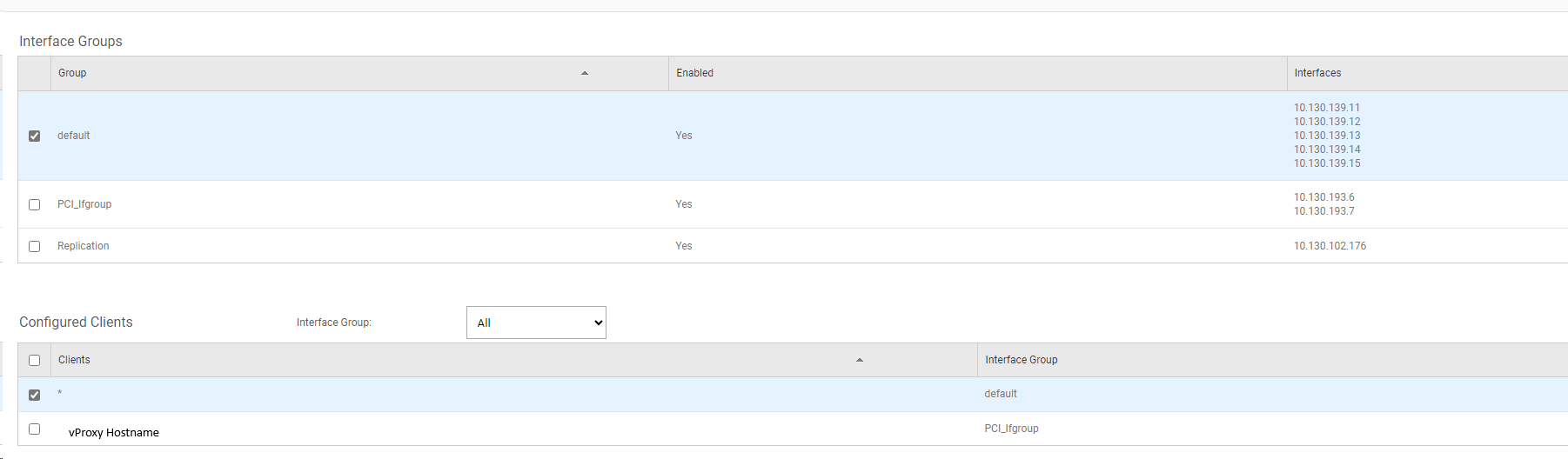
vProxy 主機已設定為使用 Data Domain 上不同的介面群組。
Resolution
若要解決備份失敗問題,請按照下列步驟操作:
- 登入 DD 使用者介面
- 前往 通訊協定 ->DD Boost ->IP 網路。
- 檢查已 設定的用戶端欄位,確認 vProxy 設定為使用的介面群組。
- 檢查 介面組 欄位以查看分配給介面組的IP位址。
- 更新 vProxy 的 /etc/hosts 檔案組態,以使用正確的 IP。
- 執行 VM 備份,並確認備份成功。
注意:建議使用正確的介面群組 IP,以避免與 Data Domain 發生任何連線問題。
Article Properties
Article Number: 000272927
Article Type: Solution
Last Modified: 16 Jan 2025
Version: 1
Find answers to your questions from other Dell users
Support Services
Check if your device is covered by Support Services.