Avamar:バックアップがI/Oエラーで失敗する: (3) "some file" を読み取れません (コード 2: 指定されたファイルが見つかりません)
Summary: Avamarバックアップが「avtar error 5737: 入出力(I/O)エラー - ファイルを読み取れません(コード2: 指定されたファイルが見つかりません)」というエラーが表示された場合は、Windowsイベント ビューアーで一致する入出力(I/O)エラーを確認します。(Microsoft サポート チームと協力して解決してください)
This article applies to
This article does not apply to
This article is not tied to any specific product.
Not all product versions are identified in this article.
Symptoms
Avamarバックアップが失敗し、 avtar 次のエラーを報告します。
avtar Error <5737>: I/O error: Unable to read(3) "some file or directory" (code 2: The system cannot find the file specified).Cause
WindowsでI/Oの問題が発生しました。
確認するには、次の手順を実行します。
1.[コントロール パネル]--[> イベント ビューアー]--[> システム]に移動します。
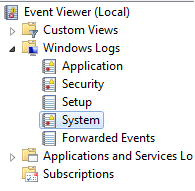
2.同時に発生したイベントを検索します
avtar 。
-
-
次の項目に一致させてください
avtarerror とイベント ビューアーのエラー タイムスタンプ。 -
WindowsにI/Oエラーが発生したことを示すイベント ビューアー エラーが表示されるはずです
-
Resolution
Windows I/Oエラーを解決するには、Microsoftにお問い合わせください。
I/Oエラーが解決されると、Avamarバックアップは成功します。
Affected Products
AvamarProducts
Avamar, Avamar Client, Avamar Client for WindowsArticle Properties
Article Number: 000041410
Article Type: Solution
Last Modified: 20 Mar 2026
Version: 6
Find answers to your questions from other Dell users
Support Services
Check if your device is covered by Support Services.