Avamar:備份失敗,並出現 I/O 錯誤:無法讀取(3) “某些檔案”(代碼 2:系統找不到指定的檔案 )
Summary: 如果 Avamar 備份失敗,並顯示「avtar 錯誤 5737:輸入輸出 (I/O) 錯誤 - 無法讀取檔案 (代碼 2:系統找不到指定的檔案)」,請檢查 Windows 事件檢視器是否有相符的輸入輸出 (I/O) 錯誤。(與Microsoft支援團隊合作解決)
This article applies to
This article does not apply to
This article is not tied to any specific product.
Not all product versions are identified in this article.
Symptoms
Avamar 備份失敗,且 avtar 報告以下錯誤:
avtar Error <5737>: I/O error: Unable to read(3) "some file or directory" (code 2: The system cannot find the file specified).Cause
Windows 發生 I/O 問題。
若要確認:
1.前往控制台 --> 事件檢視器 --> 系統:
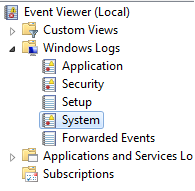
2.尋找與
avtar 錯誤。
-
-
符合
avtar錯誤和事件檢視器錯誤時間戳記。 -
應該會出現事件檢視器錯誤,表示 Windows 發生 I/O 錯誤
-
Resolution
請聯絡 Microsoft 以解決 Windows I/O 錯誤。
解決 I/O 錯誤後,Avamar 備份就會成功。
Affected Products
AvamarProducts
Avamar, Avamar Client, Avamar Client for WindowsArticle Properties
Article Number: 000041410
Article Type: Solution
Last Modified: 20 Mar 2026
Version: 6
Find answers to your questions from other Dell users
Support Services
Check if your device is covered by Support Services.