Avamar:备份失败并显示 I/O 错误:Unable to read(3) “some file” (code 2:系统找不到指定的文件)
Summary: 如果 Avamar 备份失败并显示“avtar error 5737:输入输出 (I/O) 错误 — 无法读取文件(代码 2:系统找不到指定的文件)“,请检查 Windows 事件查看器是否存在匹配的输入输出 (I/O) 错误。(请与 Microsoft 支持团队合作解决)
This article applies to
This article does not apply to
This article is not tied to any specific product.
Not all product versions are identified in this article.
Symptoms
Avamar 备份失败,并且 avtar 报告以下错误:
avtar Error <5737>: I/O error: Unable to read(3) "some file or directory" (code 2: The system cannot find the file specified).Cause
Windows 遇到 I/O 问题。
要确认:
1.转至控制面板 --> 事件查看器 --> 系统:
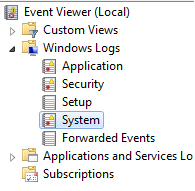
2.查找与
avtar 错误,请参阅概述的步骤以帮助解决该问题。
-
-
匹配
avtar错误和事件查看器错误时间戳。 -
应该有一个事件查看器错误,指示 Windows 有 I/O 错误
-
Resolution
请联系 Microsoft 以解决 Windows I/O 错误。
解决 I/O 错误后,Avamar 备份将会成功。
Affected Products
AvamarProducts
Avamar, Avamar Client, Avamar Client for WindowsArticle Properties
Article Number: 000041410
Article Type: Solution
Last Modified: 20 Mar 2026
Version: 6
Find answers to your questions from other Dell users
Support Services
Check if your device is covered by Support Services.