NetWorker: The maximum number 655 of nsrmmd processes for storage node was exceeded
Summary: NetWorker error message indicating nsrmmd process for storage node was exceeded.
Symptoms
The /nsr/logs/daemon.raw is flooded with the error message:
"The maximum number (655) of nsrmmd processes for storage node <storage-node-hostname> was exceeded".
Cause
On any configured Storage Node, there is an *internal* limit of 655 for the maximum number of nsrmmd processes that can be running on it. This limit is part of the nsrsnmd design. It has been there since the introduction of the nsrsnmd process and the nsrsnmd <-> nsrmmd related functionality was coded in NetWorker.
When nsrsnmd attempts to start a new nsrmmd on a storage node for a save or recovery session, and the limit is exceeded, the following error appears in the Storage Node daemon.log:
"The maximum number (655) of nsrmmd processes for storage node <storage-node-hostname> was exceeded."A note has been added in the NetWorker Administration Guide that says: "NOTE: You must ensure that the sum of storage node devices nsrmmds count should not exceed 655."
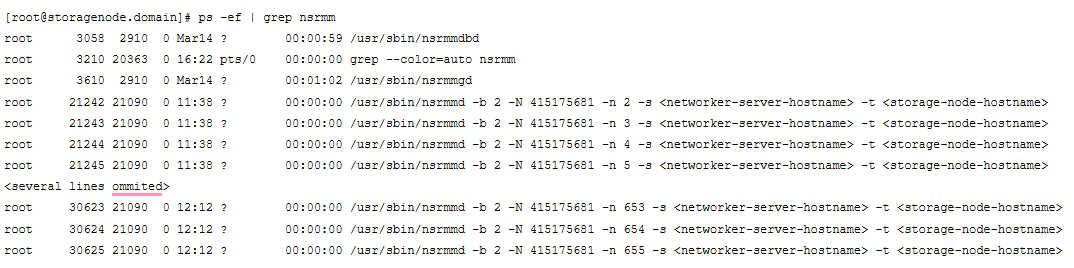
The issue can be confirmed by listing the nsrmmd process from the storage node:
Resolution
Check the storage node properties. If the "Dynamic nsrmmds" is set to NO, changing it to YES might resolve the issue. The storage node must be disabled and enabled to kill all the nsrmmd processes. If there are any save, recover, or clone sessions running, there is the option to wait for them to finish or cancel accordingly.
The NetWorker Performance Optimization Guide says:
Recommendations for the static nsrmmds option:
If the dynamic mmds option is enabled on the NetWorker storage node, NetWorker spawns a single mmd at a time based on the device target sessions. A firewall port must be calculated and opened based on the number of dynamic mmds that gets spawned. If firewall restrictions require all ports open, Dell Technologies recommends disabling the dynamic mmds option for security reasons. When disabling the dynamic nsrmmds option under Storage Node properties, consider the following:
Dell Technologies recommends restricting the maximum nsrmmd count based on the number of devices configured. For Advanced File Type Device(AFTD) devices, max and target sessions are 4 and 32, respectively. For Data Domain devices, max and target sessions are 20 and 60, respectively.
The number of nsrmmd processes that are spawned is equal to the value set under Max nsrmmd count under Device properties. Because the Max nsrmmd count is calculated based on the target and max sessions, the Max nsrmmd count value can increase with lower target sessions. Therefore, Dell Technologies recommends keeping the Max nsrmmd count as 4 under the Static mmd configuration setting.
A reduced Max nsrmmd count helps in managing the mmds load on the NetWorker storage node, which might be idle most of the time.
Optimal mmd values per device help NetWorker load balance streams by saturating mmds during backup or clone operations. Example, 10 Data Domain devices with target and max sessions of 6 and 60, respectively, and static mmd setting, result in 140 nsrmmds (14 per device). Dell Technologies recommends using the default target or max sessions and the Max nsrmmd counts as 4 when dynamic mmd is disabled.
The Static mmd setting advantage is that NetWorker load balances 60 streams across four nsrmmds, even if a single device handles all 60 streams. Also, a lesser Max nsrmmd count setting helps reduce the number of RPC and TCP connections during backup, clone, or server protection policy operations.
Source: NetWorker 19.7 Performance Optimization Planning Guide