vCenter 이미지 백업에 대한 Avamar FLR이 실패하고 "LVM GUID 목록 구문 분석 실패" 오류가 표시됩니다.
Summary: vCenter 이미지 백업에 대해 FLR 탐색이 실패하고 "LVM GUID 목록 구문 분석 실패" 오류 메시지가 표시됩니다.
This article applies to
This article does not apply to
This article is not tied to any specific product.
Not all product versions are identified in this article.
Symptoms
FLR이 실패하고 오류 메시지가 표시됩니다. "Failed to parse the LVM GUID list" vCenter 이미지 백업인 경우 AUI 또는 Avamar Administrator에서 모니터링합니다.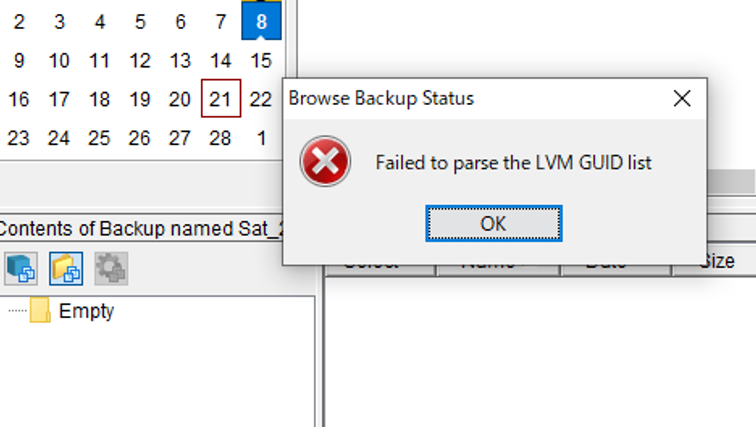

Cause
vCenter OS가 VMware Photon인 경우 해당 OS가 지원되지 않으므로 FLR이 실패하고 오류가 발생합니다.
Resolution
vCenter OS 유형을 확인하는 방법:
vCenter에 루트로 로그인하고 아래 명령을 실행하여 OS 유형을 확인합니다.
shell
cat /etc/*release
<Snippet>
root@vCenter01 [ ~ ]# cat /etc/*releaseDISTRIB_ID="VMware Photon OS"DISTRIB_RELEASE="3.0"DISTRIB_CODENAME=PhotonDISTRIB_DESCRIPTION="VMware Photon OS 3.0"NAME="VMware Photon OS"VERSION="3.0"ID=photonVERSION_ID=3.0PRETTY_NAME="VMware Photon OS/Linux"ANSI_COLOR="1;34"HOME_URL="https://vmware.github.io/photon/"BUG_REPORT_URL="https://github.com/vmware/photon/issues"VMware Photon OS 3.0PHOTON_BUILD_NUMBER=05f9d3d8d
Affected Products
AvamarProducts
PowerProtect Data Protection Appliance, Avamar Client for VMware, Integrated Data Protection Appliance Family, Integrated Data Protection Appliance SoftwareArticle Properties
Article Number: 000311828
Article Type: Solution
Last Modified: 26 May 2025
Version: 1
Find answers to your questions from other Dell users
Support Services
Check if your device is covered by Support Services.