配備 Optane 加速裝置的電腦開機時發生錯誤,強制關機
Summary: 強制關閉 Optane 加速裝置後,開機時可能會收到錯誤。
This article applies to
This article does not apply to
This article is not tied to any specific product.
Not all product versions are identified in this article.
Symptoms
Optane 開機錯誤
如果配備 Optane 加速的電腦發生強制關機情況,重新開機電腦時可能會看到錯誤訊息:
"The operating system did not shut down cleanly. Reconstructing Cache Metadata."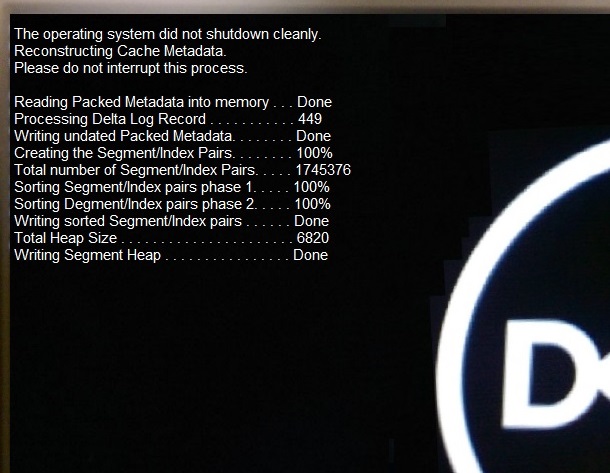
Cause
在設計規範內工作
當 Optane 加速電腦遭到強制關機時,序列 ATA (SATA) 和 Optane 磁碟機之間的磁碟機中繼資料將不再相符。
Resolution
在設計規範內工作
發生強制關機時,必須在下次重新開機時重建中繼資料。此作業會自動發生,不應花費過多時間。
此錯誤訊息為重新建置程序的範例。
重新建置中繼資料後,電腦便會開機。
注意:如果電腦在中繼資料重建後無法開機或故障,則存在硬碟或作業系統損毀的問題。執行增強型開機前系統評估 (ePSA) 診斷程式,並視需要對作業系統進行故障診斷。如果 ePSA 診斷失敗,請使用下列連結聯絡 Dell 技術支援,以取得進一步協助:Dell 技術支援連絡人
Affected Products
Alienware Aurora R6, Inspiron 3670, OptiPlex 3050 All-In-One, OptiPlex 3050 Tower, OptiPlex 3050 Micro, OptiPlex 3050 Small Form Factor, OptiPlex 5050 Tower, OptiPlex 5050 Micro, OptiPlex 5050 Small Form Factor, OptiPlex 5250 All-In-One
, OptiPlex 7050 Tower, OptiPlex 7050 Micro, OptiPlex 7050 Small Form Factor, OptiPlex 7450 All-In-One, Vostro 3670, XPS 8920
...
Article Properties
Article Number: 000133144
Article Type: Solution
Last Modified: 01 May 2026
Version: 13
Find answers to your questions from other Dell users
Support Services
Check if your device is covered by Support Services.